How to plan an AI product ad with a shot list (free template)
Plan a 15 to 30 second AI product ad before you generate anything: hook, shots, camera moves, text and voice in one simple shot list, with a filled-in example.
Saqqa Academy team
19-Nov-2026 · 7 min read
In this article
To plan an AI product ad, write a shot list before you open any AI tool: a short table with one row per shot, saying how long it lasts, what the viewer sees, how the camera moves, what text appears on screen and what the voice says. For a 15 to 30 second Reel or TikTok ad, that's usually 5 to 8 shots: a hook, the problem or desire, the product, two or three proof or detail shots, and a clear call to action. Planning first saves credits, keeps the product consistent from shot to shot, and gives a client something to approve before you spend hours generating.
The method below is the one we use for our own course examples. The numbers in it are planning guides, not platform rules; check each platform's current ad specs before you publish.
Why plan before you generate
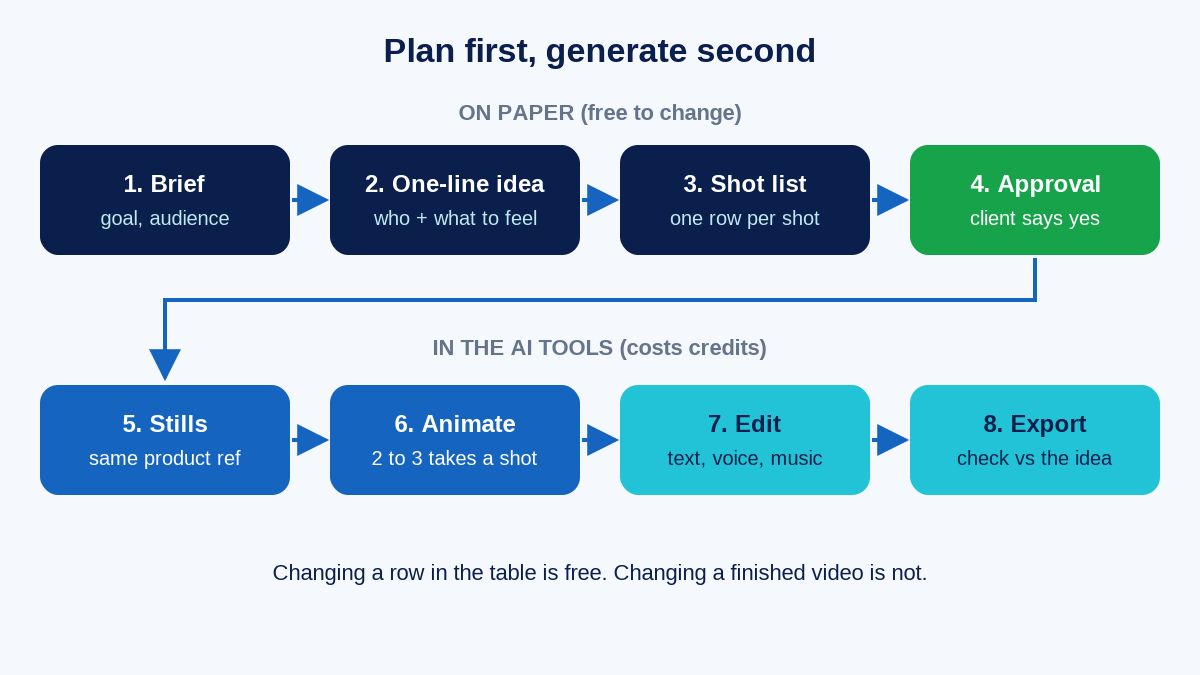
AI video tools charge per generation, and most clips are only a few seconds long. Without a plan, it's easy to generate twenty beautiful clips that don't join into a story, show the product in three different colours, or leave no room for the price. A shot list fixes that:
- You generate only what the edit needs. Each row is one clip to make.
- The product stays the same. You decide once which reference image every shot uses.
- The client approves the idea, not the render. Changing a row in a table is free; changing a finished video isn't. If you're doing client work, pair this with our questions to ask a client before an AI video project.
Step 1: Write the one-line idea
Before any shots, write one sentence that says who the ad is for and what it should make them feel or do. For example:
"For people buying Eid gifts: this dry fruit box looks premium enough to give to family, and it's easy to order."
Every shot must serve that sentence. If a shot is pretty but doesn't help the idea, cut it.
Step 2: Choose a simple structure
Most short product ads follow some version of this order:
- Hook (first 1 to 3 seconds): something that makes a scrolling thumb stop. A close-up, a surprising movement, or a question on screen.
- Desire or problem: the moment the viewer recognises themselves. "Running out of gift ideas?"
- Product reveal: the product, clearly, in good light.
- Proof or details: texture, opening the box, the product in use, what's inside.
- Call to action: what to do next, with the price or offer if there is one.
You don't need all five every time, but the hook and the call to action should always be there.
Step 3: Fill in the shot list
Use one row per shot. These are the columns we use:
| Column | What to write |
|---|---|
| # | Shot number |
| Time | Rough length in seconds |
| What we see | The picture, in plain words |
| Camera | Static, slow push-in, orbit, pan, top-down |
| On-screen text | Exact words, or "none" |
| Voice / sound | The line spoken, or music only |
| Source | Which reference image or start frame the shot uses |
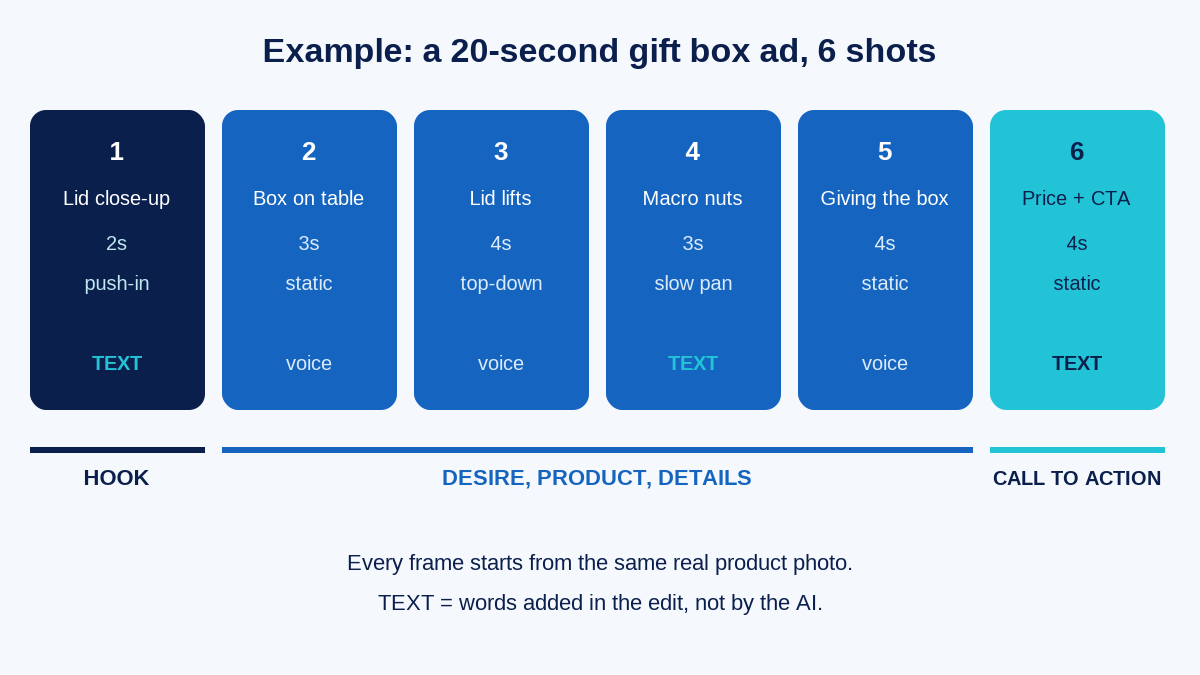
Here's a filled-in example for a 20-second vertical ad for a dry fruit gift box:
| # | Time | What we see | Camera | On-screen text | Voice / sound | Source |
|---|---|---|---|---|---|---|
| 1 | 2s | Extreme close-up of the gold box lid catching light | Slow push-in | "The gift they'll remember" | Soft music starts | Product photo A |
| 2 | 3s | Hands placing the box on a table set for Eid | Static | none | "Every Eid, the same question..." | Still 2 (made from photo A) |
| 3 | 4s | Lid lifts, almonds and pistachios revealed | Top-down, slight push-in | none | "...what do we take for the family?" | Still 3 |
| 4 | 3s | Macro of cashews and dates in their sections | Slow pan | "Hand-packed, fresh" | Music only | Still 4 |
| 5 | 4s | Box handed to an older relative, both smiling (no faces close up) | Static, shallow focus | none | "Give something that looks as good as it tastes." | Still 5 |
| 6 | 4s | Box on a plain background with space above | Static | Brand name, price, "Order on WhatsApp" | "Order today on WhatsApp." | Still 6, text added in the edit |
Notice the last column. Every shot is tied to a still image that came from the same real product photo, which keeps the box identical in every clip. That's the same idea we use for people in our guide to keeping an AI character consistent across images.
Step 4: Plan the text and voice separately
Two rules save a lot of trouble:
- Add on-screen text in the edit, not in the AI generation. AI tools still misspell words, and letters wobble when an image turns into video. Write the exact words in the shot list and add them later as real text layers. Our guide on fixing misspelled text in AI product images explains why.
- Assume many people watch without sound. Put the key message in on-screen text as well as in the voice, and add captions. You can make the voice from your script with CapCut text to speech.
Read the voice lines out loud with a timer. If a line doesn't fit inside its shot's time, shorten the line rather than stretching the shot.
Step 5: Turn each row into prompts
Now, and only now, open your AI tools. For each row:
- Make the still image with the product reference. Describe the scene from "What we see".
- Animate the still, using the "Camera" column for the movement. Keep moves small for product shots. Our guide to writing image-to-video prompts shows the prompt structure, and first and last frames in Google Flow helps when a shot must start and end in exact positions, like a lid opening.
- Generate two or three takes per shot, not twenty. Pick the best and move on.
Tick each row off as you finish it. When every row has a clip, the edit is mostly putting them in order.
Step 6: Edit, then check against the list
Lay the clips in shot-list order, add music, voice, text and captions, and export in 9:16 for Reels and TikTok. Then check the finished ad against the one-line idea from Step 1:
- Does the first second make you stop?
- Is the product clearly visible and the same in every shot?
- Can you understand the ad with the sound off?
- Is the call to action clear, with the right price?
A clean shot list plus the finished ad also makes a strong portfolio piece, because it shows clients you plan, not just press buttons. See how to build an AI video portfolio for how to present it.
Planning, generating and editing product ads like this, step by step, is a big part of the AI Content Creator Program.
Frequently asked questions
Is a shot list the same as a storyboard?
They do the same job in different forms. A shot list is a table of words; a storyboard is a row of pictures. With AI tools, your still images become the storyboard, so many creators write the shot list first and then generate one still per row to show the client.
How many shots should a 15-second ad have?
There's no fixed rule. Many short ads use 4 to 6 shots of 2 to 4 seconds each. Fewer, clearer shots usually work better than many quick cuts the viewer can't follow.
Do I need a shot list for a simple one-shot product video?
Even a single shot benefits from the same columns: length, camera move, text and voice. It takes two minutes and stops you from forgetting the call to action or leaving no space for the price.
Can I use AI to write the shot list?
Yes, a chat assistant can draft one from your brief. Check it carefully: remove shots your tools can't make well, make sure every row uses your real product reference, and write the on-screen text yourself.
- #ai video
- #product ads
- #shot list
- #storyboard
- #planning
- #reels
Want to learn AI video properly?
The AI Content Creator Program takes you from your first prompt to a portfolio you can show: 27 short, focused lessons in easy Urdu, with a weekly live session and tasks our team reviews.
Enroll now