Do you have to label AI videos on Instagram, TikTok and YouTube?
When Instagram, Facebook, TikTok and YouTube require an AI label on your video, when they don't, and exactly where to switch the label on before you post.
Saqqa Academy team
24-Nov-2026 · 7 min read
In this article
Yes, in most cases. If your video looks or sounds realistic and AI made or changed it, Instagram, Facebook, Threads, TikTok and YouTube all ask you to label it when you post. A realistic AI person, a realistic AI scene or a realistic AI voiceover needs the label. A clearly cartoon-style video usually doesn't, and neither do small edits like captions, colour fixes or an AI-written script. Turning the label on takes one toggle on each app, and all three platforms say the label itself doesn't hurt your reach, while skipping it when it's required can lead to the post being labelled anyway or removed.
We checked the official help pages of Meta, Instagram, TikTok and YouTube on 24 November 2026. These rules change often, so open the linked pages before you rely on a detail. This post is about normal posts (organic content). Ads have their own rules on each platform.
The quick answer for each platform
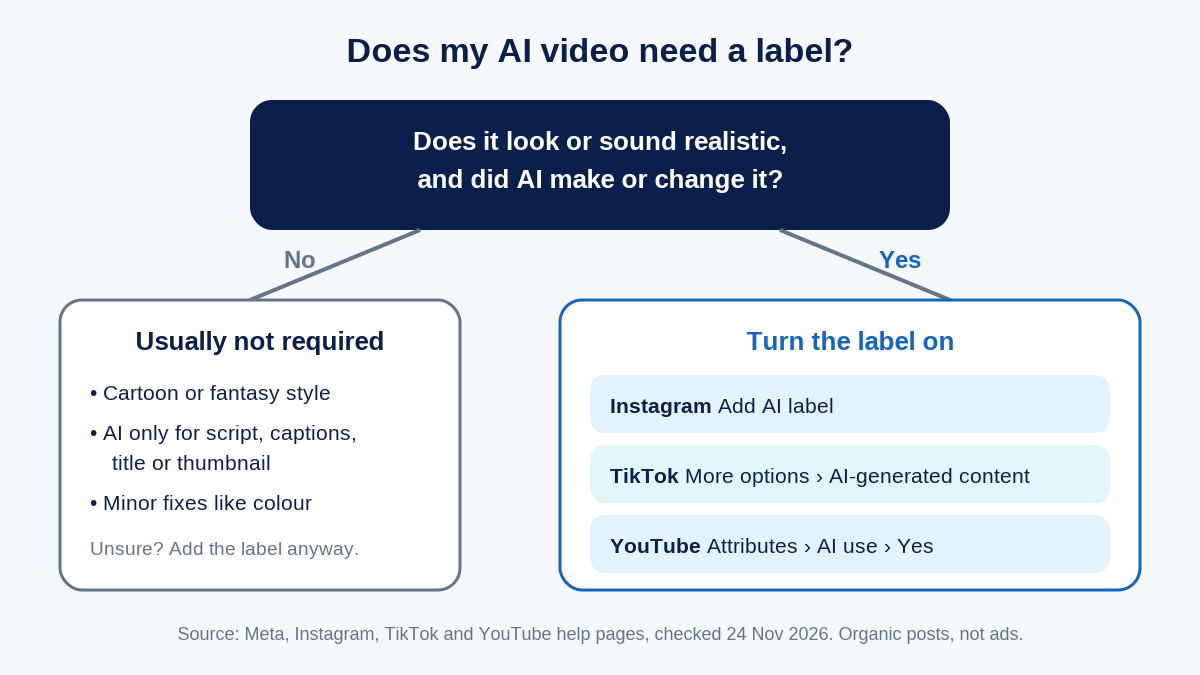
The question all three platforms ask is the same: could a viewer mistake this for real footage or a real voice? If yes, label it.
| Platform | When a label is required | Where the switch is |
|---|---|---|
| Instagram, Facebook, Threads | Photorealistic video or realistic-sounding audio that was digitally created or altered. Images don't need it. | Add AI label toggle when you share the post or reel |
| TikTok | All AI-generated content with realistic images, audio or video | AI-generated content setting under More options before posting |
| YouTube | AI-generated or altered content that seems realistic | AI use under Attributes when you upload in YouTube Studio |
Sources: Meta, How to identify AI content, Instagram, Label AI content, TikTok, About AI-generated content, YouTube, Disclosing use of GenAI content. All checked 24 November 2026.
Instagram, Facebook and Threads
Meta's help centre says it may require an AI label when content has photorealistic video or realistic-sounding audio that was made or changed digitally, including with AI. Its own examples that need a label include a realistic video of people walking around a market, a song with AI-generated vocals, and a reel narrated with a realistic AI voiceover. That last one matters for faceless channels: even if every picture is real, a realistic AI voice on top is enough.
Meta does not require a label on images. An AI product photo posted as a picture doesn't need one, though Meta may still add a label if its systems detect AI signals in the file.
To label a reel on Instagram:
- Create your reel as normal.
- On the sharing screen, tap the toggle next to Add AI label.
- Share.
For a story, tap Options in the story, then Label AI, then turn on Add AI label. If most of your account is AI content, Instagram also has an AI-generated profile toggle under Edit profile, which shows a label on your profile.
Meta also labels some content on its own. Files that carry industry-standard signals showing they were created with AI get an "AI content" label, and content made with Meta's own AI tools is labelled automatically. Meta says there may be penalties if you don't label content when it's required.
TikTok
TikTok's support page goes a little further. It requires a label on all AI-generated content with realistic images, audio or video, and encourages a label on anything completely generated or significantly edited by AI, such as a person shown saying something they never said, or a face swap.
To turn the label on for a video:
- Tap Add post (the + button) and record or upload your video.
- Tap Next.
- Tap More options, then turn on AI-generated content.
Viewers then see "creator labeled as AI-generated". TikTok says this setting won't affect your video's distribution as long as the video follows its Community Guidelines. TikTok can also add its own "AI-generated" label when a file has Content Credentials (C2PA metadata) or was made with TikTok's AI effects, and once that automatic label is on you can't remove it. Videos made only with TikTok's own AI effects are labelled for you.
TikTok also bans some AI content even with a label, for example fake endorsements by public figures, or the likeness of private adults used without their permission. Never put a real person's face or voice in a client video unless that person has agreed in writing.
YouTube
YouTube requires creators to disclose AI-generated or altered content that seems realistic. Its examples include making a real person appear to say or do something they didn't, altering footage of a real place or event, a realistic scene that never happened, and AI-generated music that is the main focus of the video.
It does not need disclosure for clearly unrealistic content, beauty filters, or using AI to help with the script, title, thumbnail, captions or ideas. Cloning your own voice for voiceovers or dubs is also listed as not needing disclosure.
To disclose:
- Upload your video in YouTube Studio.
- In the Attributes section, find AI use.
- Choose Yes if the video has realistic AI content.
YouTube says disclosing AI content alone won't limit a video's audience or its eligibility to earn money. It may add a label itself for videos made with its own AI tools, files with C2PA metadata, or content its systems detect. Creators who keep choosing not to disclose can face penalties, including removal of content or suspension from the YouTube Partner Program.
If you run a channel built on AI visuals and voices, read our guide on starting a faceless YouTube channel with AI with this rule in mind: plan to tick "Yes" on most uploads.
Common cases, answered
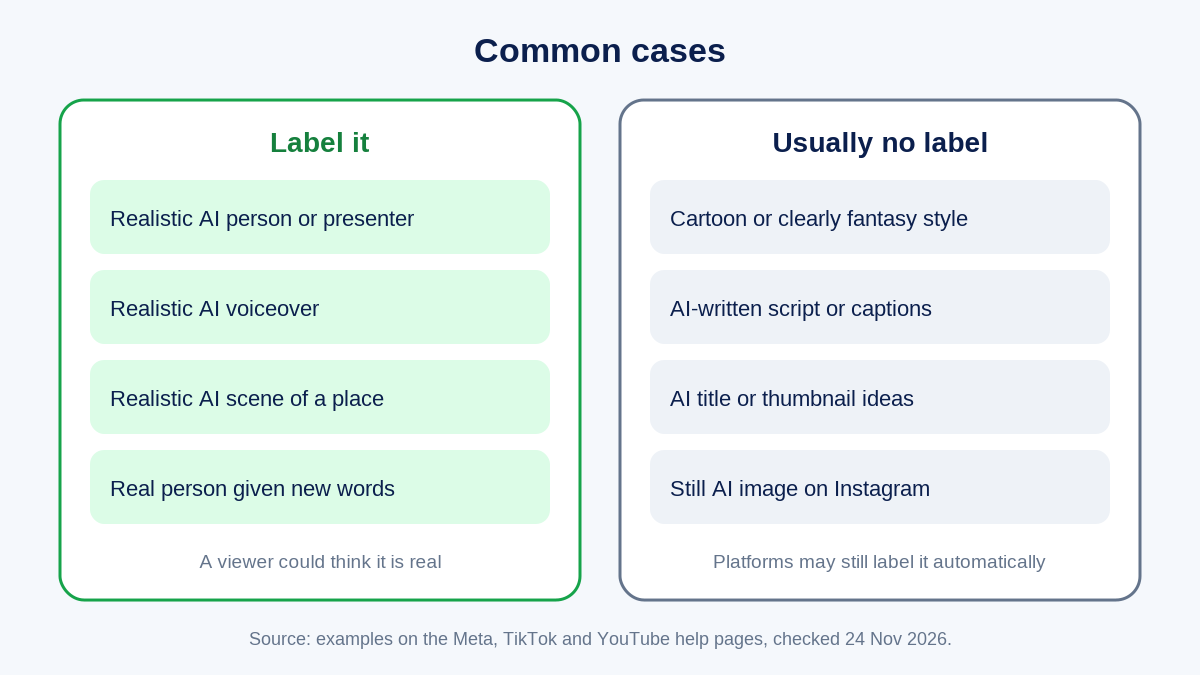
- AI product ad with a realistic model holding the product. Label it. The person and the scene look real.
- Real product photo turned into a moving clip with image-to-video. If the result looks like real footage, label it. Making a still image move is a change a viewer can't see.
- Real footage with an AI voiceover. On Meta, a realistic AI voiceover needs a label, and TikTok requires a label on realistic AI audio. YouTube says cloning your own voice for a voiceover doesn't need disclosure; for any other realistic AI voice that viewers could take for a real person, disclosing is the safe choice.
- Cartoon or 3D-animated style. Usually no label is required, though you can still add one.
- You only used AI for the script, captions or thumbnail. No label needed on YouTube, and these aren't realistic AI video or audio on the other apps.
- AI music. YouTube asks for disclosure when AI music is the main focus. Also check the music licence, as our post on adding music to an AI video without copyright claims explains.
When you're unsure, add the label. All three platforms say the label on its own doesn't reduce reach, and a missing label is the thing that can get a post removed.
What this means for client work
If you make videos for businesses, the label is part of the job. Tell the client before you start that realistic AI videos will carry an AI label on social media, and write it into your proposal. Some clients worry that the label looks bad; in practice it protects their account, and hiding AI use from viewers can damage trust far more than a small label.
Add a line to your handover notes saying which platforms need the label and where the switch is. Our guide on how to deliver an AI video to a client shows what else to put in a handover. In the AI Content Creator Program we treat honest AI labelling as a normal step in every client project.
Frequently asked questions
Does an AI label reduce views on TikTok or YouTube?
Both say no. TikTok says turning on the AI-generated content setting won't affect distribution if the video follows its Community Guidelines, and YouTube says disclosure alone won't limit a video's audience or its eligibility to earn money. Meta's help pages don't make a reach promise either way.
Do I need to label AI images on Instagram?
No. Meta's help centre says the label requirement does not apply to images. Instagram may still add a label automatically if the file carries signals that it was made with AI.
Can I remove an AI label that the platform added by itself?
On TikTok, no: once an automatic "AI-generated" label is applied, you can't remove it. On YouTube you can change the disclosure in most cases, except for content made with YouTube's own AI tools, files with C2PA metadata, or videos labelled after manual review.
What happens if I don't label a realistic AI video?
The platform may label it anyway when it detects AI signals. Meta says there may be penalties, TikTok may remove unlabelled realistic AI content, and YouTube may remove content or suspend creators from the Partner Program if they keep not disclosing.
- #ai label
- #ai disclosure
- #tiktok
- #youtube
- #ai video
- #reels
Want to learn AI video properly?
The AI Content Creator Program takes you from your first prompt to a portfolio you can show: 27 short, focused lessons in easy Urdu, with a weekly live session and tasks our team reviews.
Enroll now