How to write a 30-second script for an AI product video ad
A five-part structure for a short AI video ad script (hook, problem, product, proof, action), a worked example, and code that checks it fits in 30 seconds.
Saqqa Academy team
24-Nov-2026 · 5 min read
In this article
To write a 30-second script for an AI product video ad, use five short parts in this order: a hook that stops the scroll in the first line, the problem or wish the viewer already has, the product shown as the answer, one or two pieces of honest proof, and a clear action telling people what to do next. Write it as spoken lines, not a paragraph, and keep the spoken part to about 20 to 25 seconds so the opening shot and the end card have room to breathe. Then time it out loud before you make a single clip, because a script that's too long is the most common reason a short ad feels rushed.
The structure here is our own working method. It isn't an official rule from any platform, so adjust it to the product and the audience. The timing script in Step 6 was tested with Node.js on 22 November 2026.
Why write the script before the clips
With AI video it's tempting to generate pretty clips first and find words for them later. That usually gives you a slideshow with a voice on top. When the script comes first, every clip has a job: this shot shows the problem, this one shows the product, this one shows the price. It also saves credits, because you only generate the shots the script needs.
Once the script is done, turn each line into a shot. Our guide on planning an AI product ad with a shot list picks up exactly where this post ends.
The five parts of a short ad
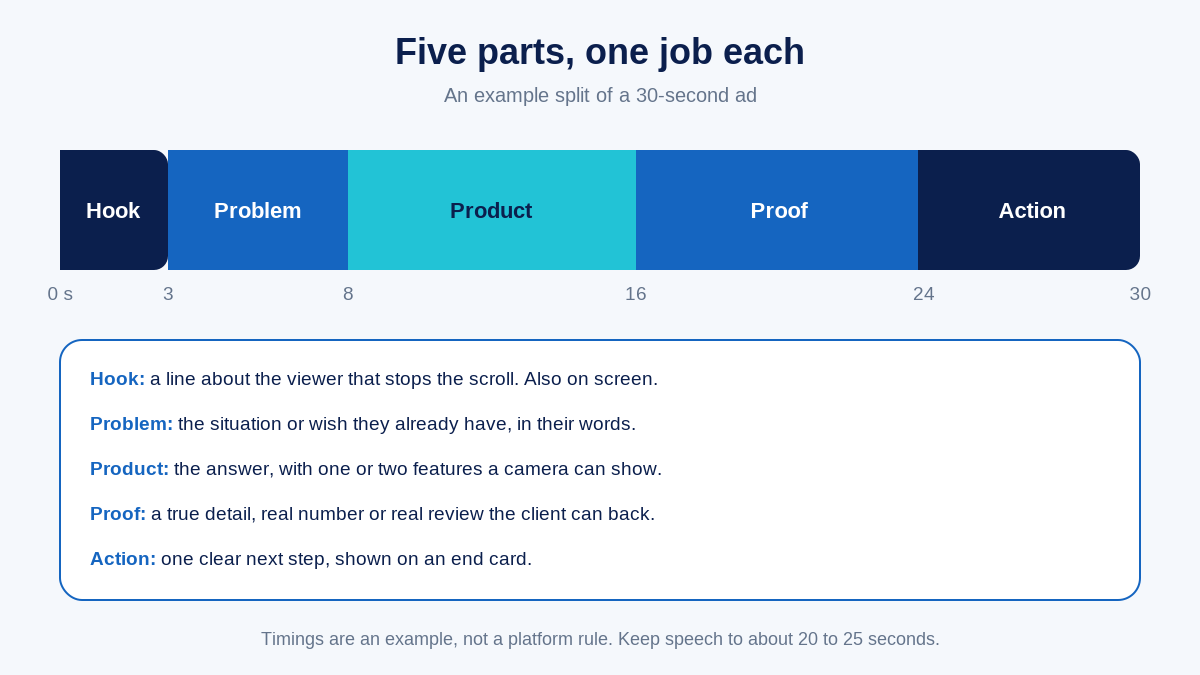
The timings in the picture are an example, not a rule. What matters is the order and that each part does one job.
Step 1: Write the hook as the first thing people hear or read
The first line decides whether anyone sees the rest. A good hook is short, specific and about the viewer, not about the brand. Some patterns that work for products:
- A question they'd say yes to: "Still giving the same box of sweets every Eid?"
- A surprising picture: the product appears somewhere unexpected while the line explains why.
- A direct promise you can keep: "Three ways to style one scarf, in 20 seconds."
Avoid opening with the brand name or "Hi everyone". Put the hook on screen as text too, because many people scroll with the sound off.
Step 2: Name the problem or the wish in their words
One or two sentences about the situation the viewer is in. Use the words a customer would use, not marketing words. If you're making this for a client, ask them what customers actually say on WhatsApp or in reviews. Our list of questions to ask a client before an AI video project includes this one.
Step 3: Show the product as the answer
This part gets the most screen time. Say what it is and the one or two features that solve the problem from Step 2. Pick the features a camera can show: the sections inside a box, the fabric moving, the size in someone's hand. If you only have one product photo, our guide to making a product ad from one photo shows how to build these shots.
Step 4: Add honest proof
Proof is a reason to believe you. Only use proof that is true and that the client can back up:
- a real, visible detail: "hand-packed", "sealed", "comes with a card"
- a real number the client gives you, such as years in business
- a real customer review the client has permission to share
Never invent reviews, ratings, sales numbers or "only 3 left" urgency. It misleads viewers, it can break ad platform rules, and it puts the client at risk.
Step 5: End with one clear action
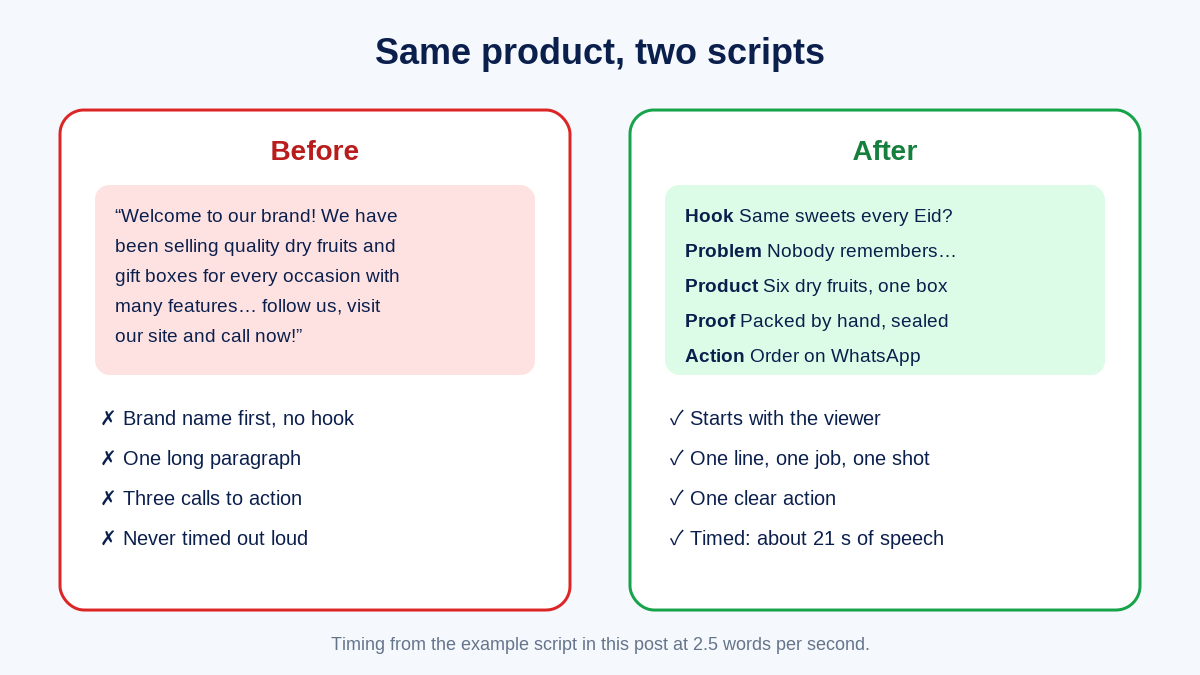
Tell people exactly what to do, once: "Order on WhatsApp today. Link in our bio." One action only. "Follow us, visit our site and call now" gives people three choices, and most will pick none. Show the action on an end card for the last two or three seconds, with the price if the client wants it shown.
Step 6: Time it before you generate anything
Speaking speed varies a lot between people, voices and languages, so don't trust a fixed number. Read one line aloud at your normal pace, time it, and work out your own words per second. Then use this small script to check the whole ad. Save it as script-timer.mjs and run node script-timer.mjs.
// Estimate how long each line of an ad script takes to say.
// 1. Read one line aloud at your normal pace and time it.
// 2. Put your own words-per-second below.
const WORDS_PER_SECOND = 2.5; // replace with your own measurement
const LIMIT_SECONDS = 30;

const script = [
  ["Hook", "Still giving the same box of sweets every Eid?"],
  ["Problem", "Everyone brings sweets. Nobody remembers who brought which box."],
  ["Product", "This gift box holds six kinds of dry fruit, each in its own section."],
  ["Proof", "Packed by hand, sealed fresh, with a card you can write on."],
  ["Action", "Order on WhatsApp today. Link in our bio."],
];

let total = 0;
for (const [part, line] of script) {
  const words = line.trim().split(/\s+/).length;
  const seconds = words / WORDS_PER_SECOND;
  total += seconds;
  console.log(`${part.padEnd(8)} ${String(words).padStart(2)} words  ~${seconds.toFixed(1)}s`);
}
console.log(`Total: ~${total.toFixed(1)}s of speech (limit ${LIMIT_SECONDS}s)`);
if (total > LIMIT_SECONDS - 3) console.log("Too tight: cut words, leave room for the opening shot and the end card.");
With the example value of 2.5 words per second, it prints:
Hook      9 words  ~3.6s
Problem   9 words  ~3.6s
Product  14 words  ~5.6s
Proof    12 words  ~4.8s
Action    8 words  ~3.2s
Total: ~20.8s of speech (limit 30s)
That leaves about nine seconds for pauses, the opening shot and the end card, which is comfortable. If your total is close to 30, cut words rather than speeding up the voice. A rushed AI voice sounds less natural, not more exciting.
Step 7: Turn the script into a voice and a shot list
Put each line next to the shot that will play under it. Then make the voice: our guide to adding an AI voiceover in CapCut with text to speech covers one free way. Record or generate the voice before you edit, and cut the clips to the voice, not the other way round.
Writing scripts like this, then turning them into finished product ads, is one of the practical tasks in the AI Content Creator Program.
Frequently asked questions
How many words fit in a 30-second ad?
It depends on the voice and the language, so measure your own pace. At 2.5 words per second, 30 seconds of non-stop speech is 75 words, but you should leave room for pauses and the end card, so aim well below that.
Should the ad have a voice at all?
Not always. A product ad can work with music and on-screen text only. Even then, write the script: the lines become your on-screen text, and the five parts still give the ad its order.
Can I write the script in Urdu or another language?
Yes. The structure works in any language. Time it in the language you'll publish in, because the same message can take more or fewer words in another language.
What if the client wants to mention ten features?
Pick the one or two that answer the problem in Step 2 and save the rest for a second ad. A short ad that says one thing clearly does better than one that lists everything.
- #ad script
- #product ads
- #ai video
- #voiceover
- #reels
- #copywriting
Want to learn AI video properly?
The AI Content Creator Program takes you from your first prompt to a portfolio you can show: 27 short, focused lessons in easy Urdu, with a weekly live session and tasks our team reviews.
Enroll now