How to fix the Claude API error 400 invalid_request_error
A 400 invalid_request_error means Claude rejected the request. The common causes on newer models (prefill, thinking, forced tools, spend limits) and each fix.
Saqqa Academy team
17-Nov-2026 · 5 min read
In this article
A 400 invalid_request_error from the Claude API means something in your request's format or content is wrong, so the API refused it before doing any work. Retrying the same request will fail every time: you have to change it. The fix is almost always in error.message, which names the problem and often the exact field, such as messages.1.content.0. On the newest models, the most common causes are a prefilled assistant message, an old thinking setting (enabled or disabled), a forced tool_choice, and an organisation or workspace spend limit you set yourself, which also returns a 400.
Everything below comes from Anthropic's API errors page, checked on 17 November 2026. Models and their accepted settings change, so check that page for the model you use.
What the error looks like
Every Claude API error is JSON with a top-level error object that has a type and a message, plus a request_id:
{
  "type": "error",
  "error": {
    "type": "invalid_request_error",
    "message": "This model does not support assistant message prefill. The conversation must end with a user message."
  },
  "request_id": "req_..."
}
The type is the same for every 400, so it doesn't tell you much. Read the message. If you contact support, include the request_id (it's also in the request-id response header).
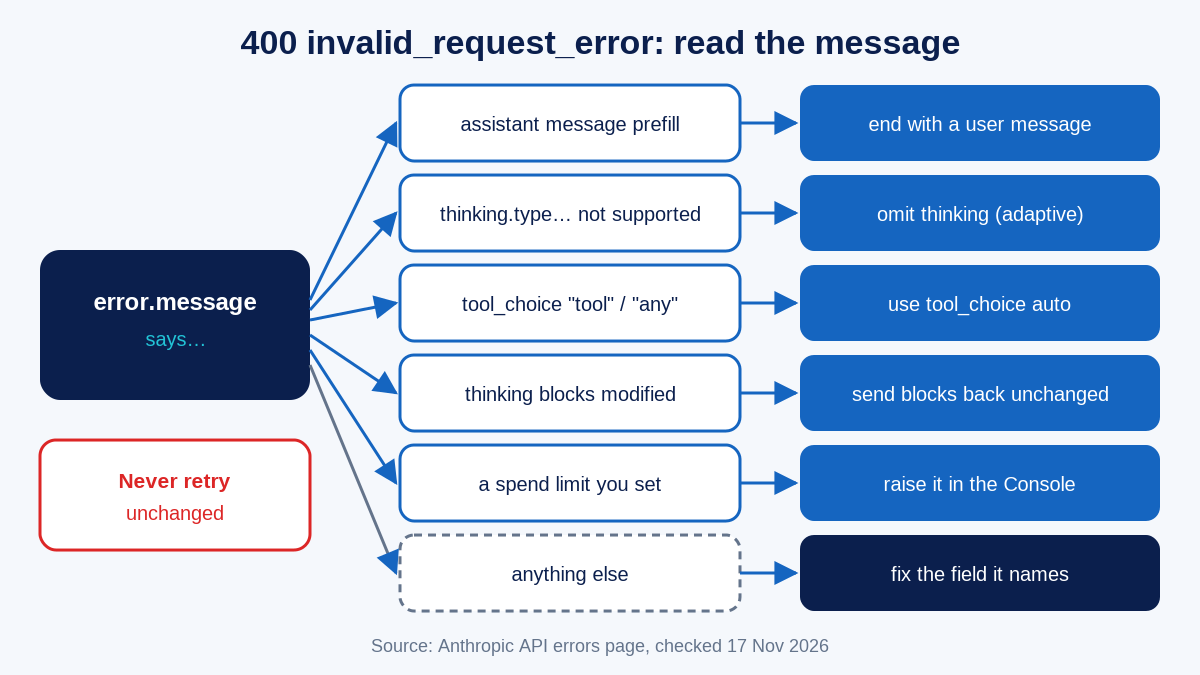
Cause 1: You prefilled the assistant's answer
Older code sometimes ended the messages list with a partial assistant message, like {"role": "assistant", "content": "{"}, to force the reply to start a certain way. According to Anthropic's errors page, Claude 4.6 and later models don't support prefill, and you get:
This model does not support assistant message prefill. The conversation must end with a user message.Fix: make sure the last message is from the user. If you used prefill to get JSON, switch to structured outputs or clear instructions in the system prompt. Our guide on getting valid JSON from an LLM shows both approaches, and how to write a system prompt covers the instructions side.
Cause 2: An old thinking setting
Thinking settings changed with newer models, so code written for older ones can break:
thinking: {"type": "enabled", "budget_tokens": N}is rejected by Claude 4.7 and later models. The message says to use"thinking.type.adaptive"andoutput_config.effortinstead.thinking: {"type": "disabled"}is rejected by models where thinking is always on, which includes Claude Fable 5.2 and Claude Opus 5.5.- On Claude Sonnet 5.5,
disabledis also rejected; the error tells you to send{"type": "between_tools"}for the lowest setting.between_toolsis accepted only on Sonnet 5.5. - The other way round, Claude 4.5 and earlier models reject
{"type": "adaptive"}.
Fix: on current models, the simplest choice is to leave out the thinking field: requests then run with adaptive thinking. Use output_config.effort to control how much it thinks. If you're not sure which model to pick, see which Claude model should I use.
Cause 3: Forcing a tool with tool_choice
Anthropic lists Claude Fable 5.2, Claude Opus 5.5 and Claude Sonnet 5.5 among the models that don't support forced tool use. Sending tool_choice: {"type": "any"} or {"type": "tool", "name": "..."} returns:
tool_choice: type "tool" and "any" are not supported for this model.This also applies to the token counting endpoint. Fix: use {"type": "auto"} (the default) or {"type": "none"}. If you need the tool input to match a schema, Anthropic suggests strict tool use; if you need the whole reply in a fixed JSON shape, use structured outputs.
Cause 4: You changed thinking blocks before sending them back
In a tool-use loop you send the assistant's previous turn back to the API. If you filter or edit its content and drop or change a thinking or redacted_thinking block, you get an error saying those blocks "cannot be modified", with the position of the bad block at the start of the message.
Fix: pass back every content block from the assistant turn exactly as you received it, including thinking blocks with an empty thinking field. If you filter blocks by type, keep both thinking and redacted_thinking. Our guides on the agent loop and the tool_use without tool_result error show how to append the whole assistant turn safely.
Cause 5: You reached a spend limit you set
If you set a spend limit on your organisation or a workspace in the Claude Console, requests over that limit return a 400, not a 429. The message will mention the limit rather than a field. Fix: raise the limit in the Console or wait until it resets. This is different from your usage tier's monthly spend cap, which returns a 429; see how to fix the 429 rate_limit_error.
Anything else: the message names the field
Other 400s are usually plain mistakes in the request: a missing required field such as max_tokens, a wrong type, a misspelled parameter, or a tool type the model doesn't accept (the message says which tool types it does accept). Read the message, fix that field and send it again. A request that is too big is a different error: 413 request_too_large, with a 128 MB limit for the Messages API on Anthropic's own API.
A small helper that suggests the fix
This JavaScript function reads an error body and returns a likely fix. We tested the matching locally with Node.js using the sample messages from Anthropic's errors page; we didn't send live requests, so treat it as a starting point and check the full message too.
// Map a Claude API 400 message to a likely fix.
const fixes = [
  [/does not support assistant message prefill/i,
    "End the conversation with a user message. Use structured outputs or the system prompt instead of prefill."],
  [/thinking\.type\.enabled.*not supported/i,
    "Remove thinking: { type: 'enabled' }. Use adaptive thinking and output_config.effort."],
  [/thinking\.type\.disabled.*not supported/i,
    "Thinking can't be turned off on this model. Omit the thinking field, or on Sonnet 5.5 send { type: 'between_tools' }."],
  [/tool_choice: type "tool" and "any" are not supported/i,
    "Use tool_choice auto (the default) with strict tool use, or structured outputs."],
  [/thinking.*blocks.*cannot be modified/i,
    "Send every thinking and redacted_thinking block back exactly as you received it."],
  [/does not support tool types/i,
    "This model doesn't accept that tool version. Check the tool docs for the version it supports."],
];

export function explain400(body) {
  const message = body?.error?.message ?? "";
  for (const [pattern, fix] of fixes) {
    if (pattern.test(message)) return fix;
  }
  return "Read error.message: it names the field that is wrong. Check your spend limits too. Don't retry unchanged.";
}
With the official TypeScript SDK, a 400 is thrown as Anthropic.BadRequestError, and the parsed body is on the error object, so you can log the hint before you rethrow:
try {
  await client.messages.create(request);
} catch (err) {
  if (err instanceof Anthropic.BadRequestError) {
    console.error(err.message, "\nHint:", explain400(err.error));
  }
  throw err;
}
Don't add 400s to your retry logic. The SDK retries connection errors, 429s and 5xx errors on its own, but a 400 means the request itself has to change.
Frequently asked questions
Should I retry a 400 error?
No. A 400 means the request is wrong, so the same request fails again. Fix what the message names. Only errors like 429, 500 and 529 are worth retrying with backoff; see how to fix the 529 overloaded_error.
My code worked last month. Why does it fail now?
Usually because you switched to a newer model. Prefill, thinking: {"type": "enabled"} and forced tool_choice all worked on some older models but are rejected by newer ones. Check the model name in your request first.
How do I get JSON out without prefill?
Use structured outputs where your model supports it, or describe the exact JSON shape in the system prompt and validate the reply in your code.
What's the difference between a 400 and a 413?
A 400 means the content or format is wrong. A 413 request_too_large means the request is too many bytes, for example very large images or files; make it smaller. The errors page lists the size limit for each endpoint.
- #claude api
- #error 400
- #invalid_request_error
- #thinking
- #tool_choice
- #javascript
Want a full course on this?
Build Apps with AI
Use AI coding assistants to build, fix and ship real websites and apps.
Join the free waitlistWant to learn AI video properly?
The AI Content Creator Program takes you from your first prompt to a portfolio you can show: 27 short, focused lessons in easy Urdu, with a weekly live session and tasks our team reviews.
Enroll now