How to write a system prompt: what goes in it, with a template you can copy
A system prompt sets the role, rules and output format for every reply. Learn what belongs in it, what belongs in the user message, and copy a template that works.
Saqqa Academy team
13-Nov-2026 · 6 min read
In this article
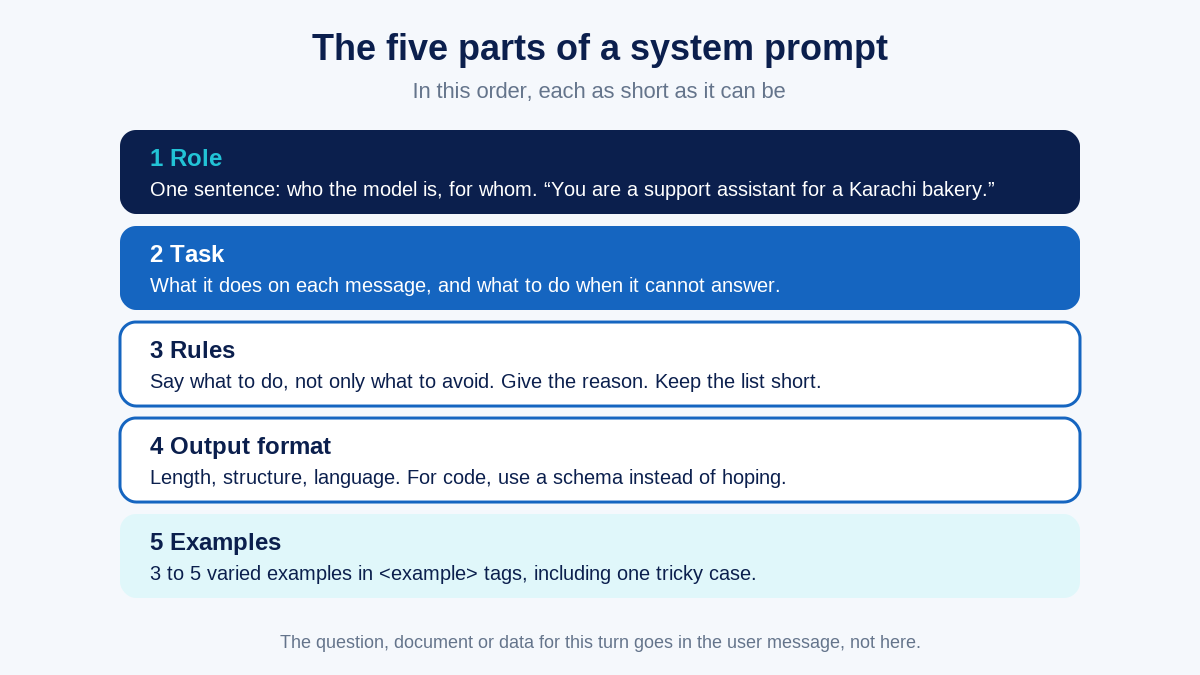
A system prompt is the standing instruction you give an AI model before the conversation starts: who it is, what job it does, the rules it must follow and the shape of its answers. It applies to every reply, while the user message changes each turn. A good system prompt has five parts: a role, the task, the rules, the output format, and a few examples. Keep the actual question, document or data for each request in the user message, and keep secrets out of both.
The advice here follows Anthropic's prompting best practices, read on 13 November 2026. The same structure works in ChatGPT's custom instructions and in Gemini, because the underlying idea, a stable instruction plus a changing request, is the same everywhere.
System prompt or user message?
In the Claude API the system prompt goes in the system field, and the conversation goes in messages. In the chat apps, the "custom instructions" or "project instructions" box plays the same role. The split is simple:
- System prompt: things that are true for every request. Role, tone, rules, format, background about your product or audience, examples of good answers.
- User message: things that change each time. The question, the document to summarise, the data to extract from, the customer's actual words.
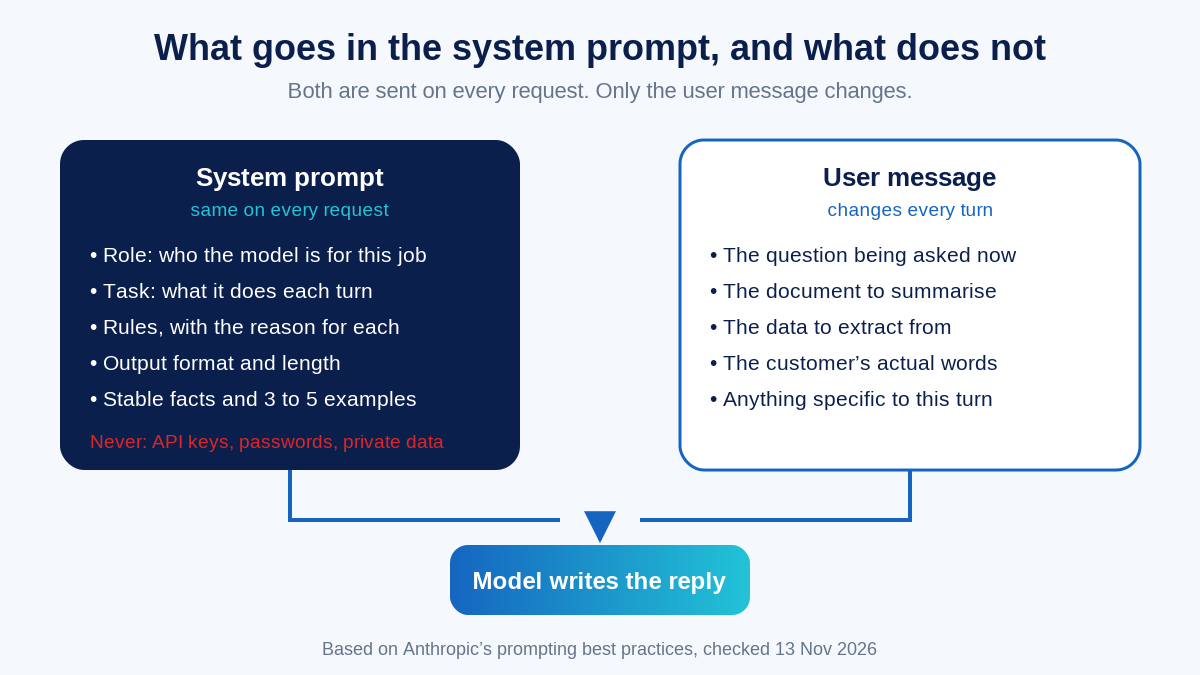
Putting a changing document into the system prompt is not wrong, but it makes prompt caching less effective and mixes "how to behave" with "what to work on". Putting rules only in the user message means you must repeat them every turn, and a long chat tends to drift away from them.
The five parts, in order
1. Role
One sentence that says who the model is for this job. Anthropic's docs note that setting a role in the system prompt focuses the model's behaviour and tone, and that even a single sentence makes a difference. Be specific: "You are a support assistant for a Karachi bakery's website" beats "You are a helpful assistant".
2. Task
What the model does on each turn, in plain words. "Answer customer questions about orders, delivery and allergens using the information below. If you do not know, say so and offer the phone number."
3. Rules
The constraints. Two tips from the docs make rules work much better:
- Say what to do, not only what not to do. Instead of "Do not use markdown", write "Reply in short plain paragraphs." The model has a positive target to aim at.
- Give the reason. The docs' example is "never use ellipses" versus "your reply will be read aloud by a text-to-speech engine, so never use ellipses, because it cannot pronounce them". With the reason, the model can generalise to cases you did not list.
Keep the list short. Five clear rules are followed better than thirty vague ones.
4. Output format
Describe the shape of a good answer: length, structure, language. If you need machine-readable output, say so, and in code use structured outputs or a JSON schema rather than hoping. The docs also suggest matching your prompt style to the output you want: a prompt written in plain paragraphs tends to get plain paragraphs back, while a prompt full of bullet points gets bullet points.
5. Examples
Examples are, in Anthropic's words, one of the most reliable ways to steer format, tone and structure. Give three to five, wrap each in <example> tags so the model can tell them apart from instructions, and make them varied, so the model does not copy a pattern you did not intend. A few-shot example of a good answer and one of a tricky case ("customer asks something we do not know") does more than a paragraph of description.
A template you can copy
Here is the structure as one prompt. Replace the parts in capitals. The XML-style tags are not required, but the docs recommend them for separating instructions, context and examples when a prompt has several kinds of content.
You are a ROLE for COMPANY, talking to AUDIENCE.

<task>
On each message, TASK IN ONE OR TWO SENTENCES.
</task>

<rules>
- Use only the facts in <context>. If the answer is not there, say you do not know and offer NEXT STEP.
- Reply in simple English in two to four short sentences, because our readers are often on a phone.
- Never promise RESULTS WE CANNOT PROMISE.
- Respond directly without preamble. Do not start with phrases like "Here is" or "Based on".
</rules>

<context>
STABLE FACTS: opening hours, prices, policies, product names.
</context>

<examples>
<example>
User: QUESTION A
Assistant: GOOD ANSWER A
</example>
<example>
User: QUESTION WE CANNOT ANSWER
Assistant: HONEST ANSWER WITH NEXT STEP
</example>
</examples>
The "respond directly without preamble" line comes straight from Anthropic's migration advice for people who used to force this with a prefilled reply; a direct instruction in the system prompt is now the recommended way.
Sending it in the API
In the Claude API the system prompt is a top-level field, separate from the conversation:
{
  "model": "claude-sonnet-5-5",
  "max_tokens": 600,
  "system": "You are a support assistant for a Karachi bakery. Answer only from the facts provided. Reply in two to four short sentences.",
  "messages": [
    { "role": "user", "content": "Do you deliver on Sunday?" }
  ]
}
We did not send this request, because it needs a paid API key; the shape follows the official docs. The system text can be long: many production prompts are several pages, and prompt caching makes re-sending that prefix cheap.
Test it like a colleague would read it
Anthropic suggests a simple test: show your prompt to a colleague who knows little about the task and ask them to follow it. If they would be confused, the model will be too. In practice:
- Write the prompt.
- Run ten real questions through it, including two that it should refuse or say "I do not know" to.
- Fix the prompt where the answers were wrong, and add the failing case as an example.
- Repeat until all ten pass, then save those ten as your regression test for the next edit.
Mistakes to avoid
- Shouting. The docs note that recent models follow the system prompt closely, and that aggressive wording such as "CRITICAL: you MUST" can make them over-trigger. Normal, clear sentences work better.
- Secrets in the prompt. Anything in the system prompt can come out in a reply. Keep API keys, internal prices you do not publish and personal data out of it.
- Contradictions. "Be concise" next to "always explain your reasoning in full" leaves the model guessing. Pick one.
- Everything at once. A system prompt that tries to cover ten unrelated jobs does all of them worse. Use one prompt per job.
Frequently asked questions
What is the difference between a system prompt and a user prompt?
The system prompt is the standing instruction for the whole conversation: role, rules, format. The user prompt is the message for this turn: the question or the data. Both are sent on every request, but only the user message changes.
How long should a system prompt be?
As long as it needs to be, and no longer. A short, clear prompt of ten lines often beats a vague one of two pages. If you need long reference material, put it in a clearly marked context section and use prompt caching so you do not pay full price to resend it.
Can I use the same system prompt in ChatGPT, Claude and Gemini?
Mostly yes. The role, rules, format and examples structure works across providers. Check each provider's documentation for details that differ, such as how they recommend formatting examples or where custom instructions live in their apps.
Do I need XML tags in a system prompt?
No, but they help when a prompt mixes instructions, background facts and examples. Anthropic's docs recommend consistent, descriptive tag names so the model can tell each part apart.
- #system prompt
- #prompting
- #claude api
- #chatgpt
- #prompt engineering
Want a full course on this?
AI for Everyone
Use ChatGPT, Claude and Gemini properly for study, work and daily tasks.
Join the free waitlistWant to learn AI video properly?
The AI Content Creator Program takes you from your first prompt to a portfolio you can show: 27 short, focused lessons in easy Urdu, with a weekly live session and tasks our team reviews.
Enroll now