How to fix the Claude API error 529 overloaded_error
A 529 overloaded_error means Anthropic's servers are busy, not that your code is wrong. How to retry it safely, catch it inside a stream and keep your app working.
Saqqa Academy team
10-Nov-2026 · 6 min read
In this article
A 529 overloaded_error from the Claude API means the API is temporarily overloaded because of high traffic across all users. It is not a problem with your request, your key or your account, so there is nothing to fix in your prompt. The fix is to wait and retry: use exponential backoff with jitter, stop after a few attempts, and show a friendly message if it still fails. The official Anthropic SDKs already retry 5xx errors twice by default, so often you only need to raise that number.
All facts in this guide come from Anthropic's official errors page and streaming page, checked on 10 November 2026.
Step 1: Make sure it really is a 529
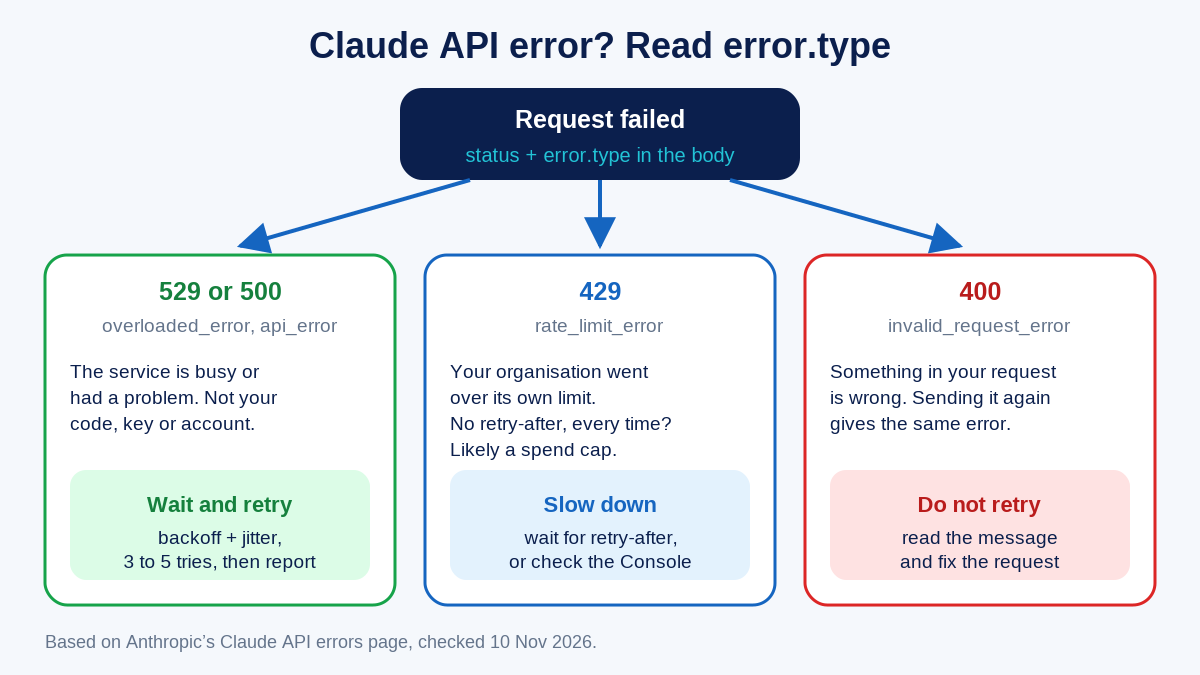
Several Claude errors look alike in a log. Read the HTTP status and the error.type in the JSON body, because each one needs a different response:
| Status | error.type | What it means | Retry? |
|---|---|---|---|
| 529 | overloaded_error | The API is busy for everyone | Yes, with backoff |
| 500 | api_error | Unexpected error inside Anthropic | Yes, with backoff |
| 429 | rate_limit_error | Your organisation hit a rate or spend limit | Only if it is a rate limit (see below) |
| 504 | timeout_error | The request took too long | Use streaming for long requests |
| 400 | invalid_request_error | Your request is wrong | No, fix the request |
Every error body has the same shape, with a request_id you can give to support:
{
  "type": "error",
  "error": { "type": "overloaded_error", "message": "Overloaded" },
  "request_id": "req_011CSHoEeqs5C35K2UUqR7Fy"
}
The difference between 429 and 529 matters most. A 429 is about you: you sent too much, too fast, or reached a spend cap. A 529 is about the service: your account did nothing wrong. Anthropic's docs add one exception: if your organisation's usage rises very sharply, you can get 429 errors from "acceleration limits", so grow traffic gradually.
Step 2: Let the SDK retry for you
If you use an official Anthropic SDK, it already retries connection errors, rate limits and 5xx errors (which includes 529) with exponential backoff, twice by default, and it follows the retry-after header when the server sends one. During a busy period two retries may not be enough, so raise it:
import anthropic

# Retry up to 5 times instead of the default 2
client = anthropic.Anthropic(max_retries=5)import Anthropic from "@anthropic-ai/sdk";
const client = new Anthropic({ maxRetries: 5 });That one setting fixes most 529 problems in small apps and scripts. Keep the number modest: if the API is overloaded for several minutes, ten fast retries from thousands of apps only add to the load.
Step 3: Write your own retry if you call the API directly
If you use plain fetch or another HTTP client, you need your own loop. This version retries 529, 500, 504 and 429, waits for retry-after when it is present, and otherwise uses exponential backoff with "full jitter" (a random wait between zero and the backoff time, so many clients don't all retry at the same moment):
// Retry a Claude API call when it fails with a temporary error.
const RETRYABLE = new Set([429, 500, 504, 529]);

const sleep = (ms) => new Promise((resolve) => setTimeout(resolve, ms));

export async function callClaude(body, { maxRetries = 4, baseMs = 1000, capMs = 30000, fetchFn = fetch } = {}) {
  for (let attempt = 0; ; attempt++) {
    const res = await fetchFn("https://api.anthropic.com/v1/messages", {
      method: "POST",
      headers: {
        "x-api-key": process.env.ANTHROPIC_API_KEY,
        "anthropic-version": "2026-10-21",
        "content-type": "application/json",
      },
      body: JSON.stringify(body),
    });

    if (res.ok) return res.json();

    const error = await res.json().catch(() => ({}));
    const type = error?.error?.type;
    const requestId = res.headers.get("request-id");

    if (!RETRYABLE.has(res.status) || attempt >= maxRetries) {
      throw new Error(`Claude API ${res.status} ${type ?? ""} (request-id: ${requestId})`);
    }

    // Use the server's retry-after if it sent one, otherwise exponential backoff with full jitter.
    const retryAfter = Number(res.headers.get("retry-after"));
    const waitMs = retryAfter > 0
      ? retryAfter * 1000
      : Math.random() * Math.min(capMs, baseMs * 2 ** attempt);

    console.warn(`Got ${res.status} ${type}, retry ${attempt + 1}/${maxRetries} in ${Math.round(waitMs)} ms`);
    await sleep(waitMs);
  }
}
We tested this in Node.js 24 with a fake fetch that returned 529 twice and then 200 (it retried twice and returned the answer), a 400 (it threw at once, without retrying) and a 529 every time (it gave up after the retry limit). We did not run it against the live API for this post. The anthropic-version value is the one shown in Anthropic's docs on the day we checked.
Two details to keep:
- Log the
request-id. Every response has arequest-idheader. If an error keeps happening, support can look it up. - Watch for spend caps. Anthropic's docs say a 429 caused by your tier's monthly spend cap has no
retry-afterheader and keeps failing until access resumes. If you see the same 429 every time, stop retrying and check the Claude Console.
Step 4: Catch the error inside a stream too
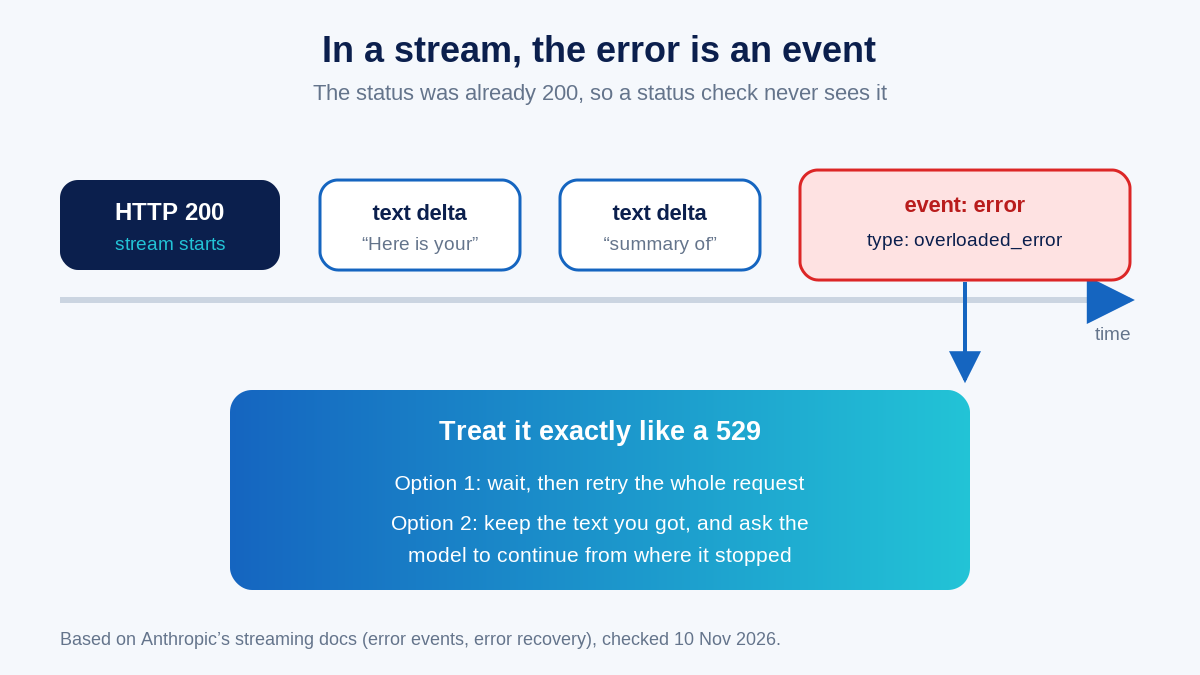
With "stream": true, the API first answers with HTTP 200 and then sends events. If the API gets busy half way through, the error arrives as an event, not as a 529 status, so a status check never sees it:
event: error
data: {"type": "error", "error": {"type": "overloaded_error", "message": "Overloaded"}}
Treat an error event with overloaded_error the same as a 529. You can retry the whole request, or keep the text you already received and ask the model to continue. Anthropic's streaming docs describe this recovery: on Claude 4.6 and later models, you send a follow-up user message that asks the model to continue from where it stopped. Tool use and thinking blocks cannot be partly recovered, so resume from the last text block.
Step 5: Keep your app usable while the API is busy
Retries handle short spikes. For a better experience during longer ones:
- Show a clear message. "Our AI assistant is busy, please try again in a minute" is far better than a spinner that never stops or a raw error.
- Queue work that can wait. Summaries, reports and bulk jobs don't need an instant answer. For large jobs, Anthropic's Message Batches API lets you send work and collect results later.
- Check the status page. If retries keep failing, look at status.claude.com before you start debugging your own code.
- Consider a fallback. Some teams send the request to a different model when one keeps failing. This is a design choice, not something the docs require; test that the other model gives good enough answers for your task first.
Don't treat one 529 as a fatal error that crashes your server or worker. Catch it, wait, retry, and only then report a failure.
Frequently asked questions
Is error 529 my fault?
No. Anthropic's docs describe 529 as the API being temporarily overloaded, which can happen during high traffic across all users. Your code, key and billing are fine. Retry with backoff.
What is the difference between 429 and 529 in the Claude API?
A 429 rate_limit_error means your organisation went over its own rate limit or spend cap. A 529 overloaded_error means the service is busy for everyone. Slow down for a 429; just wait and retry for a 529.
How many times should I retry a 529?
The SDKs retry twice by default. Three to five retries with backoff and jitter is a sensible range for most apps. After that, show a friendly message or queue the job instead of retrying forever.
Will a new API key or a different account avoid 529 errors?
No. A 529 comes from the service as a whole, not from your key, so a new key gets the same response. Retrying after a short wait is the fix.
- #claude api
- #error 529
- #overloaded_error
- #retries
- #javascript
Want a full course on this?
Build Apps with AI
Use AI coding assistants to build, fix and ship real websites and apps.
Join the free waitlistWant to learn AI video properly?
The AI Content Creator Program takes you from your first prompt to a portfolio you can show: 27 short, focused lessons in easy Urdu, with a weekly live session and tasks our team reviews.
Enroll now