How to fix the Claude API error 429 rate_limit_error
A 429 from the Claude API can be a rate limit, a ramp limit or your monthly spend cap. How to tell them apart, when to retry and when retrying never helps.
Saqqa Academy team
16-Nov-2026 · 5 min read
In this article
A 429 rate_limit_error from the Claude API means your organization has sent more than it is allowed to right now. There are three different causes, and they need different fixes: a normal rate limit (too many requests or tokens per minute), a ramp limit (your usage grew too fast), or your tier's monthly spend cap. For the first two, wait the number of seconds in the retry-after header and try again, more slowly. For the spend cap, retrying never helps: the response has no retry-after header and keeps failing until access resumes or your tier goes up. You can tell them apart by reading error.details.error_code in the response.
Everything below comes from Anthropic's errors and rate limits pages, checked on 16 November 2026. Limits change, so check those pages for your own numbers.
What the error looks like
A 429 response body is JSON with a top-level error object. A spend-cap 429 looks like this (shortened):
{
  "type": "error",
  "error": {
    "type": "rate_limit_error",
    "message": "You have reached your API usage limits: ...",
    "details": { "error_code": "enforced_spend_limit_reached" }
  },
  "request_id": "req_..."
}
The error.type is rate_limit_error in all three cases. That is why you can't stop at the type: you need the details.error_code and the retry-after header too.
Step 1: Work out which 429 you have
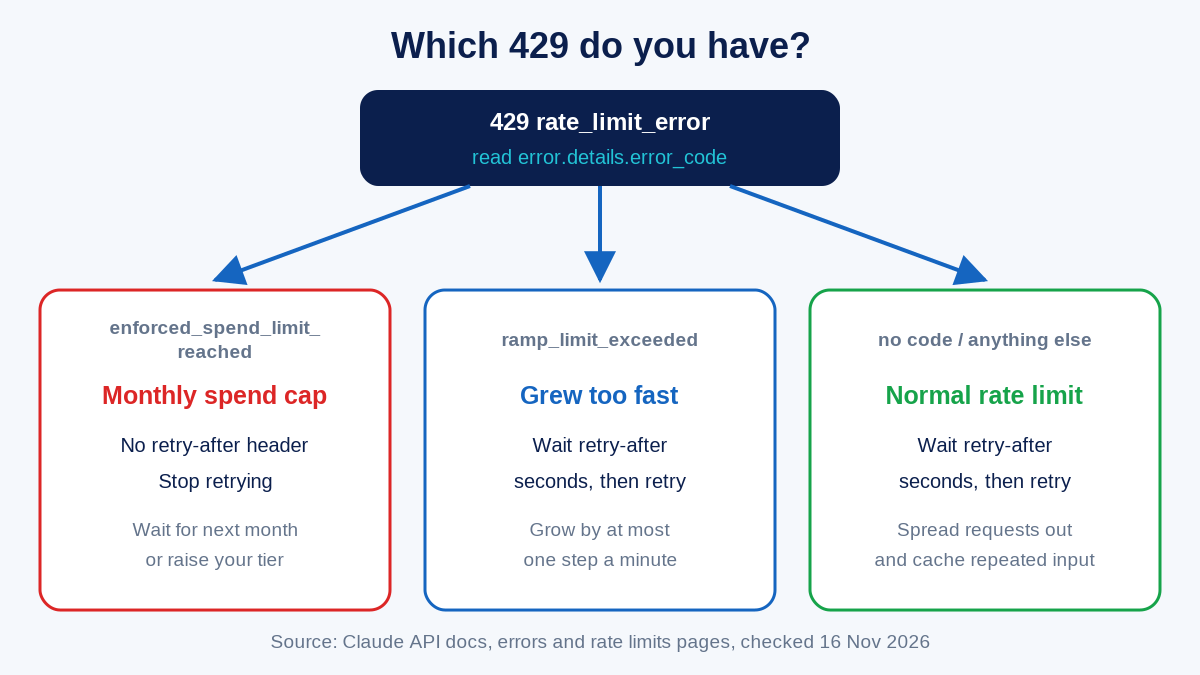
1. Normal rate limit. The Messages API limits each model by requests per minute (RPM), input tokens per minute (ITPM) and output tokens per minute (OTPM). Going over any one of them returns a 429. The limits use a token bucket, so capacity refills continuously rather than resetting on the minute, and Anthropic notes that 60 RPM might be enforced as about 1 request per second. A burst of requests can trip the limit even when your per-minute total looks fine.
2. Ramp limit (ramp_limit_exceeded). A ramp limit caps how fast your usage of a model can grow. If you were sending a little and suddenly send a lot, you can get a 429 while still under your normal limits. The limit rises one step per minute as your successful usage grows, and the error message usually states your current ramp limit and the step. Message Batches are not subject to ramp limits.
3. Monthly spend cap (enforced_spend_limit_reached). Each usage tier has a monthly spend cap. Once you reach it, the API returns 429 until 00:00 UTC on the first day of the next month, unless your tier is raised. The response has no retry-after header, and the SDKs' automatic retries will keep failing.
A spend limit that you set yourself, below your tier's cap, returns a 400 invalid_request_error, not a 429. Raise or remove that limit in the Console.Step 2: Let the SDK retry the normal cases
The official Anthropic SDKs already retry rate limits, connection errors and 5xx errors with exponential backoff, twice by default, and they follow retry-after when the server sends one. If short bursts are your only problem, raising the retry count may be enough:
import Anthropic from "@anthropic-ai/sdk";

const client = new Anthropic({ maxRetries: 4 });
In Python the option is anthropic.Anthropic(max_retries=4). More retries don't fix a spend cap, so catch that case and stop.
Step 3: Handle the three cases yourself
If you call the API with fetch, or want clear messages for each case, this function reads the error code, stops at once on a spend cap, and otherwise waits for retry-after (or uses backoff with jitter when the header is missing):
// call-claude.mjs: call the Messages API and handle the three kinds of 429.
const API_URL = process.env.ANTHROPIC_BASE_URL ?? "https://api.anthropic.com";

const sleep = (ms) => new Promise((r) => setTimeout(r, ms));

export async function callClaude(body, { maxRetries = 4 } = {}) {
  for (let attempt = 0; ; attempt++) {
    const res = await fetch(`${API_URL}/v1/messages`, {
      method: "POST",
      headers: {
        "x-api-key": process.env.ANTHROPIC_API_KEY,
        "anthropic-version": "2026-10-21",
        "content-type": "application/json",
      },
      body: JSON.stringify(body),
    });

    if (res.ok) return res.json();

    const data = await res.json().catch(() => ({}));
    const code = data.error?.details?.error_code;
    const requestId = res.headers.get("request-id");

    if (res.status !== 429) {
      throw new Error(`HTTP ${res.status} ${data.error?.type}: ${data.error?.message} (${requestId})`);
    }

    // 1. Monthly spend cap: retrying will not help until access resumes.
    if (code === "enforced_spend_limit_reached") {
      throw new Error(`Spend cap reached, stop retrying: ${data.error.message}`);
    }

    if (attempt >= maxRetries) {
      throw new Error(`Still rate limited after ${maxRetries} retries (${requestId})`);
    }

    // 2. Rate limit or 3. ramp limit: wait at least retry-after seconds.
    const retryAfter = Number(res.headers.get("retry-after"));
    const backoff = Math.min(2 ** attempt * 1000, 30_000);
    const waitMs = Number.isFinite(retryAfter) && retryAfter > 0 ? retryAfter * 1000 : backoff;
    const jitter = Math.random() * 250;

    console.warn(`429 (${code ?? "rate_limit"}), waiting ${Math.round((waitMs + jitter) / 1000)}s, retry ${attempt + 1}`);
    await sleep(waitMs + jitter);
  }
}
We tested this with Node.js 24 against a small local server that imitates the API: it returned two ramp-limit 429s with retry-after: 1 and then a 200 (the function waited, retried twice and returned the answer), and in a second run a spend-cap 429 (the function stopped at once without retrying). We did not run it against the live API for this post. The non-429 errors are thrown without a retry here; see our guide to the 529 overloaded_error for retrying those.
Step 4: Stop hitting the limit in the first place
Retrying treats the symptom. These change the cause:
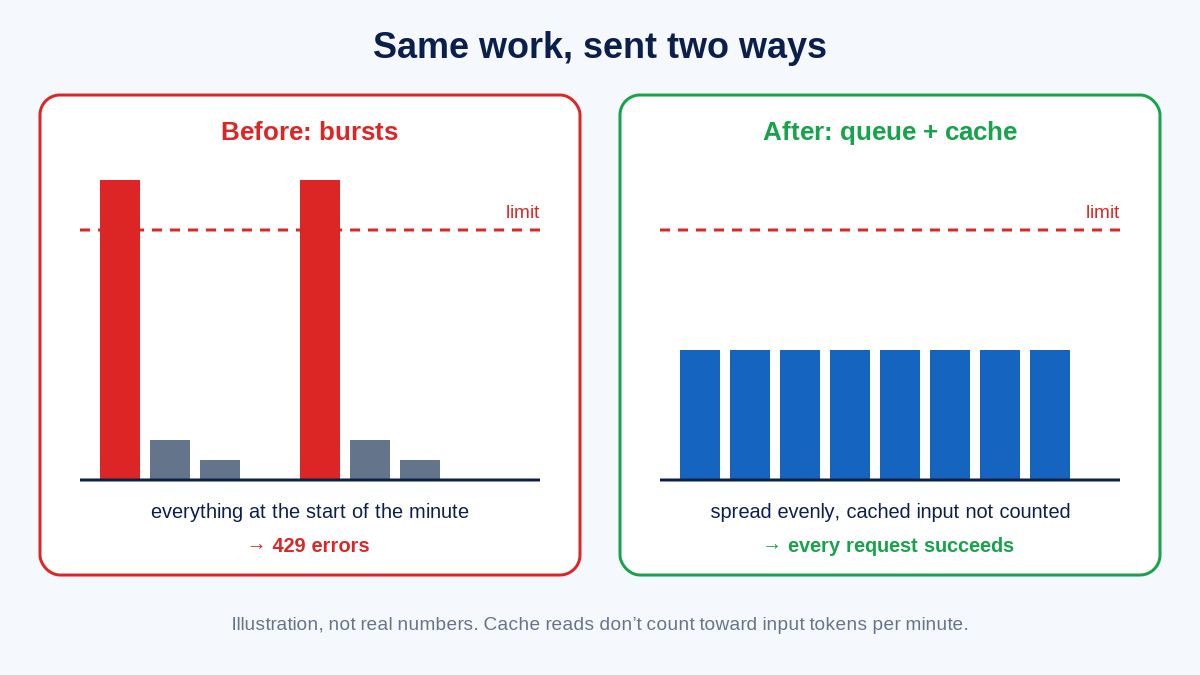
- Cache repeated input. By default, ITPM counts only uncached input: tokens read from the cache don't count toward it, while tokens written to the cache do. If every request repeats a long system prompt or document, prompt caching can raise your real throughput a lot without a higher limit.
- Spread requests out. Because the bucket refills continuously, ten requests spaced over a minute are safer than ten in one second. Use a small queue with a concurrency limit for bulk jobs.
- Ramp up slowly. For a new bulk job, start at a low rate and increase by at most one step per minute, as Anthropic advises for ramp limits.
- Move bulk work to batches. Jobs that don't need an instant answer can go through the Message Batches API, which has its own limits, no ramp limit, and costs half the normal price.
- Watch the headers. Every response includes headers such as
anthropic-ratelimit-requests-remaining,anthropic-ratelimit-input-tokens-remainingandanthropic-ratelimit-output-tokens-remaining. Slow down before they reach zero. - Check your tier. Your tier and current limits are on the Rate limits page in the Claude Console, where you can also request a higher tier.
Frequently asked questions
Is a 429 the same as a 529?
No. A 429 is about your organization: you went over a limit or your spend cap. A 529 overloaded_error means the API is busy for everyone, and there is nothing in your account to change. Both are worth retrying with backoff, except the spend-cap 429.
Does a higher max_tokens count against my output limit?
No. Anthropic's docs say OTPM counts only the output tokens actually generated, and max_tokens doesn't factor into it. If replies get cut off, see how to handle stop_reason max_tokens.
Why do I get 429s when I'm under my limits?
Usually one of two reasons: a short burst (the limit can be enforced over seconds, not a full minute) or a ramp limit after a sudden jump in usage. Check error.details.error_code: ramp_limit_exceeded means the second.
How long should I wait before retrying?
At least the number of seconds in the retry-after header. When there is no header, use exponential backoff with a little random jitter and a cap. If the code is enforced_spend_limit_reached, don't retry at all.
- #claude api
- #error 429
- #rate_limit_error
- #rate limits
- #retries
- #javascript
Want a full course on this?
Build Apps with AI
Use AI coding assistants to build, fix and ship real websites and apps.
Join the free waitlistWant to learn AI video properly?
The AI Content Creator Program takes you from your first prompt to a portfolio you can show: 27 short, focused lessons in easy Urdu, with a weekly live session and tasks our team reviews.
Enroll now