How to get valid JSON from ChatGPT or Claude every time
Models sometimes wrap JSON in chat, add code fences or invent values. Use structured outputs where you can, and validate and retry where you cannot. Here is how.
Saqqa Academy team
10-Nov-2026 · 5 min read
In this article
To get valid JSON from an AI model every time, do two things. First, if you use the API, turn on structured outputs and give the model a JSON Schema: both the OpenAI and Claude APIs can then make the reply follow your schema. Second, always validate the result in your own code and, if it is wrong, send the problems back and ask again. Prompting alone ("reply only in JSON") works most of the time, but "most of the time" breaks a program that runs a thousand times a day.
Facts about the APIs below come from OpenAI's structured outputs guide and Anthropic's structured outputs documentation, both checked on 10 November 2026.
Why the JSON breaks
If you have tried this, you have probably seen one of these:
- The model adds a friendly sentence before the JSON: "Sure! Here is the data:"
- It wraps the JSON in a Markdown code fence.
- It uses a value you did not allow, such as
"very high"when you wantedhot,warmorcold. - It leaves out a field, or adds one you did not ask for.
- The reply is cut off halfway because it hit the output token limit, so the closing brace is missing.
Each of these makes JSON.parse fail or, worse, succeed with data your code does not expect.
Step 1: Write a clear prompt (this helps everywhere)
Even with the API features below, a clear prompt gives better values. Show the exact shape and the allowed values:
Extract the lead from the message below.
Reply with only a JSON object, no other text, in this exact shape:
{"name": string, "city": string, "interest": "hot" | "warm" | "cold"}
If the city is not mentioned, use "".

Message: Ayesha from Lahore really wants to join the next batch.
In the chat apps (ChatGPT, Claude.ai, Gemini) this is all you can do, and it is usually enough for one-off tasks. For code, keep going.
Step 2: Use structured outputs in the API
Both major APIs let you send a JSON Schema and have the model's reply follow it.
OpenAI (Responses API): set text.format to a json_schema with strict: true.
{
  "model": "YOUR_MODEL",
  "input": "Ayesha from Lahore really wants to join the next batch.",
  "text": {
    "format": {
      "type": "json_schema",
      "name": "lead",
      "strict": true,
      "schema": {
        "type": "object",
        "properties": {
          "name": { "type": "string" },
          "city": { "type": "string" },
          "interest": { "type": "string", "enum": ["hot", "warm", "cold"] }
        },
        "required": ["name", "city", "interest"],
        "additionalProperties": false
      }
    }
  }
}
OpenAI's guide notes that the older JSON mode ("type": "json_object") only guarantees valid JSON, not that it matches your schema, and recommends structured outputs instead where the model supports it.
Claude (Messages API): use output_config.format with "type": "json_schema" and the same kind of schema:
{
  "model": "claude-opus-5-5",
  "max_tokens": 1024,
  "messages": [
    { "role": "user", "content": "Extract the lead: Ayesha from Lahore really wants to join the next batch." }
  ],
  "output_config": {
    "format": {
      "type": "json_schema",
      "schema": {
        "type": "object",
        "properties": {
          "name": { "type": "string" },
          "city": { "type": "string" },
          "interest": { "type": "string", "enum": ["hot", "warm", "cold"] }
        },
        "required": ["name", "city", "interest"],
        "additionalProperties": false
      }
    }
  }
}
Anthropic's documentation says the older output_format parameter is deprecated in favour of output_config.format. It also lists schema features that are not supported, including minimum, maximum, minLength and maxLength; using them returns a 400 error. Put those rules in your own validation instead.
We did not send these two requests, because they need paid API keys. Their shapes follow the official docs above.
Step 3: Validate anyway
Structured outputs are a big improvement, but the docs of both providers describe cases where the reply may still not match:
- Refusals. If the model refuses for safety reasons, the reply may not follow your schema. OpenAI returns this in a
refusalfield; Claude usesstop_reason: "refusal". - Cut-off replies. If the output hits the token limit, the JSON can be incomplete. Check for an incomplete status (OpenAI) or
stop_reason: "max_tokens"(Claude), and retry with a higher limit. - Small differences. Anthropic notes that enum values may come back with different capitalisation, so compare them case-insensitively.
- Older models or other providers may not support structured outputs at all.
So treat the model's reply like any input from outside your program: check it before you use it.
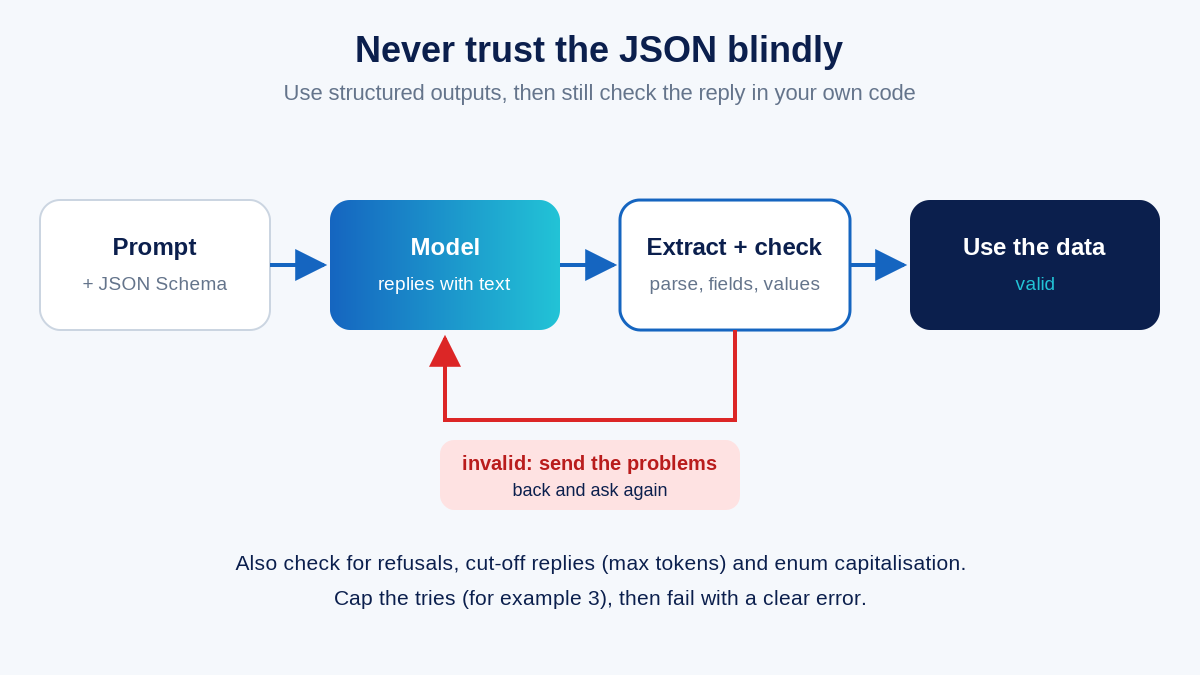
Step 4: A validate-and-retry helper you can run
This JavaScript works with any model, even one with no structured outputs. It pulls the JSON out of a chatty reply, checks the fields, and if something is wrong, tells the model exactly what to fix. The example uses a fake model so you can run it with no API key.
// Pull a JSON object out of a model reply, even if it is wrapped in ```json fences or chat.
function extractJson(text) {
  const fenced = text.match(/```(?:json)?\s*([\s\S]*?)```/);
  const raw = fenced ? fenced[1] : text;
  const start = raw.indexOf("{");
  const end = raw.lastIndexOf("}");
  if (start === -1 || end <= start) throw new Error("No JSON object found");
  return JSON.parse(raw.slice(start, end + 1));
}

// Check the fields you need. Return a list of problems (empty means valid).
function checkLead(obj) {
  const problems = [];
  if (typeof obj.name !== "string" || !obj.name.trim()) problems.push("name must be a non-empty string");
  if (typeof obj.city !== "string") problems.push("city must be a string");
  if (!["hot", "warm", "cold"].includes(obj.interest)) problems.push('interest must be "hot", "warm" or "cold"');
  return problems;
}

async function getValidJson(prompt, callModel, maxTries = 3) {
  let messages = [{ role: "user", content: prompt }];
  for (let i = 1; i <= maxTries; i++) {
    const text = await callModel(messages);
    let problems;
    try {
      const obj = extractJson(text);
      problems = checkLead(obj);
      if (problems.length === 0) return obj;
    } catch (e) {
      problems = [e.message];
    }
    console.log(`Try ${i} rejected: ${problems.join("; ")}`);
    messages = [...messages,
      { role: "assistant", content: text },
      { role: "user", content: `That was not valid. Fix these problems and reply with only the JSON object: ${problems.join("; ")}` }];
  }
  throw new Error("Model did not return valid JSON");
}

// Fake model: first a chatty reply with a bad value, then a correct one.
let n = 0;
const fakeModel = async () => {
  n++;
  if (n === 1) return 'Sure! Here is the data:\n```json\n{"name": "Ayesha", "city": "Lahore", "interest": "very high"}\n```';
  return '{"name": "Ayesha", "city": "Lahore", "interest": "hot"}';
};

console.log(await getValidJson("Extract the lead from: Ayesha from Lahore really wants to join.", fakeModel));
Save it as json.mjs and run node json.mjs. We ran it with Node.js 22. The first reply was rejected with interest must be "hot", "warm" or "cold", and the second was accepted:
Try 1 rejected: interest must be "hot", "warm" or "cold"
{ name: 'Ayesha', city: 'Lahore', interest: 'hot' }
To use a real model, replace fakeModel with a function that sends messages to your API and returns the reply text. In a larger project, a schema library such as Zod can replace the hand-written checkLead.
Frequently asked questions
Is "reply only in JSON" in the prompt enough?
For a quick task in a chat app, usually yes. For code that runs many times, no: sooner or later you will get extra text or a missing field. Use structured outputs where available and always validate.
What is the difference between JSON mode and structured outputs?
JSON mode promises the reply is valid JSON of some shape. Structured outputs promise it follows your specific schema, with the fields and allowed values you defined. OpenAI recommends structured outputs over JSON mode when the model supports it.
Why is my JSON cut off at the end?
The reply hit the output token limit. Raise max_tokens (or the output limit setting), ask for fewer items per request, or ask for shorter field values.
Can I use the same approach with Gemini or local models?
Yes. The validate-and-retry helper works with any model that returns text. Many other providers and local tools also offer a JSON or schema mode; check their own documentation for the exact setting.
- #json
- #structured outputs
- #prompting
- #openai api
- #claude api
Want a full course on this?
AI for Everyone
Use ChatGPT, Claude and Gemini properly for study, work and daily tasks.
Join the free waitlistWant to learn AI video properly?
The AI Content Creator Program takes you from your first prompt to a portfolio you can show: 27 short, focused lessons in easy Urdu, with a weekly live session and tasks our team reviews.
Enroll now