Fix the Claude API error: tool_use ids were found without tool_result blocks
Why Claude returns a 400 error saying tool_use ids have no tool_result blocks, and how to fix your message history so every tool call gets its answer.
Saqqa Academy team
12-Nov-2026 · 5 min read
In this article
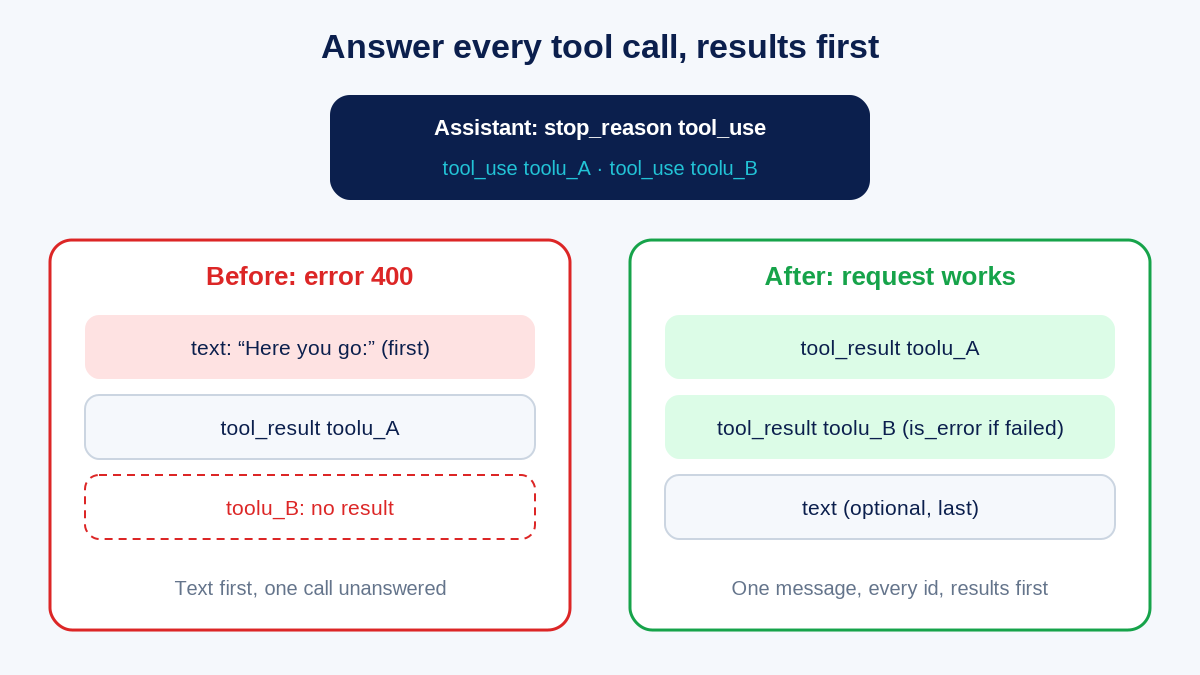
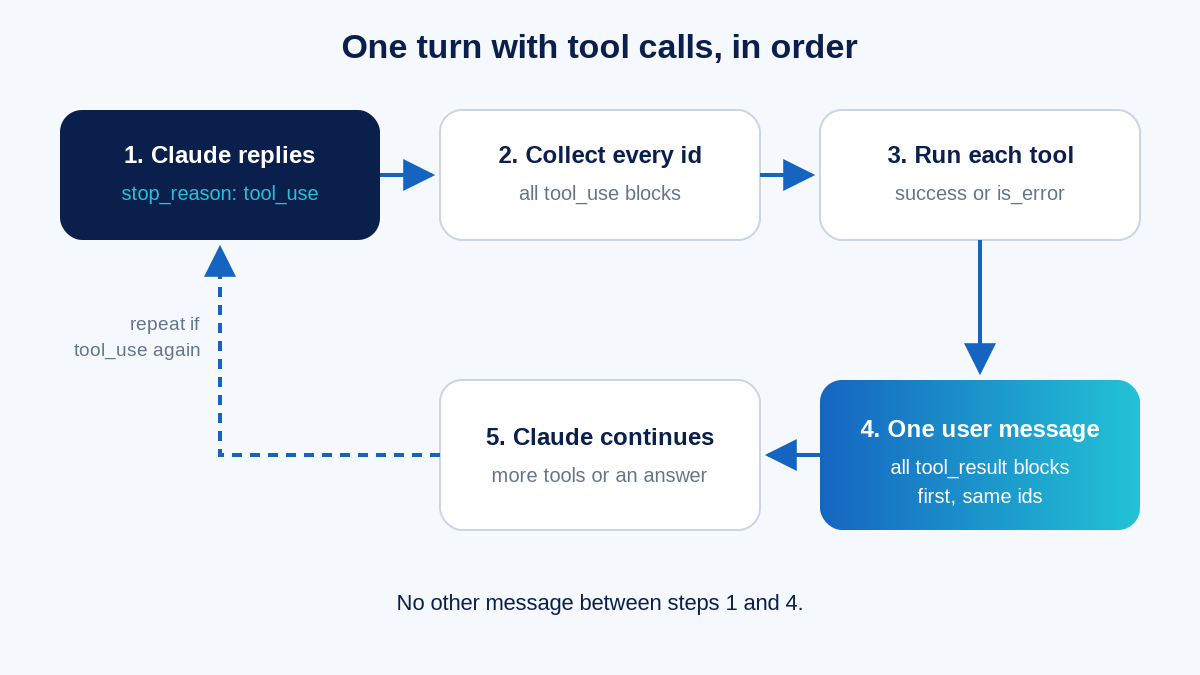
The Claude API error tool_use ids were found without tool_result blocks immediately after means your message history is out of shape: Claude asked to call one or more tools, and the very next user message does not answer every one of those calls in the right place. To fix it, send one tool_result block for every tool_use block in the last assistant message, using the same id, put all of them in one user message right after it, and put the tool_result blocks before any text. That is it in most cases. Below are the four ways people usually break this rule and a small function that repairs a broken history.
Everything about the rules here comes from Anthropic's Handle tool calls and Troubleshooting tool use pages, checked on 12 November 2026.
What the API expects after a tool call
When Claude wants a tool, the response has stop_reason: "tool_use" and one or more tool_use blocks. Each block has an id (for example toolu_01A09q90...), a name and an input. Your code runs the tool, then sends a new message with role: "user" that contains a tool_result block per call:
{
  "role": "user",
  "content": [
    {
      "type": "tool_result",
      "tool_use_id": "toolu_01A09q90qw90lq917835lq9",
      "content": "15 degrees"
    }
  ]
}
Anthropic's docs list three formatting rules:
- The tool result message must come immediately after the assistant message that asked for the tools. No other message can sit between them.
- In that user message, the
tool_resultblocks must come first. Any text goes after all of them. - Every
tool_useid needs its owntool_resultwith a matchingtool_use_id.
The four common causes
1. Claude called two tools and you answered one
Claude can call several tools in one turn (parallel tool use). If the assistant message has toolu_A and toolu_B, you must return both results. A common bug is a loop that runs only the first tool_use block, or that returns early when one tool fails. If a tool fails, still send a result, with is_error: true and a clear message:
{
  "type": "tool_result",
  "tool_use_id": "toolu_B",
  "content": "ConnectionError: weather service returned HTTP 500. Try again in 60 seconds.",
  "is_error": true
}
2. You sent one result per message
With parallel calls, the results belong together. Anthropic's troubleshooting table says to send multiple tool_result blocks in one user message, not one message per result. If you send toolu_A in one message and toolu_B in the next, the first message is already missing toolu_B.
3. You put text before the results
This one is easy to miss. A message like this fails, because the text comes first:
{
  "role": "user",
  "content": [
    { "type": "text", "text": "Here are the results:" },
    { "type": "tool_result", "tool_use_id": "toolu_A", "content": "31 C" }
  ]
}
Move the text after the results, or drop it. Anthropic's stop reasons guide also warns that adding text right after tool results can lead to empty replies, so most of the time it is best to send only the results.
4. The history was cut, saved or reordered wrongly
Chat apps often trim old messages to save tokens, save conversations to a database, or rebuild them after a crash or a cancelled request. Any of these can leave an assistant tool_use with no answer, or split a pair. Check your trimming code: always remove an assistant tool_use message and its tool_result message together, never one of them.
Step by step: repair the history before you send it
If your history comes from storage or from a request the user cancelled, run it through a small repair step. This JavaScript function (Node 18 or newer) finds every assistant message with tool calls, makes sure the next message is a user message, adds an error result for any missing id, and moves all results to the front:
// Make sure every tool_use in an assistant message has a tool_result,
// and that the tool_result blocks come first in the next user message.
export function repairToolResults(messages) {
  const out = structuredClone(messages);
  for (let i = 0; i < out.length; i++) {
    const msg = out[i];
    if (msg.role !== "assistant" || !Array.isArray(msg.content)) continue;
    const ids = msg.content.filter((b) => b.type === "tool_use").map((b) => b.id);
    if (ids.length === 0) continue;

    let next = out[i + 1];
    if (!next || next.role !== "user") {
      next = { role: "user", content: [] };
      out.splice(i + 1, 0, next);
    }
    if (typeof next.content === "string") {
      next.content = [{ type: "text", text: next.content }];
    }

    const results = next.content.filter((b) => b.type === "tool_result");
    const others = next.content.filter((b) => b.type !== "tool_result");
    const answered = new Set(results.map((b) => b.tool_use_id));

    for (const id of ids) {
      if (!answered.has(id)) {
        results.push({
          type: "tool_result",
          tool_use_id: id,
          content: "Tool did not run (the request was interrupted).",
          is_error: true,
        });
      }
    }
    next.content = [...results, ...others]; // results first, then any text
  }
  return out;
}
We tested it with Node on a broken history: an assistant message calling get_weather twice (Karachi as toolu_A, Lahore as toolu_B), followed by a user message that started with the text "Here you go:" and answered only toolu_A. The repaired user message came out as the Karachi result, then an is_error result for toolu_B, then the text. That is the shape the API accepts. We did not send it to the live API in this test.
Use this as a safety net, not as your main logic. The real fix is in the code that runs tools: loop over all tool_use blocks, collect all results, and send them together.
A related error with server tools
If you also use Anthropic's server tools (for example web search) together with your own tools, you might see a different message: was found without a corresponding <name>_tool_result block. According to the troubleshooting page, this happens when Claude called a server tool alongside one of your client tools and the server tool has no result yet. The fix is to send a user message that contains only your tool_result blocks (no text at all) and to keep the same tools array on the next request.
Using an SDK tool runner instead
If you don't need custom control, Anthropic's SDKs include a tool runner that runs your tools and formats the results for you, so this whole class of bug goes away. Write the loop yourself only when you need logging, approvals or custom retries.
Frequently asked questions
Can I send a tool_result with no content?
Yes. The content field is optional, so { "type": "tool_result", "tool_use_id": "toolu_..." } is valid. It is still better to say what happened, even "Done", so Claude knows the tool ran.
Does the tool_use_id have to match exactly?
Yes. Copy the id from the tool_use block as it is. A typo, or an id from an older turn, counts as a missing result.
Is this the same error in Claude Code?
Claude Code shows the same API message when a session's history gets out of order, often after an interrupted tool call. That is a problem inside the tool, not your code. Going back to an earlier point in the conversation or starting a new session usually clears it.
Why do I get this only sometimes?
It usually depends on how many tools Claude calls. With one call, a bug that handles only the first tool_use block works fine. When Claude calls two tools at once, the second one goes unanswered and the request fails.
- #claude api
- #tool use
- #error 400
- #tool_result
- #agents
Want a full course on this?
Build Apps with AI
Use AI coding assistants to build, fix and ship real websites and apps.
Join the free waitlistWant to learn AI video properly?
The AI Content Creator Program takes you from your first prompt to a portfolio you can show: 27 short, focused lessons in easy Urdu, with a weekly live session and tasks our team reviews.
Enroll now