What is an AI agent loop? Build one in about 40 lines of JavaScript
An AI agent is a model that calls tools in a loop until the job is done. Here is how the loop works, with a small agent you can run today without an API key.
Saqqa Academy team
10-Nov-2026 · 4 min read
In this article
An AI agent loop is a simple repeat: you send the model a task and a list of tools, the model either answers or asks to use a tool, your code runs that tool and sends the result back, and you repeat until the model says it is finished. That is the whole idea. Everything people call an "agent", from coding assistants to research bots, is built on this loop plus good tools and good limits. Below we explain each step and build a working agent in about 40 lines of JavaScript that you can run with no API key.
The message shapes in this post follow Anthropic's official tool use documentation, checked on 10 November 2026. Other providers, such as OpenAI's function calling, use the same idea with different field names.
The loop in plain words
Think of a new office assistant who can only talk to you through notes. You write: "How much do a laptop and a phone cost together?" They cannot know prices, but they can ask the stock room. So they write back: "Please check the laptop price." You check and reply: "Rs 250,000." They ask about the phone, then add the two, then give you the final answer.
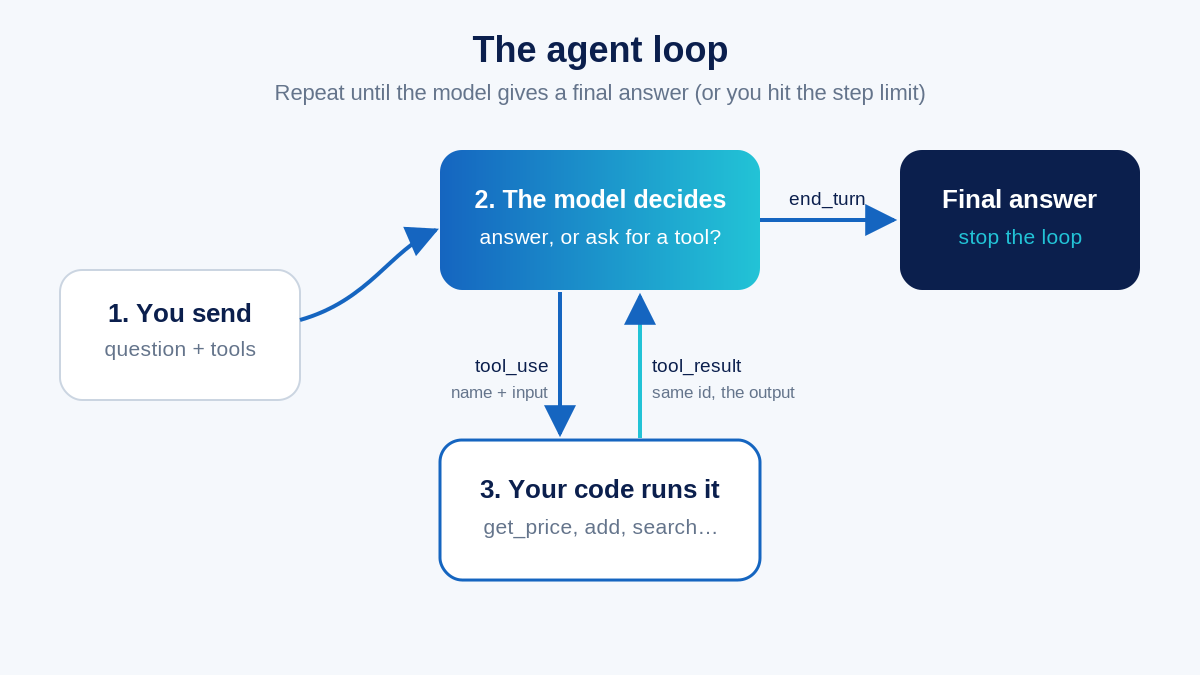
An agent works the same way:
- You send the question and a list of tools the model may use.
- The model replies with either a final answer or a request to use a tool, with the inputs it wants.
- Your code runs the tool, not the model. The model never touches your database or files directly.
- You send the result back, linked to the request it answers.
- Repeat from step 2 until the model gives a final answer.
How this looks in the Claude API
With the Claude Messages API, you describe each tool with a name, a description and an input_schema (a JSON Schema for its inputs). When Claude wants a tool, the response has stop_reason: "tool_use" and one or more content blocks like this:
{
  "type": "tool_use",
  "id": "toolu_01A09q90qw90lq917835lq9",
  "name": "get_price",
  "input": { "item": "laptop" }
}
You run the tool and send back a tool_result block in a new user message. The tool_use_id must match the id above, so Claude knows which request it answers:
{
  "type": "tool_result",
  "tool_use_id": "toolu_01A09q90qw90lq917835lq9",
  "content": "250000"
}
When Claude has everything it needs, it replies with normal text and a stop reason other than tool_use, usually end_turn. That is your signal to stop the loop.
Build it: a runnable agent
The code below has three parts: the tools, a fake model that returns the same shapes as the real API (so you can run it with no key and no cost), and the loop itself.
// The tools your agent may use. Each one is a plain function.
const tools = {
  get_price: ({ item }) => ({ laptop: 250000, phone: 90000 })[item] ?? "unknown item",
  add: ({ a, b }) => a + b,
};

// A fake model so you can run this with no API key. It returns the same
// shapes the Claude Messages API uses: stop_reason, tool_use, text.
function fakeModel(messages) {
  const results = messages.filter((m) => m.role === "user" && Array.isArray(m.content)).length;
  if (results === 0) return { stop_reason: "tool_use", content: [{ type: "tool_use", id: "t1", name: "get_price", input: { item: "laptop" } }] };
  if (results === 1) return { stop_reason: "tool_use", content: [{ type: "tool_use", id: "t2", name: "get_price", input: { item: "phone" } }] };
  if (results === 2) return { stop_reason: "tool_use", content: [{ type: "tool_use", id: "t3", name: "add", input: { a: 250000, b: 90000 } }] };
  return { stop_reason: "end_turn", content: [{ type: "text", text: "Together they cost Rs 340,000." }] };
}

async function runAgent(question, callModel, maxSteps = 10) {
  const messages = [{ role: "user", content: question }];

  for (let step = 1; step <= maxSteps; step++) {
    const reply = await callModel(messages);
    messages.push({ role: "assistant", content: reply.content });

    if (reply.stop_reason !== "tool_use") {
      return reply.content.find((b) => b.type === "text")?.text;
    }

    // Run every tool the model asked for and send the results back.
    const results = [];
    for (const block of reply.content.filter((b) => b.type === "tool_use")) {
      const fn = tools[block.name];
      let content, is_error = false;
      try {
        if (!fn) throw new Error(`No tool called ${block.name}`);
        content = JSON.stringify(await fn(block.input));
      } catch (e) {
        content = e.message;
        is_error = true;
      }
      console.log(`Step ${step}: ${block.name}(${JSON.stringify(block.input)}) -> ${content}`);
      results.push({ type: "tool_result", tool_use_id: block.id, content, is_error });
    }
    messages.push({ role: "user", content: results });
  }
  throw new Error("Stopped: too many steps");
}

console.log(await runAgent("How much do a laptop and a phone cost together?", fakeModel));
Save it as agent.mjs and run node agent.mjs. We ran it with Node.js 22 and got:
Step 1: get_price({"item":"laptop"}) -> 250000
Step 2: get_price({"item":"phone"}) -> 90000
Step 3: add({"a":250000,"b":90000}) -> 340000
Together they cost Rs 340,000.
Swap in a real model
To use Claude instead of the fake model, write a callModel that sends the messages and tool definitions to the API. With the official @anthropic-ai/sdk package it looks roughly like this:
import Anthropic from "@anthropic-ai/sdk";
const client = new Anthropic(); // reads ANTHROPIC_API_KEY

const toolDefs = [
  {
    name: "get_price",
    description: "Get the price in Pakistani rupees of a product in our shop.",
    input_schema: {
      type: "object",
      properties: { item: { type: "string", description: "Product name, e.g. laptop" } },
      required: ["item"],
    },
  },
  {
    name: "add",
    description: "Add two numbers.",
    input_schema: {
      type: "object",
      properties: { a: { type: "number" }, b: { type: "number" } },
      required: ["a", "b"],
    },
  },
];

const claude = (messages) =>
  client.messages.create({ model: "claude-opus-5-5", max_tokens: 1024, tools: toolDefs, messages });
Then call runAgent(question, claude). The loop does not change at all. We did not run this part, because it needs a paid API key; the shapes follow the official docs. The Anthropic SDKs also offer a tool runner that runs this loop for you, once you understand what it is doing.
Three things that make an agent safe and useful
1. Always cap the steps. Without maxSteps, a confused model could call tools forever, and every step costs tokens. Our loop stops after 10.
2. Return errors instead of crashing. If a tool fails, send the error message back with is_error: true. Models are often able to correct themselves, for example by retrying with a different input. If your code throws, the whole run dies.
3. Write tool descriptions like instructions for a new colleague. The model decides which tool to use only from the name and description. "Get the price in Pakistani rupees of a product in our shop" works far better than "price tool". Say what the tool does, what each input means and when not to use it.
A fourth point for later: be careful with tools that change things, such as sending emails or deleting records. Many teams ask a human to approve those steps.
Frequently asked questions
Is an agent loop the same as a chatbot?
No. A chatbot replies once per message. An agent may make many model calls and tool calls for one request, deciding on its own what to do next, until the task is done.
Can the model call more than one tool at a time?
Yes. Claude can return several tool_use blocks in one reply. That is why our loop runs every tool_use block and sends all the results back together in one message.
Do I need a framework like LangChain to build an agent?
No. As this post shows, the core loop is short plain code. Frameworks and the SDK tool runner can save time once you need memory, many tools or monitoring, but learning the raw loop first makes them much easier to understand and debug.
Why does my agent keep calling the same tool?
Usually the tool result is unclear or the description does not say when to stop. Return clear results, make sure each tool_use_id matches, and keep the step cap so a loop cannot run away.
- #ai agents
- #agent loop
- #tool use
- #claude api
- #javascript
Want a full course on this?
AI Automation & Agents
Build automations and AI agents that do real work: WhatsApp replies, lead follow-ups, reports.
Join the free waitlistWant to learn AI video properly?
The AI Content Creator Program takes you from your first prompt to a portfolio you can show: 27 short, focused lessons in easy Urdu, with a weekly live session and tasks our team reviews.
Enroll now