Claude message threads explained, with a working example
What Claude's new message threads beta does, when it helps long chats and agent loops, the exact request shape, and how to recover when a thread expires.
Saqqa Academy team
19-Nov-2026 · 6 min read
In this article
Claude message threads are a beta feature of the Messages API, launched on 2 November 2026, that keeps your conversation on Anthropic's servers for a short time. You send the full conversation, system prompt and tools once with "thread": {"type": "create"}. On every later turn you send only the new messages plus "thread": {"type": "continue", "previous_message_id": "<last response id>"}. Requests get smaller and time to first token stays lower as the chat grows, which helps most in long agent loops. Threads don't change pricing or rate limits, and they don't cache anything for you: prompt caching is still your choice.
Everything below comes from Anthropic's Message threads documentation and the API release notes, both checked on 19 November 2026. It's a beta, so names and rules may still change; check the docs before you ship.
The problem threads solve
The Messages API is stateless. To continue a conversation, you normally send the whole history every time: turn 1, turn 2, all the tool results, all of it. In an agent loop that runs dozens of steps, each request carries more than the last, and the API has to receive, validate and tokenize all of it again before the model starts answering.
With a thread, the API keeps the conversation it already has and rebuilds it on its side. Your request carries just the latest user message or tool_result blocks.
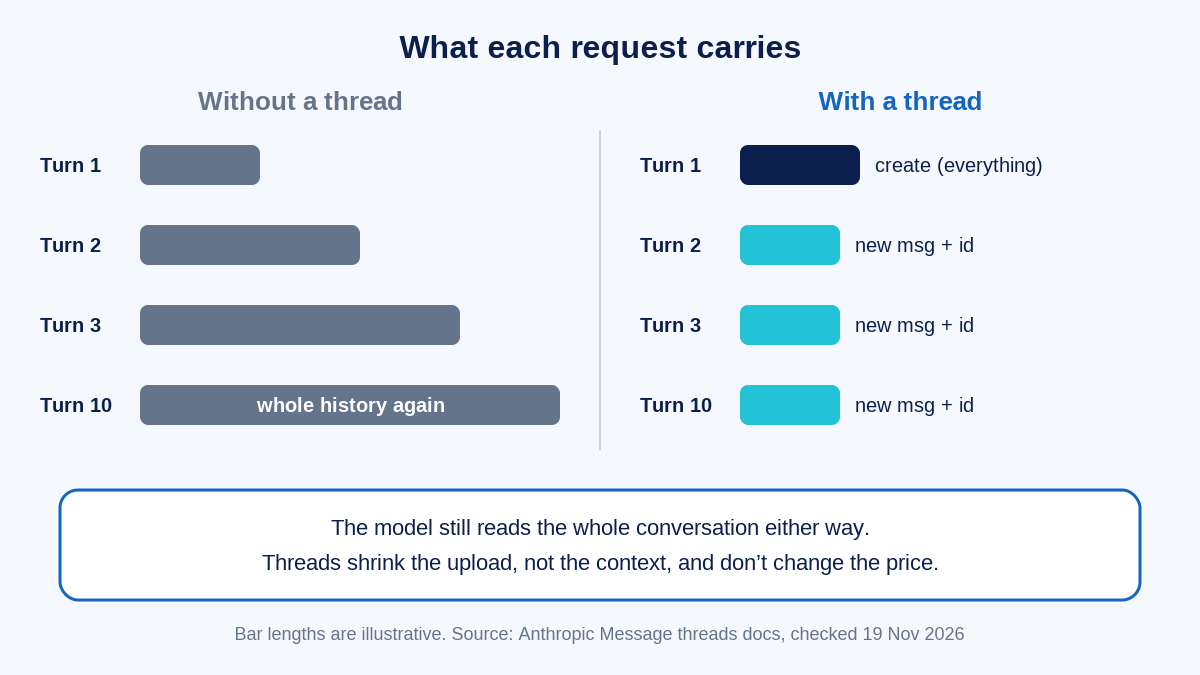
Note that this doesn't shrink your context window use. The model still reads the whole conversation; you just stop uploading it every time.
How a thread works, step by step
- Create. Send your first request as usual, with
system,toolsand the messages, and add"thread": {"type": "create"}plus the beta headeranthropic-beta: message-threads-2026-08-12. The API stores the conversation, including Claude's reply, under the responseid. - Continue. Send only the messages since the last response, with
"thread": {"type": "continue", "previous_message_id": "..."}. Leave outsystemandtools: sending either one on a continue request, even asnull, returns a 400 error. - Use the newest id. Each response
idcan be continued once. Always continue from the latest one. - Replay when it's gone. A thread expires 5 minutes after its last request and is deleted no more than an hour after its last use. Then a continue request returns a 404 with
error.details.error_codeset tothread_not_found. Send the whole conversation again in a new create request and carry on from the newid.
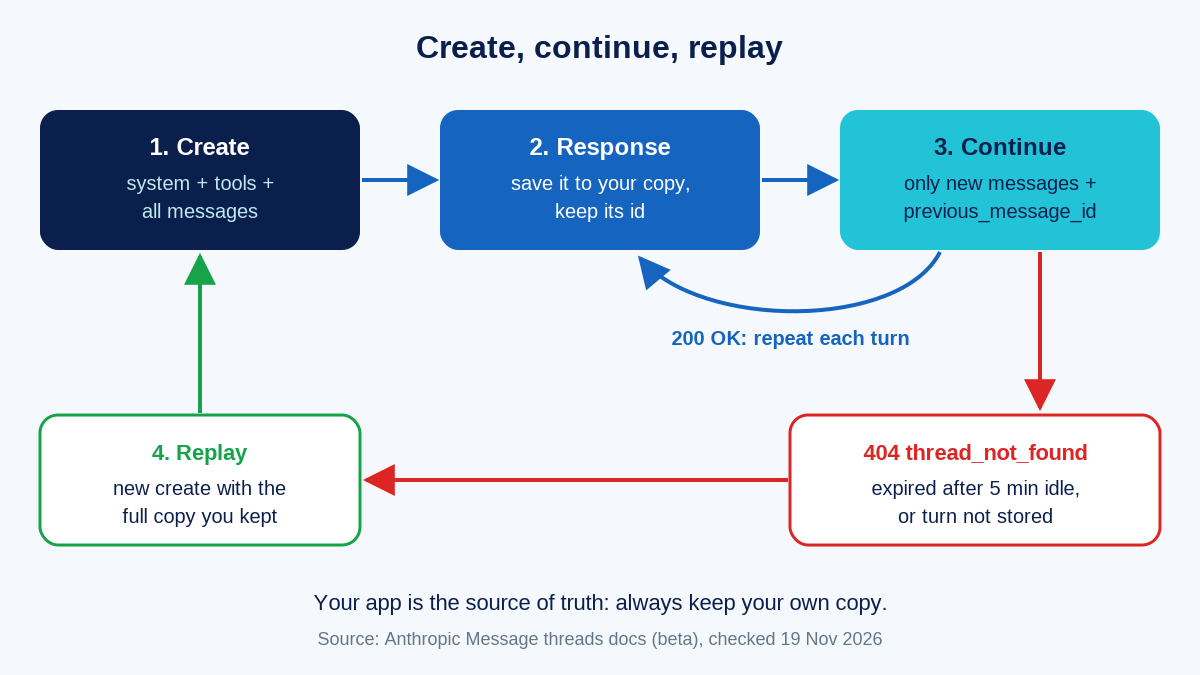
Step 4 is why the docs say your app stays the source of truth. Always keep your own copy of every message. The API never tells you in advance whether a turn was stored; you find out on the next continue request.
Which fields you must repeat
The docs split request fields into three groups:
| Group | Fields | Rule |
|---|---|---|
| Create-only | system, tools | Only on the create request |
| Fixed | model, tool_choice, thinking, top-level cache_control, the set of beta headers, and a few more | Same value on every request, or you get a 400 thread_fingerprint_mismatch |
| Free | max_tokens, stop_sequences, stream, metadata and others | Can change each turn |
To change the model, system prompt or tools, start a new thread with a create request.
A working example in Node.js
This script runs a two-turn chat on a thread and replays automatically when the thread has expired. It uses plain fetch (Node 18 or later), so you can see the exact request bodies. Save it as thread.mjs, set ANTHROPIC_API_KEY, and run node thread.mjs.
// thread.mjs - a minimal message-thread loop with replay (Node 18+)
const API_URL = process.env.API_URL ?? "https://api.anthropic.com/v1/messages";
const HEADERS = {
  "x-api-key": process.env.ANTHROPIC_API_KEY,
  "anthropic-version": "2026-10-21",
  "anthropic-beta": "message-threads-2026-08-12",
  "content-type": "application/json",
};

const MODEL = "claude-opus-5-5";
const SYSTEM = "You are a helpful tutor. Keep answers short.";

const history = []; // your own copy of the whole conversation
let lastId = null; // id of the latest stored response

async function post(body) {
  const res = await fetch(API_URL, { method: "POST", headers: HEADERS, body: JSON.stringify(body) });
  const data = await res.json();
  return { status: res.status, data };
}

async function send(userText) {
  const newMessage = { role: "user", content: userText };
  const fixed = { model: MODEL, max_tokens: 1024, cache_control: { type: "ephemeral" } };

  let result;
  if (lastId) {
    // Continue: only the new message, no system or tools
    result = await post({
      ...fixed,
      messages: [newMessage],
      thread: { type: "continue", previous_message_id: lastId },
    });
  }

  if (!lastId || (result.status === 404 && result.data?.error?.details?.error_code === "thread_not_found")) {
    // Create (first turn) or replay (thread expired): send everything again
    result = await post({
      ...fixed,
      system: SYSTEM,
      messages: [...history, newMessage],
      thread: { type: "create" },
    });
  }

  if (result.status !== 200) {
    throw new Error(`API error ${result.status}: ${JSON.stringify(result.data)}`);
  }

  const reply = result.data;
  history.push(newMessage, { role: "assistant", content: reply.content });
  lastId = reply.id;
  return reply.content.filter((b) => b.type === "text").map((b) => b.text).join("");
}

console.log(await send("What is a context window, in one sentence?"));
console.log(await send("And why does it matter for long chats?"));
How we tested it: we ran this script against a local mock server that copies the documented behaviour (it stores responses, rejects system on continue requests, and returns a 404 thread_not_found when asked). Both paths worked: a normal create-then-continue, and an expired thread that replayed all three messages in a new create request. We did not run it against the live Claude API, so check the response shape on your first real call. The request bodies match the examples in Anthropic's docs as of 19 November 2026.
The top-level cache_control line is optional. With it, each turn reads the earlier conversation from the prompt cache and writes the new turn to it, once the conversation passes the minimum cacheable length. Because it's a fixed field, send the same value on every request.
Or let the SDK do it
The official SDKs include a thread helper that adds the beta header, leaves system and tools out of continue requests, and replays on a 404 for you. In Python it looks like this, adapted from the docs:
import anthropic

client = anthropic.Anthropic()

thread = client.beta.messages.thread(
    model="claude-opus-5-5",
    max_tokens=1024,
    cache_control={"type": "ephemeral"},
    system="You are a helpful tutor. Keep answers short.",
)

thread.send({"role": "user", "content": "What is a context window, in one sentence?"})
second = thread.send({"role": "user", "content": "And why does it matter for long chats?"})

for block in second.content:
    if block.type == "text":
        print(block.text)
This needs an SDK version with thread support; we couldn't test it here. The helper keeps the conversation only in memory, so if your chat must survive a restart, save your own copy.
Gotchas worth knowing
- Streaming: the response
idarrives inmessage_start, but only continue aftermessage_stop. Continuing earlier can return a 404. - Refusals: if a response has
stop_reason: "refusal", don't continue that thread. Start a new one without the turn that caused it. - Paused turns: after
stop_reason: "pause_turn", continue with an emptymessageslist. - Same key: use the same workspace and API key for the whole thread, or the continue request can return
thread_not_found. - Not supported: Message Batches, token counting with
thread, compaction and most context editing. If you need to estimate size, count tokens on the full conversation instead. - Privacy: threads are not eligible for zero data retention. The API keeps the thread in memory, encrypted, and deletes it within an hour of last use.
If you hit a 400 you don't understand, read the error.message: thread errors name the field that differs. Our guide to fixing Claude API 400 errors covers the general cases.
Frequently asked questions
Do message threads make Claude cheaper?
No. Anthropic's docs say threads don't change pricing or rate limits. The model still processes the whole conversation each turn. To lower the cost of the repeated history, use prompt caching, which you can turn on with a top-level cache_control on every request of the thread.
What happens if I wait more than 5 minutes between turns?
The thread may have expired, and your continue request returns a 404 with thread_not_found. Send the full conversation from your own copy in a new create request, then continue from the new response id. The SDK helper does this for you.
Which models support message threads?
The docs list the current Claude 5 family (including Opus 5.5, Sonnet 5.5, Haiku 5.5 and Fable 5.2) and several Claude 4 models such as Opus 4.8, Opus 4.6, Sonnet 4.6 and Haiku 4.5. Check the docs for the full, current list.
Are message threads the same as session threads in Managed Agents?
No. Anthropic notes they are different features. Message threads are a short-lived server copy of a Messages API conversation; Managed Agents session threads belong to the Managed Agents service.
- #claude
- #claude api
- #message threads
- #agents
- #latency
- #prompt caching
Want a full course on this?
AI Automation & Agents
Build automations and AI agents that do real work: WhatsApp replies, lead follow-ups, reports.
Join the free waitlistWant to learn AI video properly?
The AI Content Creator Program takes you from your first prompt to a portfolio you can show: 27 short, focused lessons in easy Urdu, with a weekly live session and tasks our team reviews.
Enroll now