What is a context window? Why long AI chats get slower, pricier and worse
Everything a model can see in one request, reply included. What fills the context window, what happens when it overflows, and how to keep a long chat inside it.
Saqqa Academy team
13-Nov-2026 · 6 min read
In this article
A context window is the total amount of text, measured in tokens, that an AI model can look at while writing one reply, and that total includes the reply itself. Think of it as the model's working memory for a single request. Everything you send counts: the system prompt, every earlier message in the conversation, tool definitions and tool results, images and documents, plus the new answer and any thinking the model does before it. When the window fills up, the request is rejected or the answer is cut short, and long before that point the extra tokens cost money and can make answers worse.
The facts below come from Anthropic's context windows documentation, read on 13 November 2026. The same idea applies to every provider, with different sizes.
What fills the window
Most people picture the context window as "my message plus the reply". In a real API call it holds much more:
- The system prompt, sent again on every request.
- Every previous turn, user and assistant, because the API has no memory between calls. Your app re-sends the whole history each time.
- Tool definitions, the JSON schemas that describe what the model may call.
- Tool results, which are often the largest part in agent workflows: a web page, a file, a database result.
- Images and documents you attach.
- The new output, including thinking tokens, which count toward the window and toward
max_tokens.
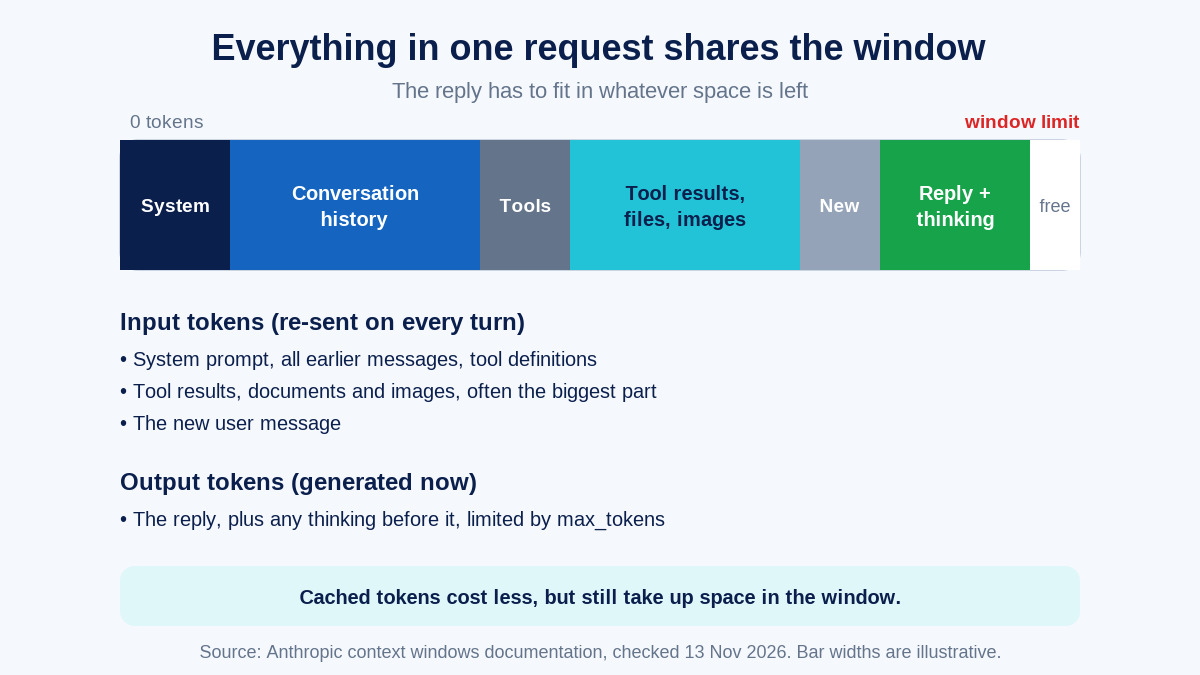
Every response tells you what the request used in its usage field. If you use prompt caching, the input count is split into input_tokens, cache_read_input_tokens and cache_creation_input_tokens, and all three count toward the window. Caching changes what you pay for those tokens, not whether they take up space.
How big is it?
For Claude, the documentation lists a 1 million token context window for the current models, including Claude Fable 5.2, Opus 5.5, Sonnet 5.5 and Haiku 5.5, with up to 128,000 output tokens in a single request. Older models such as Claude Sonnet 4.5 have a 200,000 token window. On the 1M models you do not need a beta header, and long requests are billed at standard pricing, except on Haiku 5.5, where prompts over 100,000 tokens cost more.
As a rough guide, a token is about four characters of English, so 1 million tokens is roughly 750,000 words, or several long books. That sounds like more than anyone needs, which brings us to the real problem.
Bigger is not automatically better
The docs name the problem directly: as the token count grows, accuracy and recall degrade, which Anthropic calls context rot. A model with 400,000 tokens of old chat in front of it is more likely to miss the one detail that matters in your latest question than a model with 4,000 well-chosen tokens. So curating what is in the window matters as much as the size of the window.
There is also the bill. Because the whole history is re-sent on every turn, the cost of a long chat grows with every message: the tenth message costs more than the first even if it is the same length. A one-hour support chat or an agent that has read forty files can quietly become expensive.
What happens when it overflows
Two different things can happen, and the error you see tells you which:
- The input alone is already too big. The API returns a 400
invalid_request_errorwith the message "prompt is too long". Nothing was generated and you are not charged for output. - The input fits, but input plus
max_tokenswould not. On Claude 4.5 and newer models the API accepts the request, and if the answer reaches the limit it stops withstop_reason: "model_context_window_exceeded". You get a partial answer, so your code should check the stop reason.
To avoid both, estimate before you send. The token counting API returns the token count of a request without running it, and it is free.
Three ways to keep a long chat inside the window
1. Drop or summarise old turns yourself
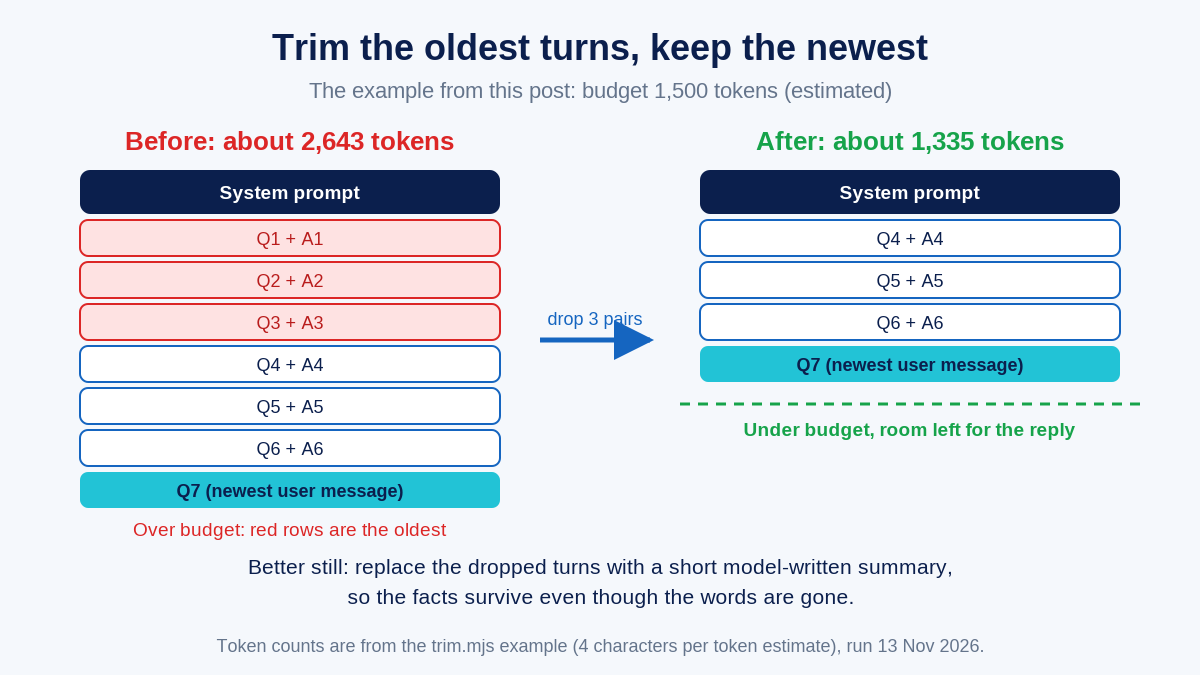
The simplest fix: keep the system prompt and the latest messages, and drop the oldest pairs when you go over a budget. This JavaScript does exactly that. It uses a rough estimate of four characters per token so it runs with no API key; in production, use the token counting API or your SDK's helper for an exact number.
// Keep a chat inside a token budget by dropping the oldest turns first.
// Rough estimate: about 4 characters per token for English text.
const estimateTokens = (text) => Math.ceil(text.length / 4);

function fitToBudget(system, messages, budget) {
  const systemTokens = estimateTokens(system);
  let kept = [...messages];
  let total = systemTokens + kept.reduce((n, m) => n + estimateTokens(m.content), 0);
  // Drop the oldest pair (user + assistant) until we fit, but always keep the latest user message.
  while (total > budget && kept.length > 1) {
    const removed = kept.splice(0, 2);
    total -= removed.reduce((n, m) => n + estimateTokens(m.content), 0);
  }
  return { kept, total, dropped: messages.length - kept.length };
}

const system = "You are a friendly tutor who explains AI in simple English.";
const messages = [];
for (let i = 1; i <= 6; i++) {
  messages.push({ role: "user", content: `Question ${i}: ` + "please explain this idea to me in detail. ".repeat(20) });
  messages.push({ role: "assistant", content: `Answer ${i}: ` + "here is a long explanation with an example. ".repeat(20) });
}
messages.push({ role: "user", content: "Question 7: can you summarise what we covered?" });

const before = estimateTokens(system) + messages.reduce((n, m) => n + estimateTokens(m.content), 0);
const { kept, total, dropped } = fitToBudget(system, messages, 1500);
console.log(`Before: ${messages.length} messages, about ${before} tokens`);
console.log(`After:  ${kept.length} messages, about ${total} tokens (dropped ${dropped} oldest messages)`);
Save it as trim.mjs and run node trim.mjs. With Node.js 24 we got:
Before: 13 messages, about 2643 tokens
After:  7 messages, about 1335 tokens (dropped 6 oldest messages)
A better version replaces the dropped turns with a one-paragraph summary written by the model, so the facts survive even though the words are gone. Notice the example always keeps the newest user message and drops turns in user-plus-assistant pairs, so the conversation still starts with a user turn, which the API requires.
2. Let the server compact it
Anthropic offers server-side compaction, in beta for Claude 4.6 and later models. It summarises earlier parts of the conversation on the server so the chat can continue past the window limit without you writing trimming code. The docs call it the primary strategy for long-running conversations and agents. There is also context editing, which can clear old tool results and thinking blocks automatically. Both are documented in the compaction guide.
3. Send less in the first place
Often the real fix is upstream. Return only the relevant part of a file from a tool instead of the whole file. Keep tool definitions short, or defer rarely used tools. Cache the long, unchanging prefix (system prompt, documents) so you pay less for it, even though it still occupies the window. And route each question to the smallest context that can answer it, rather than dragging the whole day's history along.
Frequently asked questions
Do my earlier messages cost money again on every turn?
Yes. The API is stateless, so your app sends the whole history each time and pays input-token prices for all of it. Prompt caching lowers the price of the repeated prefix but does not shrink the window.
Is the context window the same as the training data?
No. The training data is what the model learned from before release. The context window is the text it can see right now, in this one request. A fact in the window can be used directly; a fact only in training data may be remembered imperfectly.
What does "prompt is too long" mean?
Your input alone is already bigger than the model's context window. Shorten the history, summarise earlier turns, drop large tool results, or use the token counting API to find what is taking the space.
Does a bigger context window mean better answers?
Not by itself. Anthropic's docs describe context rot: accuracy and recall fall as the window fills. A smaller, relevant context usually beats a huge, noisy one.
- #context window
- #tokens
- #claude api
- #api costs
- #long conversations
Want a full course on this?
AI Automation & Agents
Build automations and AI agents that do real work: WhatsApp replies, lead follow-ups, reports.
Join the free waitlistWant to learn AI video properly?
The AI Content Creator Program takes you from your first prompt to a portfolio you can show: 27 short, focused lessons in easy Urdu, with a weekly live session and tasks our team reviews.
Enroll now