What does stop_reason mean in the Claude API? Every value and what to do
A simple guide to Claude's stop_reason field, end_turn, tool_use, max_tokens, pause_turn, refusal and more, with a tested switch statement for your agent.
Saqqa Academy team
12-Nov-2026 · 5 min read
In this article
stop_reason is the field in every successful Claude API response that tells you why Claude stopped writing. Your code should read it on every reply and decide what to do next: end_turn means the answer is finished, tool_use means Claude wants you to run a tool, pause_turn means a server tool needs you to send the turn back so Claude can continue, max_tokens and model_context_window_exceeded mean the answer was cut off, stop_sequence means one of your stop strings appeared, and refusal means Claude declined. Many agent bugs come from assuming every reply is end_turn.
The meanings and fixes below come from Anthropic's Stop reasons and fallback guide, checked on 12 November 2026.
Where you find it
A normal response looks like this (shortened):
{
  "id": "msg_01...",
  "role": "assistant",
  "content": [{ "type": "text", "text": "Here is your summary..." }],
  "stop_reason": "end_turn"
}
Two things to remember:
stop_reasonis only on successful responses. Errors such as 429 or 529 are HTTP errors and need their own error handling. See our post on the 529 overloaded error for that path.- When you stream,
stop_reasonisnullin the firstmessage_startevent. It arrives later, in themessage_deltaevent.
Every value, in plain words
| Value | What happened | What your code should do |
|---|---|---|
end_turn | Claude finished its answer normally | Show or use the answer |
tool_use | Claude wants to call one of your tools | Run every tool it asked for, send back a tool_result for each, call again |
pause_turn | A server tool loop (like web search) hit its limit for this request, 10 by default | Send the assistant content back unchanged and call again |
max_tokens | The answer hit your max_tokens limit | Raise max_tokens or continue the answer |
model_context_window_exceeded | The answer filled the model's whole context window | Treat it as cut off; trim or summarise the history |
stop_sequence | Claude wrote one of your stop_sequences | Check the stop_sequence field to see which one |
refusal | Claude declined to answer (this is HTTP 200, not an error) | Read stop_details, then try a fallback model or tell the user |
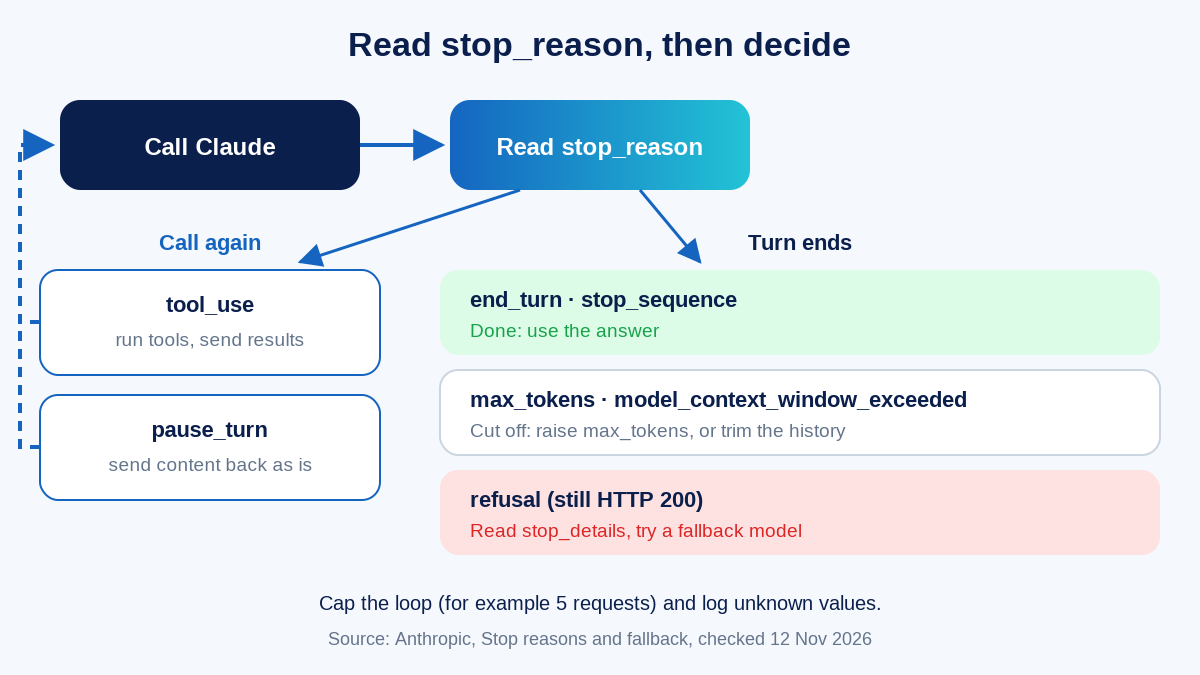
The values that loop: tool_use and pause_turn
These two mean "the turn is not finished yet". An agent keeps calling Claude while it sees either of them, and stops on anything else.
tool_use: The reply contains one or more tool_use blocks. Run all of them and send one user message with a tool_result for every block, results first. If you skip one, the next call fails with a 400 error; our guide to the missing tool_result error shows how to fix that.
pause_turn: This comes from Anthropic's server tools, such as web search, which run on Anthropic's side in a loop. When that loop reaches its limit for one request, Claude pauses. Add the assistant response to your messages as it is and call again. If the response includes a container, send its ID back too, or files from earlier in the turn are lost. Your own (client) tools never cause pause_turn; they cause tool_use.
The values that mean "cut off"
max_tokens: Your max_tokens setting was too small for the answer. Raise it, or ask Claude to continue. Anthropic's guide adds one important case: if the cut-off answer ends in a half-written tool_use block, retry with a higher max_tokens, because a broken tool call can't be run. If you show a partial answer to users, add a note saying it was cut off. We explain the fixes in why Claude's answer gets cut off.
model_context_window_exceeded: The conversation plus the answer filled the model's whole context window. Treat the answer as incomplete, then shorten the history (remove old turns, or replace them with a summary) before you continue. Anthropic notes that in the SDKs this value is currently typed only in the beta namespace.
refusal: not an error, but handle it
A refusal comes back with HTTP status 200, so error handlers don't catch it. The response includes a stop_details object that names the policy category (it is null for every other stop reason). Anthropic suggests retrying on a fallback model. For a user-facing app, also show a clear, polite message instead of an empty box.
end_turn, and the empty reply trap
end_turn is the happy path, but the guide warns that it can come with an empty reply, usually right after you sent tool results. The suggested fixes:
- Don't add text blocks right after your
tool_resultblocks. - Don't resend the empty response unchanged.
- As a last resort, add a short new user message asking Claude to continue.
Put it in code: one switch, one loop
Here is a small JavaScript function that maps each value to the next step, and a loop that uses it with fake responses so you can see the paths. We ran it with Node 24:
// What to do next, based on stop_reason.
function nextStep(response) {
  switch (response.stop_reason) {
    case "end_turn":
    case "stop_sequence":
      return "done";
    case "tool_use":
      return "run_tools";       // run every tool_use, send tool_result blocks
    case "pause_turn":
      return "continue";        // send the assistant content back unchanged
    case "max_tokens":
      return "truncated";       // raise max_tokens or continue
    case "model_context_window_exceeded":
      return "truncated";       // context is full: summarise or trim
    case "refusal":
      return "fallback";        // read stop_details, try a fallback model
    default:
      return "unknown";         // new value: log it, don't guess
  }
}

// A tiny loop with fake responses, so you can see each path.
const fake = [
  { stop_reason: "tool_use" },
  { stop_reason: "pause_turn" },
  { stop_reason: "end_turn" },
];
const MAX_REQUESTS = 5;
for (let i = 0; i < MAX_REQUESTS; i++) {
  const res = fake[i];
  const step = nextStep(res);
  console.log(`request ${i + 1}: ${res.stop_reason} -> ${step}`);
  if (step !== "run_tools" && step !== "continue") break;
}
console.log(nextStep({ stop_reason: "something_new" }));
Output:
request 1: tool_use -> run_tools
request 2: pause_turn -> continue
request 3: end_turn -> done
unknown
In a real agent, run_tools is where you run the tools and add the results to the messages, and continue is where you add the paused assistant reply back. Three habits from Anthropic's guide make this safe:
- Cap the loop. Their examples use a limit of 5 requests so a confused agent can't run forever and burn tokens.
- Keep the
toolsarray the same on every request in a turn, especially while a server tool is paused. - Keep a
defaultbranch. Anthropic adds features over time, so log any value you don't know instead of treating it asend_turn.
If you are new to agents, our post What is an AI agent loop? builds the whole loop step by step.
Frequently asked questions
Is max_tokens an error?
No. The request succeeded; the answer was just longer than the limit you set. You get HTTP 200 with stop_reason: "max_tokens" and the partial text.
How often does pause_turn happen?
Only when you use Anthropic's server tools, like web search, and their loop reaches its per-request limit (10 by default). Apps that only use their own tools will not see it.
Should I retry when I get a refusal?
Anthropic suggests reading stop_details and retrying on a fallback model. Don't resend the same request to the same model again and again; it will usually refuse again, and every try costs tokens.
Why is stop_reason null?
You are probably reading the message_start event of a stream. Wait for the message_delta event, which carries the final stop_reason.
- #claude api
- #stop_reason
- #agents
- #tool use
- #pause_turn
- #refusal
Want a full course on this?
AI Automation & Agents
Build automations and AI agents that do real work: WhatsApp replies, lead follow-ups, reports.
Join the free waitlistWant to learn AI video properly?
The AI Content Creator Program takes you from your first prompt to a portfolio you can show: 27 short, focused lessons in easy Urdu, with a weekly live session and tasks our team reviews.
Enroll now