What is RAG (retrieval-augmented generation)? Build a tiny one in JavaScript
RAG finds the right documents first and puts them in the prompt, so the model answers from your facts, not memory. How it works, with a small example you can run.
Saqqa Academy team
13-Nov-2026 · 5 min read
In this article
RAG, retrieval-augmented generation, is a simple idea with a complicated name: before you ask the model a question, you search your own documents for the parts that are relevant, paste those parts into the prompt, and tell the model to answer only from them. The model does the writing; your search does the remembering. It is how a chatbot can answer questions about your shop's delivery policy, your company's internal wiki or a 300-page manual, none of which the model saw in training, without any retraining.
RAG matters because a language model only knows two things: what it learned before its training cut-off, and what is in the prompt right now. Your private documents are in neither. Pasting everything into every prompt is slow, expensive and, past a point, makes answers worse. Retrieval puts only the relevant few paragraphs in, each time.
How RAG works, step by step
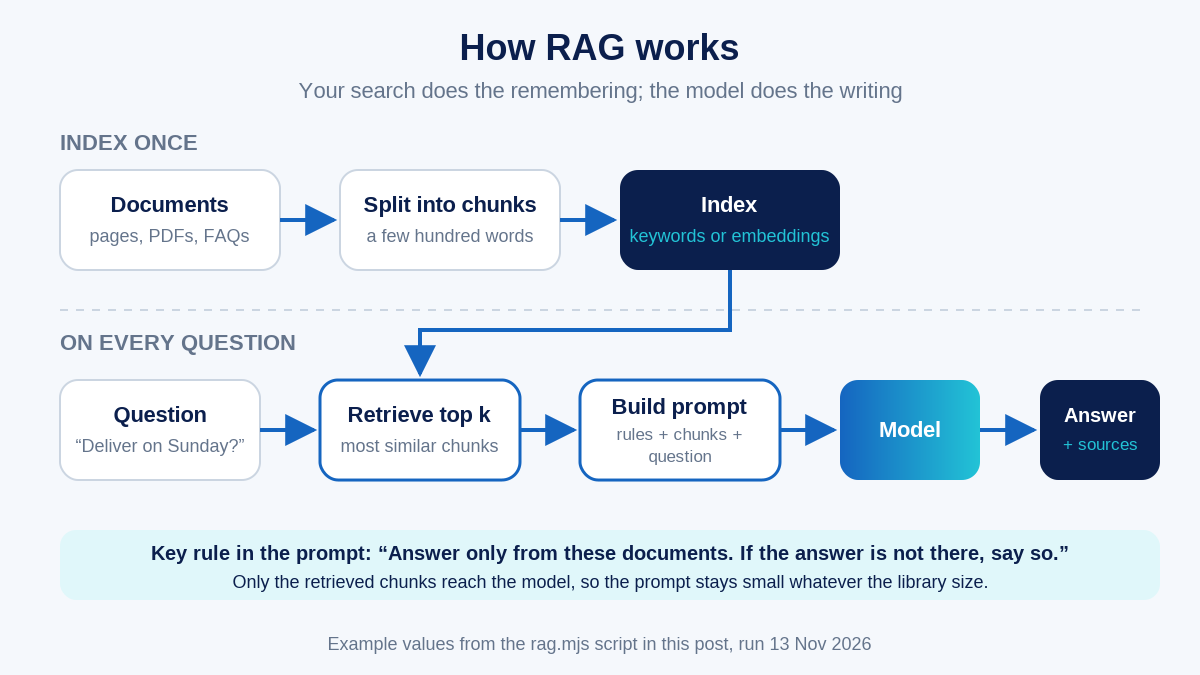
There are two phases. The first runs once, when you add documents. The second runs on every question.
Indexing (once per document):
- Collect the documents: web pages, PDFs, FAQ entries, support tickets.
- Split each into chunks, typically a few hundred words, because the model needs a focused passage, not a whole file.
- Turn each chunk into something searchable. In production that is usually an embedding, a list of numbers that captures the chunk's meaning, stored in a vector database. In the example below we use plain keyword matching, which needs no API at all.
Answering (every question):
- Take the user's question and find the chunks most similar to it. Keep the top few.
- Build a prompt: the instructions, the retrieved chunks marked clearly as documents, and the question.
- Send it to the model and return the answer, ideally with the ids of the documents it used so the reader can check.
A tiny RAG you can run right now
This example is deliberately small. It indexes four short notes about a bakery, retrieves by counting shared words, builds the prompt, and uses a fake model so it runs offline with no API key. Save it as rag.mjs and run node rag.mjs.
// A tiny RAG pipeline that runs offline: keyword retrieval + a fake model.
const docs = [
  { id: "hours", text: "Opening hours: the bakery opens at 8 am and closes at 9 pm, every day except Sunday." },
  { id: "delivery", text: "Delivery: we deliver inside the city from 10 am to 8 pm. Sunday delivery is not available." },
  { id: "allergens", text: "Allergens: all cakes contain eggs and wheat. Nut-free cakes must be ordered a day ahead." },
  { id: "payment", text: "Payment: cash on delivery, bank transfer and mobile wallets are accepted." },
];

// 1. Break text into lowercase words and drop very common ones.
const stop = new Set(["the", "a", "an", "is", "are", "of", "in", "on", "to", "and", "at", "we", "do", "you", "your"]);
const words = (text) => (text.toLowerCase().match(/[a-z0-9]+/g) ?? []).filter((w) => !stop.has(w));

// 2. Score each document by how many query words it contains, keep the best k.
function retrieve(query, k = 2) {
  const q = new Set(words(query));
  return docs
    .map((d) => ({ ...d, score: words(d.text).filter((w) => q.has(w)).length }))
    .filter((d) => d.score > 0)
    .sort((a, b) => b.score - a.score)
    .slice(0, k);
}

// 3. Put the retrieved text into the prompt, with a rule to use only that text.
function buildPrompt(query, hits) {
  const context = hits.map((h) => `<document id="${h.id}">${h.text}</document>`).join("\n");
  return `Answer the question using only the documents below. If the answer is not in them, say "I don't know".\n\n<documents>\n${context}\n</documents>\n\nQuestion: ${query}`;
}

// 4. Send the prompt to a model. This fake one returns the best document, so the demo needs no API key.
const fakeModel = async (prompt) => prompt.match(/<document id="[^"]+">([^<]+)<\/document>/)?.[1] ?? "I don't know";

const query = "Do you deliver on Sunday?";
const hits = retrieve(query);
console.log("Retrieved:", hits.map((h) => `${h.id} (score ${h.score})`).join(", "));
console.log("Prompt length:", buildPrompt(query, hits).length, "characters");
console.log("Answer:", await fakeModel(buildPrompt(query, hits)));
With Node.js 24 we got:
Retrieved: delivery (score 2), hours (score 1)
Prompt length: 407 characters
Answer: Delivery: we deliver inside the city from 10 am to 8 pm. Sunday delivery is not available.
The delivery note scored highest because it shares two words with the question, deliver and sunday; the opening-hours note shares one. The payment and allergen notes were left out entirely, so the model never sees them. That is the whole point: the prompt stayed at 407 characters instead of carrying every document you own.
To use a real model, replace fakeModel with a function that sends the prompt to the Claude or OpenAI API and returns the text. Nothing else changes.
From keywords to embeddings
Keyword matching breaks the moment the user says "ship" instead of "deliver". Embeddings fix this. An embedding model turns a text into a vector, and texts with similar meaning get vectors that point in similar directions, so "do you ship on weekends" lands close to the delivery note even though they share no words. You embed every chunk once, store the vectors, then embed each question and find the nearest vectors.
Anthropic's embeddings guide (read 13 November 2026) notes that Anthropic does not offer its own embedding model and points to Voyage AI as one provider; OpenAI, Google and several open-source models offer embeddings too. The guide's own quick-start is the same shape as our example: embed the documents, embed the query, pick the document with the highest similarity, and put it in the prompt. Many providers also offer a reranker, a second model that re-orders the top results more carefully, and a contextual embedding that includes the surrounding document when embedding each chunk, both of which improve retrieval on long documents.
When you need RAG, and when you do not
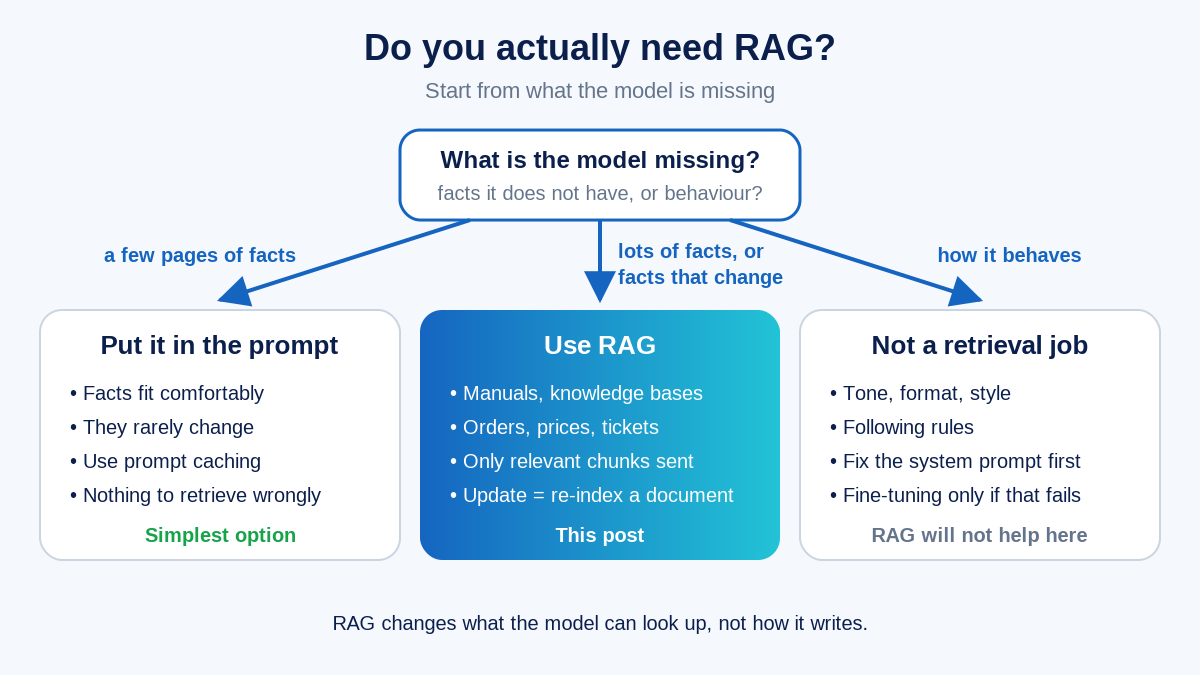
- Facts fit in a few pages and rarely change: skip RAG. Put them in the system prompt and use prompt caching. Simpler, and nothing can go wrong in retrieval.
- Facts are large (a manual, a knowledge base) or change daily (orders, prices, tickets): use RAG. Only the relevant chunks reach the model, and updating a document means re-indexing it, not rewriting a prompt.
- You want the model to behave differently, not know more: that is a prompting problem, and sometimes a fine-tuning problem. RAG changes what the model can look up, not how it writes.
Three mistakes that make RAG answers wrong
- Bad chunks. Cutting a document every 500 characters splits sentences and separates a heading from its table. Split on headings and paragraphs, and give each chunk a title.
- Retrieving too little or too much. One chunk misses context; twenty chunks drown it. Start with three to five and measure.
- No instruction to stay inside the documents. Without the "use only the documents, otherwise say I don't know" line, the model fills gaps from memory and sounds confident doing it. Ask it to quote the document id it used, and show that to the reader.
Frequently asked questions
What does RAG stand for?
Retrieval-augmented generation: retrieve the relevant documents first, then generate the answer from them.
Is RAG the same as fine-tuning?
No. Fine-tuning changes the model's weights by training it further, which is slow and expensive and does not give it an up-to-date memory. RAG leaves the model alone and changes what is in the prompt. For "answer questions about our documents", RAG is almost always the right tool.
Do I need a vector database?
Not to start. A few hundred chunks can live in an array in memory, as in the example. You need a vector database when you have many thousands of chunks, several users, or documents that update often.
Can I do RAG without any API?
Yes. The example in this post uses keyword matching and a fake model and runs offline. For real answers you need a language model, and for meaning-based search you need an embedding model, but both can be open-source models you run yourself.
- #rag
- #retrieval augmented generation
- #embeddings
- #ai agents
- #chatbots
Want a full course on this?
AI Automation & Agents
Build automations and AI agents that do real work: WhatsApp replies, lead follow-ups, reports.
Join the free waitlistWant to learn AI video properly?
The AI Content Creator Program takes you from your first prompt to a portfolio you can show: 27 short, focused lessons in easy Urdu, with a weekly live session and tasks our team reviews.
Enroll now