How prompt caching works in the Claude API, and when it saves money
Prompt caching lets Claude reuse the long, unchanging start of your prompt at a fraction of the price. How to switch it on, check it works and work out the saving.
Saqqa Academy team
10-Nov-2026 · 5 min read
In this article
Prompt caching in the Claude API lets you pay full price for a long, repeated part of your prompt (instructions, documents, tool definitions) once, and then a small fraction of that price each time you reuse it within the cache lifetime. You turn it on by adding "cache_control": {"type": "ephemeral"} to your request. Writing to the cache costs a little more than normal input (1.25 times for the default 5-minute cache), but reading from it costs 0.1 times the normal input price on most models, and less on some newer ones. If you send the same long prefix more than once in a few minutes, it almost always saves money.
All facts here come from Anthropic's official prompt caching documentation, checked on 10 November 2026. Prices and minimums change, so check that page before you plan a budget.
What actually gets cached
Claude reads your request in a fixed order: tools, then system, then messages. Caching stores this prefix, everything from the start of the request up to a point you mark, called a breakpoint.
On the next request, if the prefix is exactly the same, character for character, Claude reads it from the cache instead of processing it again. If anything before the breakpoint changes, even one word, it is a cache miss.
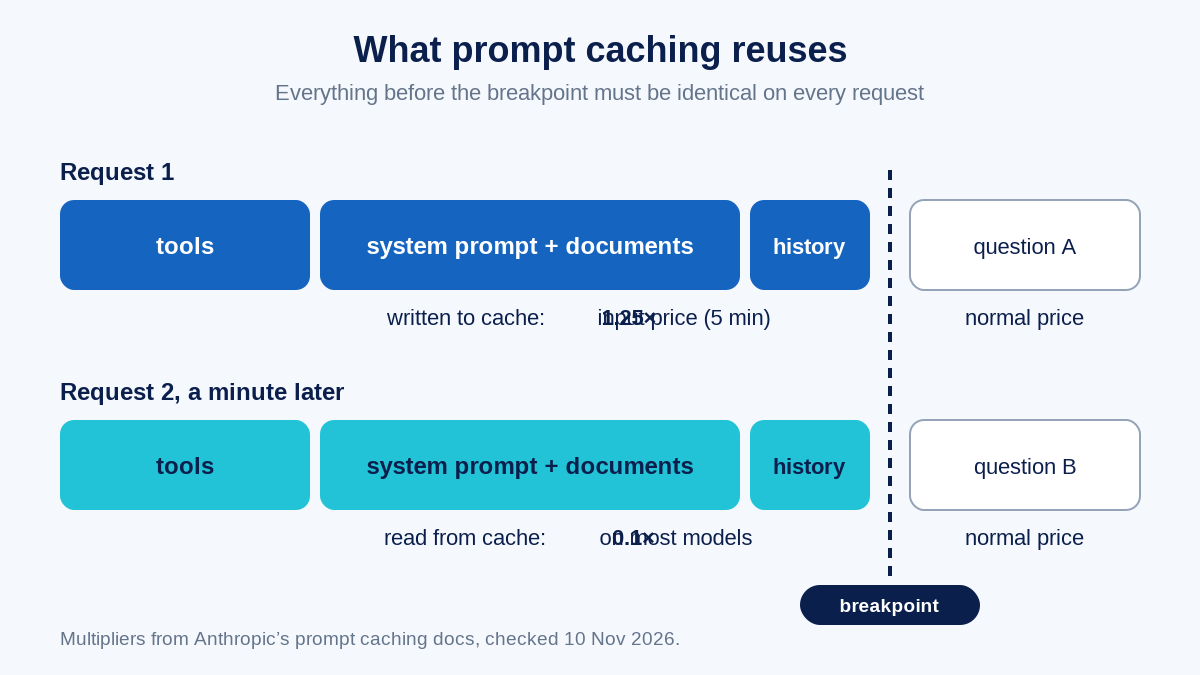
That leads to the one rule that matters most: put the parts that never change at the start, and the parts that change at the end. A good order is:
- Tool definitions (rarely change)
- System prompt with your instructions and any long reference documents
- Earlier conversation turns
- The new user question (changes every time)
A common mistake is putting today's date or a user's name at the top of the system prompt. That changes the prefix on every request, so nothing is ever reused.
Step 1: Turn it on
The simplest way is automatic caching: one cache_control field at the top level of the request. Claude places the breakpoint on the last block it can cache, and moves it forward as a conversation grows.
{
  "model": "claude-opus-5-5",
  "max_tokens": 1024,
  "cache_control": { "type": "ephemeral" },
  "system": "You are a support assistant for an online course. Here is the full course handbook: ...",
  "messages": [
    { "role": "user", "content": "Can I watch the lessons on my phone?" }
  ]
}
For more control, you can instead put cache_control on individual content blocks, such as the end of a long document. You can set up to 4 breakpoints in one request. Automatic caching uses one of those 4 slots.
Step 2: Choose how long the cache lives
The default lifetime is 5 minutes, and it is refreshed for free every time the cache is read. So a busy chatbot keeps its cache warm without doing anything.
If requests come less often, say every 20 minutes, the cache would expire between them. For that case there is a 1-hour option:
{ "cache_control": { "type": "ephemeral", "ttl": "1h" } }The 1-hour cache costs more to write (2 times the base input price instead of 1.25 times). If you mix both, the 1-hour entries must come before the 5-minute ones in the prompt.
Step 3: Check that it worked
Caching fails silently. If your prefix is too short, the request simply runs without caching, and you get no error. So always check the usage block in the response:
cache_creation_input_tokens: tokens written to the cache on this requestcache_read_input_tokens: tokens read from the cacheinput_tokens: tokens after the last breakpoint, which were not cached
The first request should show a large cache_creation_input_tokens. A second, identical request a minute later should show the same number under cache_read_input_tokens. If both are 0, nothing was cached.
The most common reason is length. Each model has a minimum prefix size. The documentation lists, for example, 512 tokens for Claude Opus 5.5, Sonnet 5.5 and Haiku 5.5, and up to 4,096 tokens for some older models such as Haiku 4.5. A short system prompt of a few lines will never be cached.
Step 4: Work out the saving
The cost of the input side of a request is the sum of four parts, each at its own multiplier of the model's base input price:
| Part | Multiplier |
|---|---|
| Normal input tokens | 1 |
| 5-minute cache write | 1.25 |
| 1-hour cache write | 2 |
| Cache read | 0.1 on most models (0.05 on Opus 5.5 and Sonnet 5.5, lower on some others; see the docs) |
Here is a small function that turns the usage block into dollars. It is plain JavaScript and needs no API key.
// basePerMTok: the model's normal input price in dollars per million tokens.
// readMultiplier: 0.1 for most models; check the docs for yours.
function inputCost(usage, basePerMTok, readMultiplier = 0.1) {
  const perToken = basePerMTok / 1_000_000;
  const c = usage.cache_creation ?? {};
  const write5m = c.ephemeral_5m_input_tokens ?? usage.cache_creation_input_tokens ?? 0;
  const write1h = c.ephemeral_1h_input_tokens ?? 0;
  return (
    usage.input_tokens * perToken +
    write5m * perToken * 1.25 +
    write1h * perToken * 2 +
    (usage.cache_read_input_tokens ?? 0) * perToken * readMultiplier
  );
}

// Example: a 20,000-token handbook in the system prompt, a 200-token question,
// a model with a $5 per million token base input price.
const first  = { input_tokens: 200, cache_creation_input_tokens: 20000, cache_read_input_tokens: 0 };
const repeat = { input_tokens: 200, cache_creation_input_tokens: 0, cache_read_input_tokens: 20000 };
const none   = { input_tokens: 20200, cache_creation_input_tokens: 0, cache_read_input_tokens: 0 };

console.log("No caching, 50 calls:", (50 * inputCost(none, 5)).toFixed(4));
console.log("With caching, 50 calls:", (inputCost(first, 5) + 49 * inputCost(repeat, 5)).toFixed(4));
We ran this in Node.js 22. It prints about $5.05 without caching and about $0.67 with caching, for the input side of 50 questions. These are worked examples from the official multipliers, not measured bills. The $5 figure is the example base price the documentation uses for Claude Opus 5; look up your model's real price on Anthropic's pricing page. Output tokens are billed as normal and are not affected by caching.
Notice that the first request costs a little more than an uncached one. Caching only pays off when the prefix is reused. If you send a long prompt once and never again, leave caching off.
When caching does not help
- One-off prompts. You pay the write premium and never collect the discount.
- Prompts that change at the top. Timestamps, random IDs or per-user text early in the prompt break every match.
- Gaps longer than the cache lifetime. With 5-minute caching and one request per hour, every request is a write. Use the 1-hour option or accept the normal price.
- Changing tools. Editing a tool definition invalidates the tools, the system prompt and the messages, because tools come first in the order.
Frequently asked questions
Does prompt caching change Claude's answers?
No. The cache stores the processed prompt, not an answer. Claude still writes a fresh reply to every request; it just does not have to reprocess the identical start.
Do extra breakpoints cost more?
No. According to the documentation, adding breakpoints is free. You pay only for cache writes, cache reads and normal uncached input, so marking a few sensible breakpoints costs nothing extra.
Can images be part of the cached prefix?
Yes, but they must be exactly the same on each request. The documentation's table shows that changing an image invalidates the messages part of the cache, while tools and the system prompt stay cached.
Does caching work with the Batch API?
Yes. The documentation says the caching multipliers stack with other discounts such as the Batch API discount, so the two together can cut costs further for large, non-urgent jobs.
- #claude
- #prompt caching
- #api costs
- #anthropic
Want a full course on this?
AI Automation & Agents
Build automations and AI agents that do real work: WhatsApp replies, lead follow-ups, reports.
Join the free waitlistWant to learn AI video properly?
The AI Content Creator Program takes you from your first prompt to a portfolio you can show: 27 short, focused lessons in easy Urdu, with a weekly live session and tasks our team reviews.
Enroll now