How to count tokens before you send a prompt to Claude or OpenAI
Count a prompt's input tokens before you pay for it, with Claude's free count_tokens endpoint and OpenAI's input_tokens endpoint, then use the number to stay on budget.
Saqqa Academy team
10-Nov-2026 · 5 min read
In this article
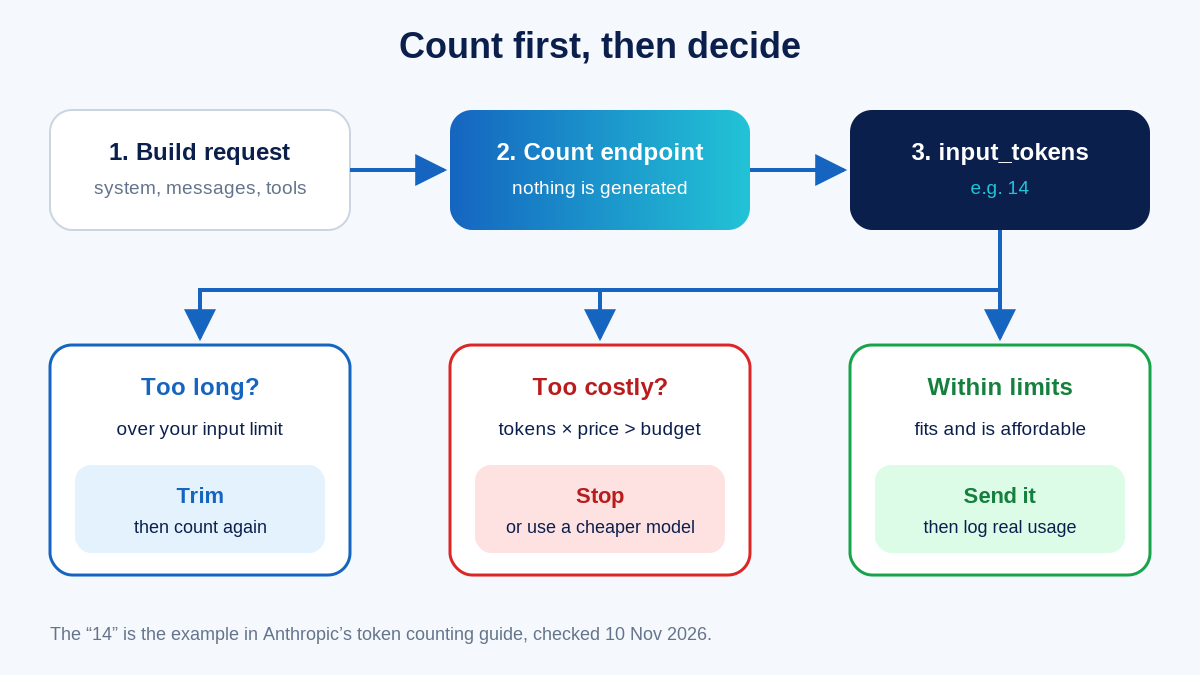
To know how many tokens a prompt will use before you send it, ask the provider to count it. Claude has a POST /v1/messages/count_tokens endpoint, and OpenAI has POST /v1/responses/input_tokens. You send the same body you would send to generate an answer, and you get back a number such as { "input_tokens": 14 }, without the model writing anything. Anthropic says its endpoint is free to use (it has its own rate limit). Use the number to check the prompt fits, estimate the cost, and trim long chats before they get expensive.
Facts here come from Anthropic's token counting guide and OpenAI's counting tokens guide, both checked on 10 November 2026.
Why count first, instead of guessing
A token is a small piece of text the model reads, often part of a word. You pay for tokens and every model has a limit on how many it can read at once, so the count matters. Guessing from word count goes wrong for three reasons:
- Each model family has its own tokenizer. The same sentence is a different number of tokens on Claude and on OpenAI models. Anthropic also notes that Claude 4.7 and later models use a newer tokenizer that produces about 30 percent more tokens for the same text than earlier models, so even an old Claude count can be wrong for a new Claude model.
- Hidden parts add tokens. Tool definitions, the system prompt, images, PDFs and the formatting around each message all count. OpenAI's guide points out that roles and message boundaries add tokens you don't see in your text.
- Local tokenizers only see text. OpenAI's guide says local tools such as
tiktokenwork for plain text but are not accurate for images, files, tools and schemas.
The counting endpoints solve all three, because the provider counts the full request with the right tokenizer.
Step 1: Count tokens for a Claude request
The body is the same as a normal Messages API call (model, system, messages, tools), but you leave out max_tokens because nothing is generated:
curl https://api.anthropic.com/v1/messages/count_tokens \
  -H "x-api-key: $ANTHROPIC_API_KEY" \
  -H "content-type: application/json" \
  -H "anthropic-version: 2026-10-21" \
  -d '{
    "model": "claude-opus-5-5",
    "system": "You are a scientist",
    "messages": [{ "role": "user", "content": "Hello, Claude" }]
  }'
Anthropic's docs show this example returning:
{ "input_tokens": 14 }In Python, with the official SDK:
import anthropic

client = anthropic.Anthropic()

count = client.messages.count_tokens(
    model="claude-opus-5-5",
    system="You are a scientist",
    messages=[{"role": "user", "content": "Hello, Claude"}],
)
print(count.input_tokens)
Things to know, all from Anthropic's guide:
- Always pass the model you will really use. The count follows that model's tokenizer.
- It is an estimate. The real number can differ by a small amount. Anthropic may add a few tokens for its own system optimisations, and you are not billed for those.
- Some inputs can't be counted here. Server tools (such as web search and code execution), the MCP connector, and images or PDFs given as a URL or file ID return an error. Send images and PDFs as base64 to count them.
- It has its own rate limit. On the day we checked: 5,000 requests per minute on the Start tier, 10,000 on Build and 20,000 on Scale. This is separate from your limit for generating messages.
- It ignores prompt caching. The count doesn't tell you what would come from the cache. For that, see our guide to prompt caching in the Claude API.
Step 2: Count tokens for an OpenAI request
OpenAI's endpoint works the same way for the Responses API. You send the same model and input you would send to responses.create:
curl https://api.openai.com/v1/responses/input_tokens \
  -H "Authorization: Bearer $OPENAI_API_KEY" \
  -H "Content-Type: application/json" \
-d '{ "model": "YOUR_MODEL_ID", "input": "Tell me a joke." }'from openai import OpenAI
client = OpenAI()
count = client.responses.input_tokens.count(
model="YOUR_MODEL_ID",
input="Tell me a joke.",
)
print(count.input_tokens)Replace YOUR_MODEL_ID with the model you plan to call. The response has object: "response.input_tokens" and an input_tokens number. OpenAI's guide didn't state a price or rate limit for this endpoint when we checked, so look at your dashboard before calling it on every request.
Step 3: Use the number to make a decision
A count is only useful if your code acts on it. This small Node.js helper counts a Claude request, then decides whether to send it, trim it, or stop:
// Count the input tokens of a Claude request before you send it.
export async function countTokens(request, fetchFn = fetch) {
  const res = await fetchFn("https://api.anthropic.com/v1/messages/count_tokens", {
    method: "POST",
    headers: {
      "x-api-key": process.env.ANTHROPIC_API_KEY,
      "anthropic-version": "2026-10-21",
      "content-type": "application/json",
    },
    // Same body as /v1/messages, without max_tokens.
    body: JSON.stringify({
      model: request.model,
      system: request.system,
      tools: request.tools,
      messages: request.messages,
    }),
  });
  if (!res.ok) throw new Error(`count_tokens failed: ${res.status}`);
  const { input_tokens } = await res.json();
  return input_tokens;
}

// Decide what to do before sending: send, trim the history, or stop.
export function checkBudget(inputTokens, { maxInput, pricePerMillion, maxCost }) {
  const cost = (inputTokens / 1_000_000) * pricePerMillion;
  if (inputTokens > maxInput) return { action: "trim", inputTokens, cost };
  if (cost > maxCost) return { action: "stop", inputTokens, cost };
  return { action: "send", inputTokens, cost };
}
Set pricePerMillion to the input price of your model from the official Claude pricing page. We don't print a price here because prices change. maxInput is your own limit, which should be well below the model's context window so there is room for the answer.
We tested this in Node.js 24 with a fake fetch: it sent only the fields the endpoint accepts (it dropped max_tokens) and returned the count, and checkBudget returned "send", "trim" and "stop" for small, too-long and too-expensive prompts. We did not call the live API for this post.
When the answer is "trim", the usual fixes for a chat are:
- Drop or summarise the oldest messages, and keep the system prompt and the latest question.
- Send only the part of a long document that matters, not the whole file.
- Remove tools the model doesn't need for this request, since tool definitions count too.
Then count again before you send.
Step 4: Check the real usage afterwards
The count tells you the input before sending. After the real call, the response has a usage object with the exact input and output tokens you were billed for. Log both numbers for a few days. If they are far apart, look for something you forgot to count, such as tools or images added later in your code. Remember that output tokens are not in the count at all: the answer's length depends on the model and on your max_tokens.
Frequently asked questions
Is Claude's token counting endpoint free?
Yes. Anthropic's guide says token counting is free to use, but it has a requests-per-minute limit based on your usage tier, separate from your message limits.
Can I use tiktoken to count tokens for Claude?
No. tiktoken is OpenAI's tokenizer, and Claude uses a different one, so the numbers won't match. Use Claude's count_tokens endpoint with the model you plan to call.
Why is my token count higher on a newer Claude model?
Anthropic says Claude 4.7 and later models use a newer tokenizer that makes about 30 percent more tokens for the same text, depending on the content. Count again with the new model ID instead of reusing old numbers.
Does the count include the answer?
No. Both endpoints count input tokens only. Output tokens depend on how long the answer is, and you limit them with max_tokens.
- #tokens
- #token counting
- #claude api
- #openai api
- #api costs
Want a full course on this?
AI Automation & Agents
Build automations and AI agents that do real work: WhatsApp replies, lead follow-ups, reports.
Join the free waitlistWant to learn AI video properly?
The AI Content Creator Program takes you from your first prompt to a portfolio you can show: 27 short, focused lessons in easy Urdu, with a weekly live session and tasks our team reviews.
Enroll now