How to deliver an AI video to a client (files, revisions and handover)
A simple way to hand over AI video work: preview drafts, agreed revision rounds, the right export sizes, a tidy handover folder and a clear note on AI use.
Saqqa Academy team
20-Nov-2026 · 6 min read
In this article
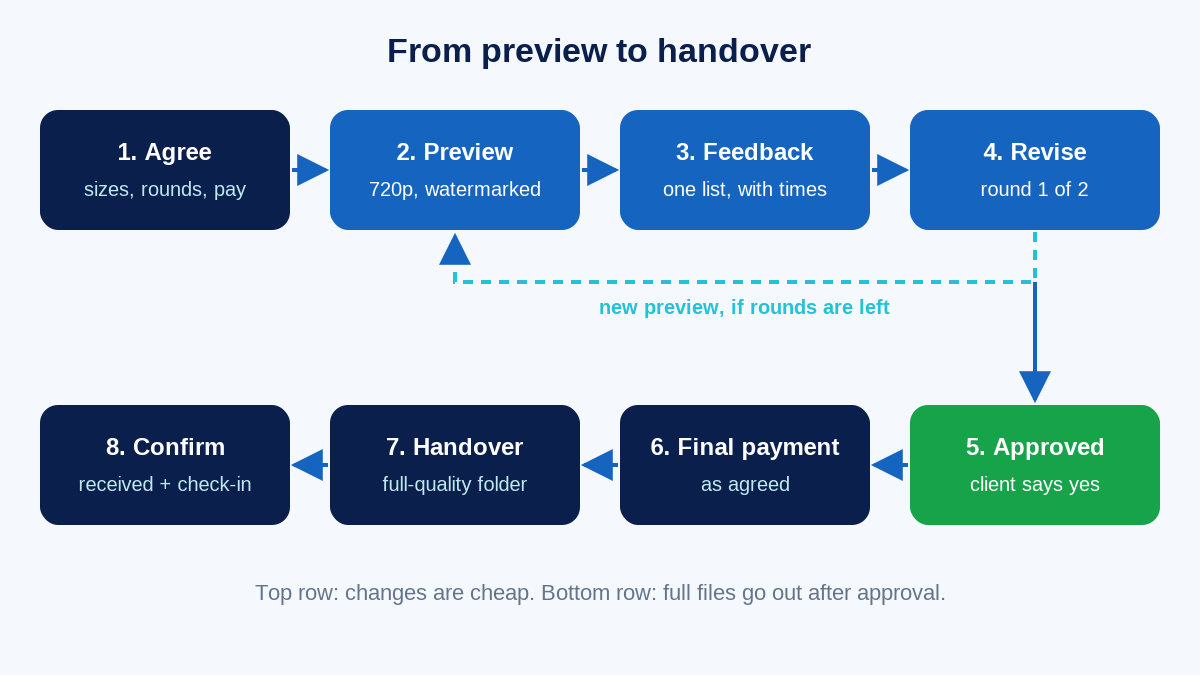
To deliver an AI video to a client professionally, send a preview first, collect all feedback in one round, then deliver the final files in a tidy folder: one clearly named export for each size they asked for (for example 9:16 for Reels and TikTok, 1:1 or 4:5 for the feed), a version without on-screen text if they might reuse it, the captions as a separate file, the key still images, and a short note saying which parts were made with AI and which music was used. Agree the number of revision rounds before you start, and only send full-quality files once the work is approved and paid as agreed. A clean handover makes small clients trust you and come back.
This is the workflow we teach and use for our own course projects. It's not a legal template; if a project is large, get proper advice on contracts.
Before you start: agree how delivery will work
Most delivery problems start at the beginning, not the end. Before you generate anything, agree these points in writing (a WhatsApp message or email is better than nothing):
- Sizes and lengths: which platforms, which aspect ratios, and how long each version should be. Our guide to AI video sizes for Reels, TikTok and Shorts helps you ask the right question.
- Revision rounds: how many rounds of changes are included (two is common for small jobs), and what counts as a change versus a new idea.
- Payment points: for example half before starting and half before final files.
- What they receive: final videos only, or also stills, captions and project files.
Put these in your quote. If you haven't written one yet, our AI video proposal template has a section for exactly this, and the questions to ask a client before an AI video project cover the brief itself.
Step 1: Send a preview, not the final file
Export a preview version for review: lower resolution (720p is fine for checking) with a small, visible "Preview" or your name in a corner. This protects your work before payment and makes it clear the file is not final.
Share it in a way the client can easily watch on a phone, because that's how most clients will check it. A link to a private cloud folder or an unlisted video works well. Ask them to watch it full screen with the sound on.
Step 2: Collect feedback in one list
The biggest time waster in client work is feedback arriving in bits over three days. Ask for all changes in one message, with the time in the video for each one:
Please send all your changes in one message, like this:
0:03 - make the logo bigger
0:08 - change the text to "Order now"
0:12 - the voice is too fast here
This counts as revision round 1 of 2.
When feedback arrives, reply with a short summary of what you will change. That way you both agree before you spend credits. If a request means generating new scenes from scratch, say kindly that it's outside the agreed scope and give a price for it.
Step 3: Export the final versions
Once the client approves, export the full-quality files. Check your editor's export settings against each platform's current upload guidance, and watch every file once from start to end before sending. If you edit in CapCut, our guide to CapCut auto captions explains burned-in captions versus a separate subtitle (.srt) file.
Name every file so it explains itself without opening it:
darwesh-giftbox_reel_9x16_30s_v2-final.mp4
darwesh-giftbox_feed_4x5_30s_v2-final.mp4
darwesh-giftbox_reel_9x16_30s_no-text.mp4
The pattern is: client and project, where it's used, aspect ratio, length, version. Avoid names like final_FINAL_new2.mp4; they confuse everyone, including you a month later.
Step 4: Build the handover folder
Put everything into one shared folder with a simple structure:
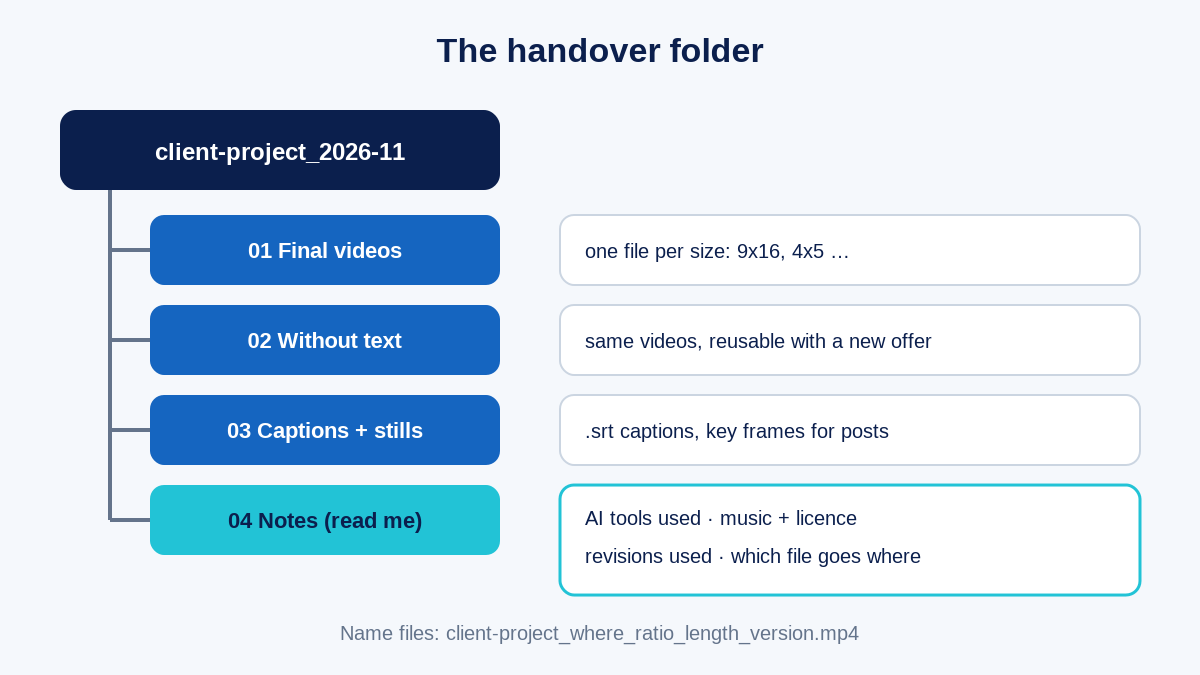
- 01 Final videos: one file per size and length.
- 02 Without text: the same videos with no on-screen text, so the client can reuse them with a new offer or in another language. Only include this if you agreed to.
- 03 Captions and stills: the caption file (for example
.srt) and a few high-quality still frames or key images for posts and thumbnails. - 04 Notes: a short read-me (see below).
Whether you also hand over project files and AI prompts is up to your agreement. Many freelancers keep them, or charge extra, because they are part of their method.
Step 5: Write a short AI and music note
Add a few lines the client can read in a minute:
Project: Gift box Reel, November 2026
AI use: product scenes generated from your product photos with AI image
and video tools; voiceover made with AI text to speech.
Music: [track name], from [library], licence covers social media ads.
Revisions: 2 of 2 rounds used.
This matters because the main platforms ask creators to label realistic AI-generated content. YouTube asks creators to disclose realistic altered or synthetic content when uploading (YouTube Help, checked 20 November 2026), and TikTok requires a label on AI-generated content that shows realistic scenes, and offers a toggle for it (TikTok Support, checked 20 November 2026). Your note tells the client what was AI-made, so whoever posts the video can label it correctly. Rules change, so ask them to check the platform's current settings when they post.
Also tell the client honestly if any music or font has a licence that only covers certain uses. Never use music you don't have the right to use in an ad.
Step 6: Confirm and follow up
Send the folder link with a short message: what's inside, which file to use where, and that you're happy to help if anything doesn't play. Ask them to confirm they received it. A week or two after the video goes live, a polite check-in ("How did the Reel do?") often leads to the next project, and, if the client agrees, to a case study for your AI video portfolio.
Handling client work from brief to handover, along with making the videos themselves, is part of the client module in the AI Content Creator Program.
Frequently asked questions
Should I send the full-quality video before the client pays?
That's your choice and your agreement, but a common approach is to send a watermarked, lower-resolution preview for review and the full-quality files after approval and the agreed payment. Say this clearly in your quote, so it never feels like a surprise.
How many revisions should I include?
Two rounds is a common choice for small jobs, but there's no fixed rule. What matters is agreeing the number before you start and asking for all changes in one list per round.
Do I have to give the client my AI prompts and project files?
Only if you agreed to. Many freelancers deliver the finished videos, stills and captions, and treat prompts and project files as their own method, or offer them for an extra fee.
Do I need to tell the client I used AI?
Yes, be open about it. It builds trust, and the client needs to know so they can follow platform rules on labelling realistic AI-generated content when they post.
- #freelancing
- #client work
- #ai video
- #video delivery
- #revisions
Want to learn AI video properly?
The AI Content Creator Program takes you from your first prompt to a portfolio you can show: 27 short, focused lessons in easy Urdu, with a weekly live session and tasks our team reviews.
Enroll now