How to add music to an AI video without copyright claims
Why AI videos get muted or claimed, and how to pick music that is safe for YouTube, TikTok and client work, with a simple checklist and a licence log.
Saqqa Academy team
21-Nov-2026 · 6 min read
In this article
To add music to an AI video without a copyright claim, use a track whose licence covers exactly where and how the video will be used: YouTube's Audio Library for YouTube videos, TikTok's Commercial Music Library for business and brand videos on TikTok, or a paid library or composer whose licence covers commercial and client work on every platform you need. Never use a popular song you downloaded, even for a few seconds, and don't trust a "no copyright music" video description. Keep a note of every track and its licence, because a platform's automatic checks can't see a licence you bought elsewhere.
This post is practical guidance, not legal advice. The platform facts come from YouTube's and TikTok's own help pages, checked on 21 November 2026. Licences change, so read the terms of each track you use.
Why AI videos get claimed or muted
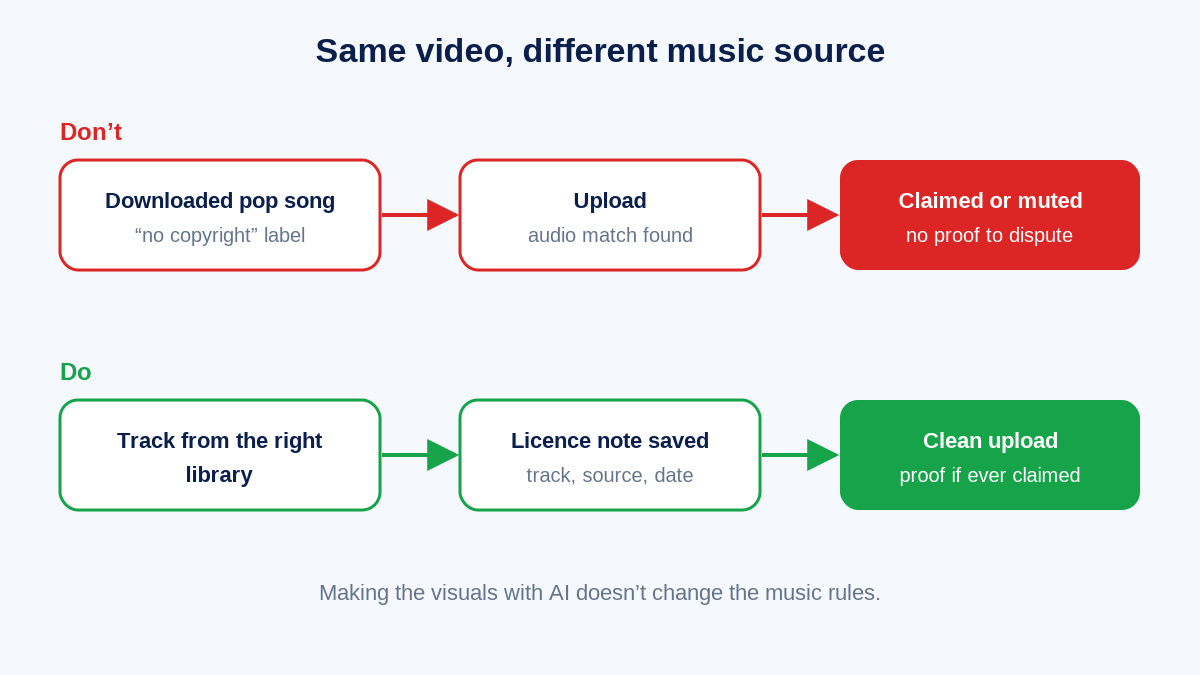
Making the visuals with AI doesn't change anything about the music. Platforms scan uploads for copyrighted audio. YouTube's system is called Content ID; TikTok and Meta have their own checks. If your soundtrack matches a protected recording, the result can be a claim (the owner earns from your video), muted audio, blocked playback in some countries, or a strike.
YouTube's page Tips to find safe music makes two points worth remembering:
- Music labelled "free" or "no copyright" on other channels can still be claimed, and writing "I don't own this music" in the description doesn't protect you.
- Content ID can't see rights you bought from someone else, so keep your licence as proof in case you need to dispute a claim.
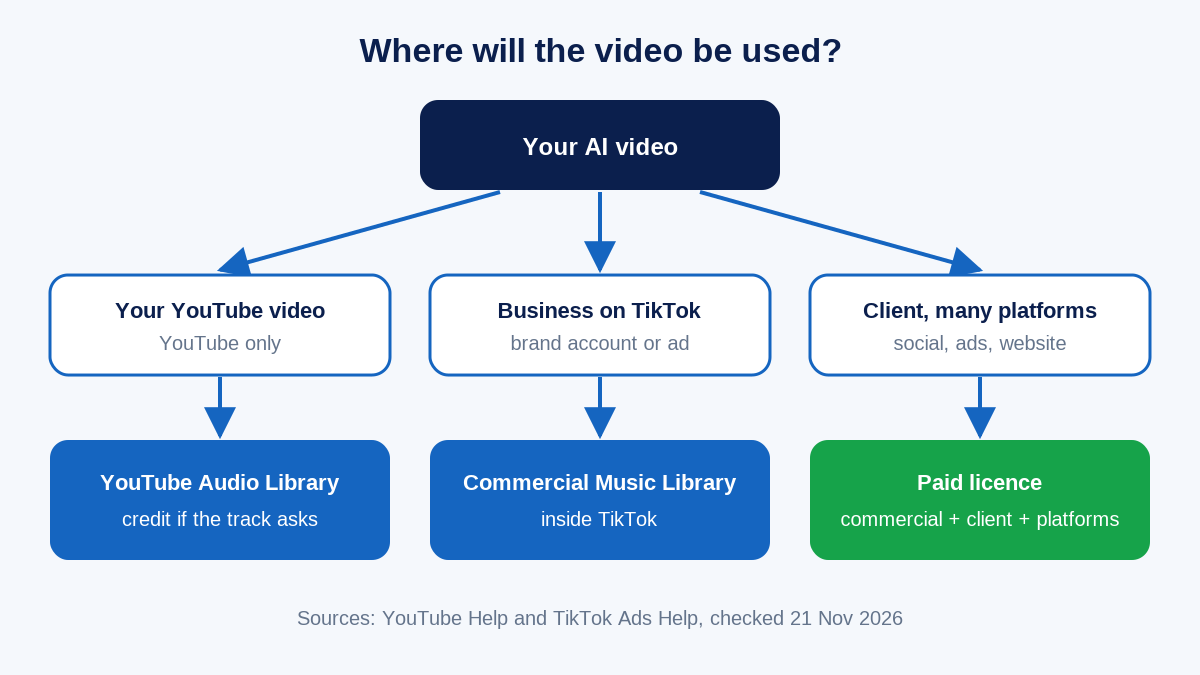
Step 1: Decide where the video will be used
Before you pick a track, answer three questions. They decide which music is allowed:
- Which platforms? YouTube only, TikTok only, Instagram and Facebook, a website, or all of them.
- Personal or commercial? A video that promotes a business, product or service is commercial, even when it's posted on a personal account.
- Your video or a client's? If you are delivering to a client, the licence has to allow that.
Step 2: Pick a safe source
For YouTube: the Audio Library
YouTube's Audio Library, inside YouTube Studio, has production music and sound effects you can use in your YouTube videos. YouTube describes these tracks as copyright-safe, and channels in the YouTube Partner Program can monetise videos that use them.
Some tracks use a Creative Commons licence and require you to credit the artist in the video description; the Audio Library shows the exact credit text to copy. If you'd rather not add credits, filter for tracks where attribution isn't required.
One limit: the help page talks about use in YouTube videos. It doesn't say the tracks are cleared for TikTok, a client's website or paid ads elsewhere, so don't assume they are.
For business videos on TikTok: the Commercial Music Library
TikTok's help page on the Commercial Music Library (CML) says businesses can't use TikTok's general music library for commercial content. Brands should use the CML, which is pre-cleared for business use, for organic posts (including duets and stitches), ads and branded content. The page also says that if you use other users' original sounds or other licensed music in business content, you should check with your legal team that you have the right licence.
So if you post a product video for a shop's TikTok account, choose the sound from the CML inside TikTok, not from the trending sounds list.
For Instagram and Facebook
Meta has its own libraries and rules for business accounts. Check what your account type is allowed to use in the music picker and in Meta's current terms before you post a brand video. The safest route for a client's Reels is the same as below: a licence that names Instagram and Facebook.
For client work on several platforms: a paid licence
When a client wants the same ad on YouTube, TikTok, Instagram and their website, platform libraries often don't cover everything. Use a paid music library or a composer, and read the licence for these points:
| Check the licence for | Why it matters |
|---|---|
| Commercial use | The video promotes a business |
| Client or end-user use | You are making it for someone else |
| Every platform you need | Some licences cover social media but not ads, or the reverse |
| Paid ads | Ads are often a separate tier |
| How long it lasts | Some licences end when your subscription ends |
What about AI-generated music?
AI music tools can make an original soundtrack, but the rules for using it commercially come from that tool's terms, and they differ between free and paid plans. Read them before you use the track in client work, and save a copy of the terms with the project.
Step 3: Add the music and mix it
In your editor (CapCut, for example), add the track under your video and then:
- Lower the music under any voice. Every word of a voiceover should be easy to hear. Our guide to adding an AI voiceover in CapCut covers the voice side.
- Cut to the beat. Line up scene changes with strong beats; it makes short AI clips feel planned.
- Fade out at the end instead of stopping mid-note.
- Check on a phone speaker. That's where most people will hear it.
Step 4: Keep a licence log
For every project, save a small text file next to the video. It takes one minute and saves you when a claim arrives:
Project: darwesh-giftbox_reel_9x16_30s
Track: "Morning Light" by Example Artist
Source: YouTube Audio Library
Licence: standard, no attribution required
Used on: YouTube only
Date checked: 21 Nov 2026
Proof: screenshot of the track page saved as music-licence.png
If you deliver to a client, put this file in the handover folder. Our guide on how to deliver an AI video to a client shows where it fits, and if you are starting your own channel, our faceless YouTube channel guide is a good next read.
Finishing a video with voice, music and captions is part of what we teach in the AI Content Creator Program.
Frequently asked questions
Can I use a popular song if it's only a few seconds long?
Don't rely on that. Platforms can detect short clips of a recording, and there is no "safe number of seconds". Use music you have a licence for.
Can I use YouTube Audio Library music on TikTok or Instagram?
YouTube's help page describes the Audio Library for use in YouTube videos and doesn't say it covers other platforms. For TikTok business content, use TikTok's Commercial Music Library; for other platforms, check that platform's library or use a paid licence that names it.
What should I do if my video gets a copyright claim?
If you have a licence for the track, gather your proof (the licence or the library page) and use the platform's dispute process. If you don't, replace the music and upload again.
Is music from the editing app safe to use?
It depends on that app's terms and on whether your video is commercial. Read the music licence in the app before using a track in brand or client work, and save a copy with the project.
- #music
- #copyright
- #ai video
- #youtube audio library
- #tiktok commercial music library
Want to learn AI video properly?
The AI Content Creator Program takes you from your first prompt to a portfolio you can show: 27 short, focused lessons in easy Urdu, with a weekly live session and tasks our team reviews.
Enroll now