How to start a faceless YouTube channel with AI, without breaking YouTube’s rules
Faceless AI channels are allowed on YouTube, but templated videos can't earn money. How to plan one, when to tick the AI label and what monetisation needs.
Saqqa Academy team
17-Nov-2026 · 6 min read
In this article
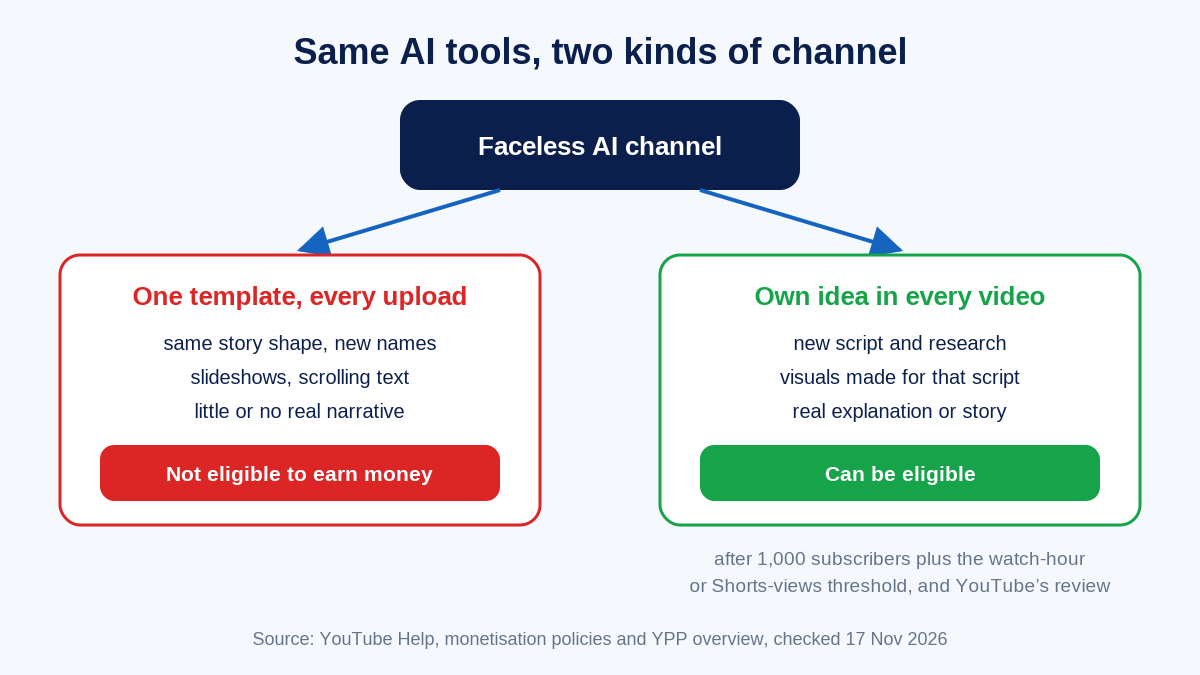
Yes, you can run a faceless YouTube channel made with AI, and YouTube doesn't punish AI use by itself. Two rules decide whether it works. First, YouTube's inauthentic content policy says channels made of templated, mass-produced or repetitive videos, including "AI-generated content made with generic or unoriginal templates", can't earn money. Second, you must tick Yes for AI use when a video shows realistic AI content that a viewer could mistake for real. So the plan is simple: pick a topic where you add real value, make every video different, and label realistic AI honestly.
Everything here comes from YouTube's official help pages on monetisation policies, disclosing AI content and the YouTube Partner Program, checked on 17 November 2026. Policies change, so read them again before you rely on any detail.
What "faceless" really means
A faceless channel is one where you don't appear on camera. The video is made from AI images and clips, screen recordings, animation or stock footage, usually with a voice-over and captions. It's popular because you don't need a camera, a studio or confidence in front of a lens.
But "faceless" is not the same as "no effort". The channels that grow are the ones where a viewer feels they learned something, enjoyed a story or saw something new. YouTube's own examples of videos that can't be monetised include image slideshows, templated storylines and scrolling text with little or no narrative.
Step 1: Choose a topic you can actually add to
Pick a subject where your own knowledge, research or opinion shows in every video. Some ideas that suit AI visuals well:
- Explainers: history, science or how things work, with AI images to show what words can't.
- Product and tool tutorials: screen recordings with your voice-over and real tips.
- Short stories with a recurring character: only if each episode has its own plot. Our guide on keeping the same AI character across images and videos shows how to make a character look the same every time.
- Local topics: recipes, places, crafts or businesses from your own city, which generic channels can't copy.
A useful test: if you could swap the title of one video onto another and nobody would notice, your videos are too similar.
Step 2: Make each video genuinely different
YouTube's policy allows a series to share an intro and outro "if the bulk of your content is different", and product-review style channels are fine when each video has its own storyline, focus or concept. In practice:
- Write a new script for every video. AI can help you draft, but add your own facts, examples and point of view.
- Generate visuals for that script, not a stock set you reuse. Our guide to writing image-to-video prompts helps here.
- Edit with intent: cut to the voice, add captions and keep the pace tight. See how to add auto captions in CapCut.
- Make it the right shape. Shorts are vertical 9:16; long videos are usually wide 16:9. The video size guide explains both.
Don't download or re-upload other people's videos, even with permission: YouTube's reused content rule applies "even if you have permission from the original creator", unless you add substantial commentary or changes.
Step 3: Tick the AI label when it's realistic
When you upload, YouTube Studio asks about AI use (in the details or attributes part of the upload screen). Select Yes if the video meets the disclosure rules and No if it doesn't. YouTube says disclosing doesn't by itself affect your eligibility to earn money, but channels that keep failing to disclose can face labels added by YouTube, removed content or suspension from the Partner Program.
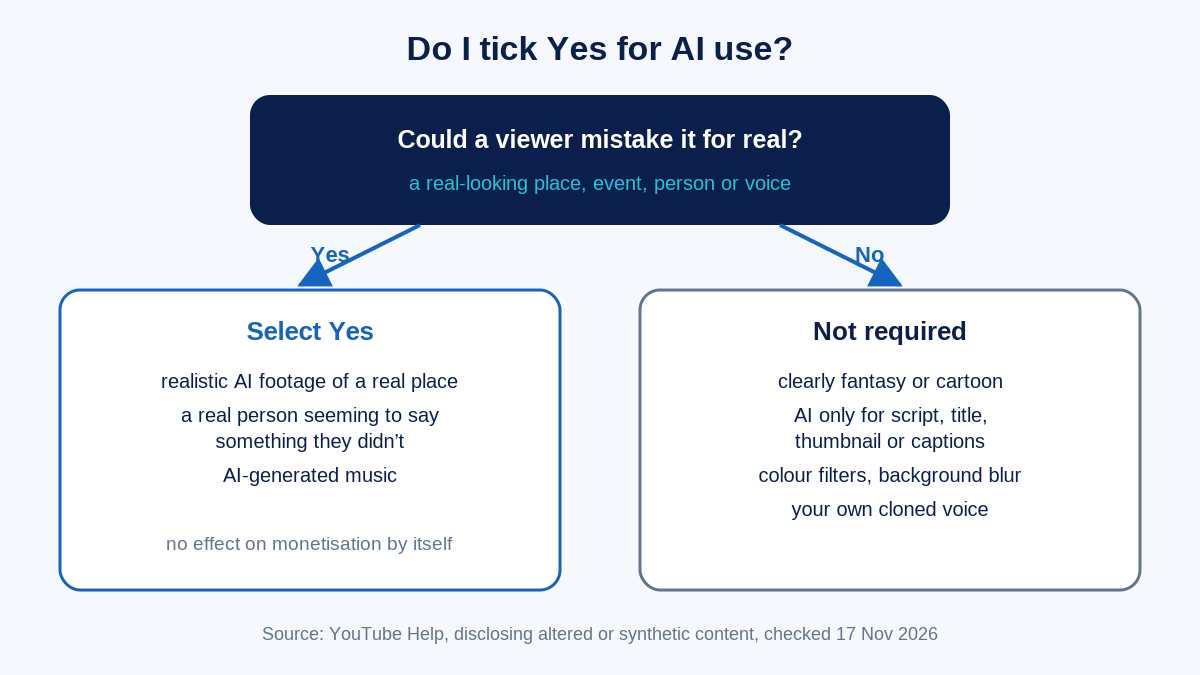
Examples from YouTube's help page:
| Needs the AI label | Doesn't need it |
|---|---|
| Realistic AI footage of a real place | Clearly fantasy scenes, like riding a unicorn |
| Making it look like a real person said something they didn't | AI help with the script, title, thumbnail or captions |
| AI-generated music | Colour or lighting filters, background blur |
| Realistic AI video of a real sports match | Cloning your own voice for your voice-over |
Never make an AI version of a real, identifiable person without their permission, whatever you label it.
Step 4: Know what monetisation needs
To share ad revenue in the YouTube Partner Program, YouTube's help page lists 1,000 subscribers plus either 4,000 public watch hours in the last 12 months or 10 million public Shorts views in the last 90 days, and you must live in a country or region where the program is available. Even then, YouTube reviews the channel against the policies above.
That takes time for most channels, and many never reach it. Treat a faceless channel as a long-term project and a public portfolio of your skills, not a quick income. The same videos can show clients what you can make; our guide on building an AI video portfolio explains how to present them.
A simple weekly plan
- Day 1: pick the topic for the week's video and research it.
- Day 2: write the script and record or generate the voice-over.
- Day 3: make the visuals for each line of the script.
- Day 4: edit, caption and make the thumbnail.
- Day 5: upload, answer the AI question honestly, and read your comments.
One good video a week beats seven near-copies. If you want to learn the whole process with feedback on every task, from images and consistent characters to editing and faceless channels, that's what the AI Content Creator Program covers.
Frequently asked questions
Can a faceless AI channel get monetised on YouTube?
It can be eligible, as long as it meets the Partner Program thresholds and its videos aren't templated or mass-produced. YouTube has said AI-generated content made with generic or unoriginal templates isn't eligible, so originality is the deciding factor, not whether you show your face.
Does ticking "Yes" for AI use reduce my views?
YouTube's help page says disclosing alone doesn't affect a video's eligibility to earn money. It adds a label so viewers know realistic content was made or changed with AI.
Do I need to disclose an AI voice-over?
Cloning your own voice for your own voice-over is listed as not needing disclosure. Making it sound like a real person said something they didn't does need it, and needs their permission.
Is it okay to use the same intro and music on every video?
Yes. YouTube allows a shared intro and outro as long as the main part of each video is different.
- #faceless channel
- #youtube
- #ai video
- #monetisation
- #ai disclosure
- #youtube shorts
Want to learn AI video properly?
The AI Content Creator Program takes you from your first prompt to a portfolio you can show: 27 short, focused lessons in easy Urdu, with a weekly live session and tasks our team reviews.
Enroll now