What size should an AI video be for Reels, TikTok and YouTube Shorts?
Make AI videos vertical (9:16) from the start, export at 1080x1920 or larger, and keep text inside the safe zone so buttons and captions don't cover it.
Saqqa Academy team
16-Nov-2026 · 6 min read
In this article
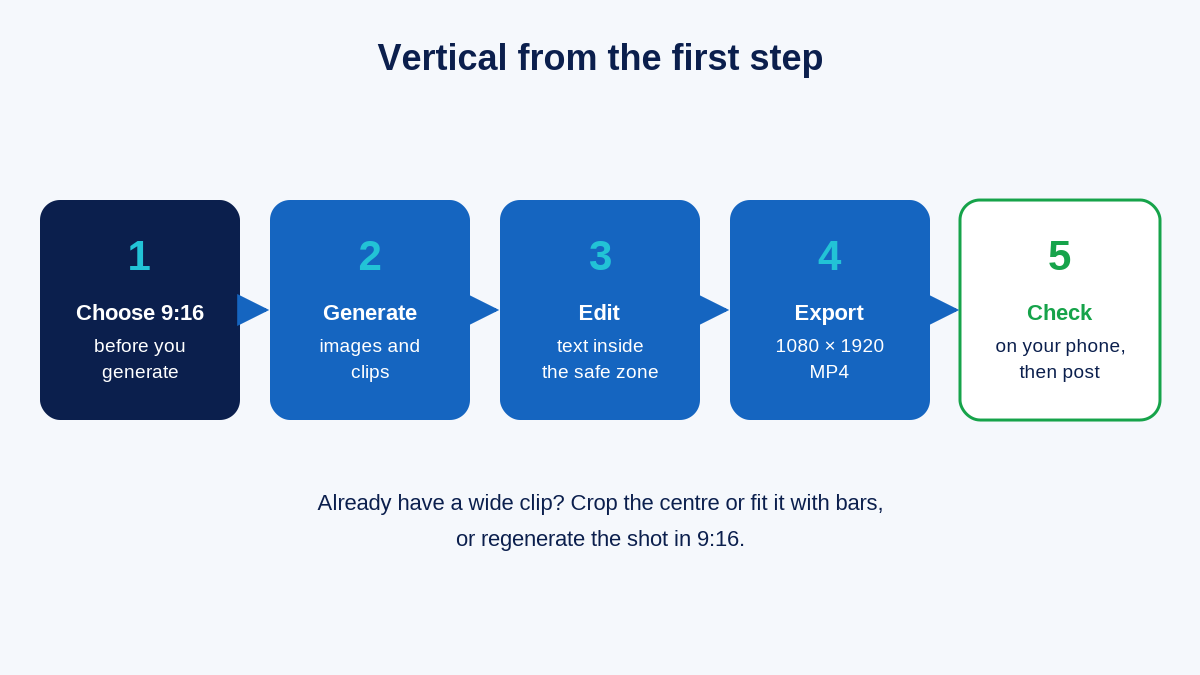
For Instagram Reels, TikTok and YouTube Shorts, make your AI video vertical, in a 9:16 aspect ratio, and export it at 1080 x 1920 pixels or larger. Choose 9:16 when you generate the images and clips, not afterwards, because cropping a wide 16:9 clip to vertical throws away about two-thirds of the picture. Then keep your text, logo and product inside the safe zone: Meta's guide for Reels ads suggests leaving at least 14% of the top, 35% of the bottom and 6% of each side clear, because the app's buttons and captions sit there.
Below are the official numbers, a quick way to fix a clip that is already wide, and a checklist before you post. We checked every platform figure on 16 November 2026. Platforms change these, so follow the links if you need them for an ad.
The numbers from each platform
| Platform | Shape | What the official page says |
|---|---|---|
| Instagram Reels ads | 9:16 | 1440 x 2560 px recommended, MP4 or MOV, up to 4 GB (Meta Ads Guide) |
| TikTok ads | 9:16 recommended | At least 540 x 960 px, up to 500 MB; 1:1 and 16:9 are also accepted (TikTok Ads help) |
| YouTube Shorts | Square or vertical | A Short is up to 3 minutes with a square or vertical aspect ratio (YouTube Help) |
The ad pages are the most detailed official specs, and ordinary posts use the same full-screen 9:16 shape. 1080 x 1920 is the size most creators use: it's comfortably above TikTok's minimum and fills a phone screen. If you are making a paid Meta ad and your tools can export larger, 1440 x 2560 is what Meta's guide recommends.
Why you should generate in 9:16 from the start
Most AI image and video tools let you choose the aspect ratio before you generate. Pick 9:16 there. The difference is easy to see with a little maths. A 16:9 clip at 1920 x 1080 has a height of 1080 pixels. A vertical slice of that clip at full height is only 1080 × 9 ÷ 16 ≈ 608 pixels wide, which is about 32% of the original width. You lose the other 68%, and then the slice has to be enlarged about 1.8 times to reach 1080 x 1920, which makes it softer.
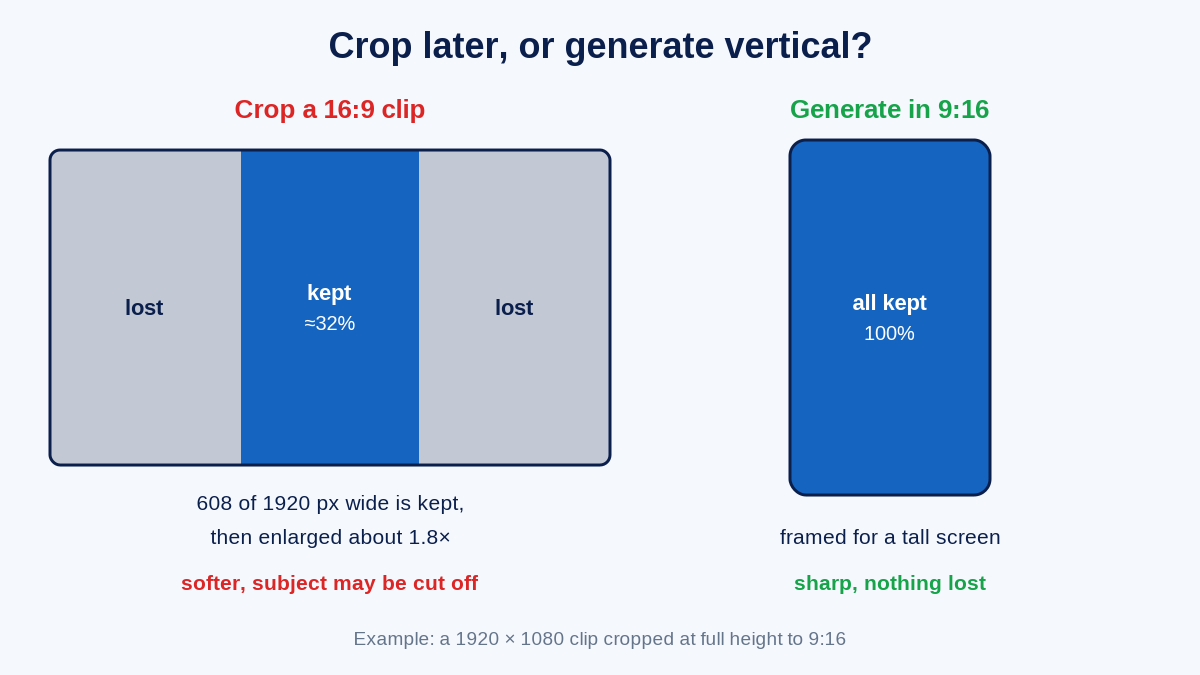
There's a second reason. When the model knows the frame is tall, it composes for it: the person is framed head to waist, the product sits in the middle, and there is room above and below. A wide shot cropped later often cuts off hands, the product or the face. If you are animating a still, start from a 9:16 image too, as we explain in our guide to writing an image-to-video prompt.
Step 1: Keep text inside the safe zone
On a phone, the app draws things over your video: the username and audio label at the top, the caption, like, comment and share buttons along the bottom and right side. Anything you put there may be covered.
Meta's Reels ads guide suggests keeping at least 14% of the top, 35% of the bottom and 6% of each side free of text, logos and key visuals. On a 1080 x 1920 frame that works out like this:
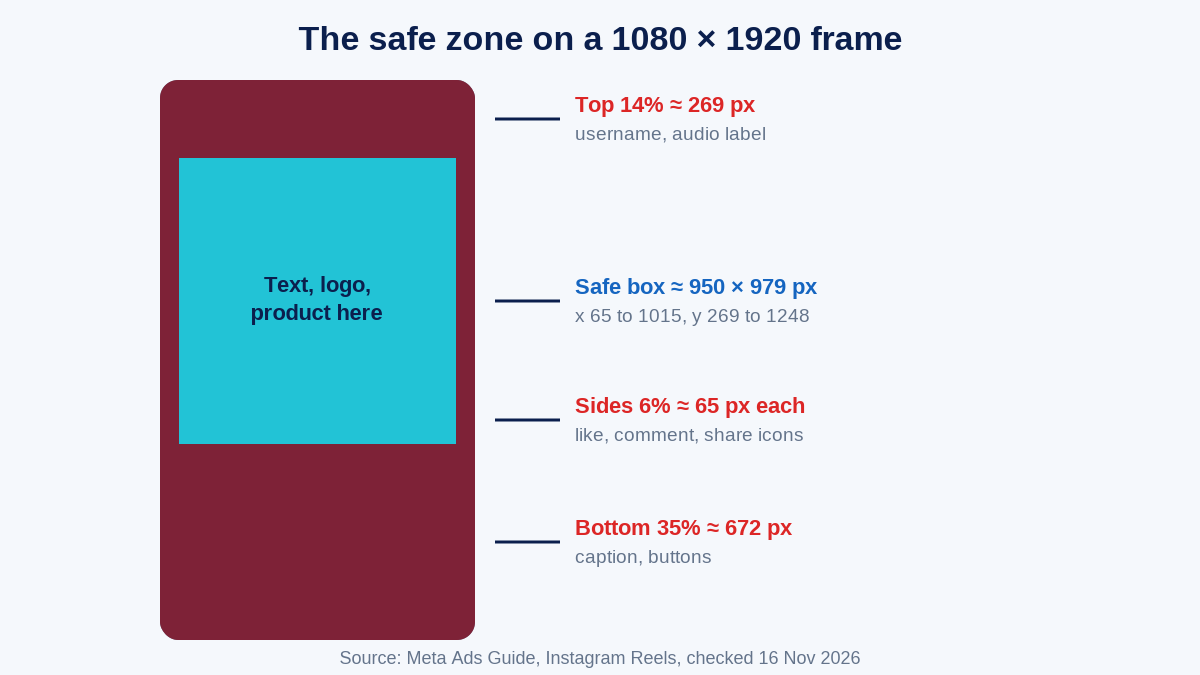
You can work out the box for any size with this small script. Run it with node safe-zone.mjs; we tested it with Node.js 24.
// safe-zone.mjs: where to keep text in a 9:16 frame (Meta's Reels ads guidance).
const width = 1080;
const height = 1920;
const clear = { top: 0.14, bottom: 0.35, side: 0.06 };

const left = Math.round(width * clear.side);
const right = width - left;
const top = Math.round(height * clear.top);
const bottom = height - Math.round(height * clear.bottom);

console.log(`Keep text and logos between x=${left} and x=${right} px`);
console.log(`and between y=${top} and y=${bottom} px`);
console.log(`Safe box: ${right - left} x ${bottom - top} px`);
It prints a safe box of 950 x 979 pixels, from x=65 to x=1015 and from y=269 to y=1248. TikTok publishes its own safe-zone files, which change with caption length, so for a TikTok ad download those from the TikTok help page above. Meta's percentages are a sensible default for organic posts on all three apps.
Step 2: Fix a clip that is already 16:9
If you already have a wide clip, you have two honest options. Both commands below use the free tool FFmpeg; we tested them with FFmpeg 6.1 on a 1920 x 1080 test clip, and both produced a 1080 x 1920 MP4.
Crop the centre (fills the screen, but keeps only the middle third):
ffmpeg -i wide.mp4 -vf "crop=ih*9/16:ih,scale=1080:1920,setsar=1" \
  -c:v libx264 -crf 18 -pix_fmt yuv420p -c:a copy -movflags +faststart vertical.mp4
Fit it with bars (keeps the whole picture, with empty space above and below that you can use for a title):
ffmpeg -i wide.mp4 -vf "scale=1080:-2,pad=1080:1920:(ow-iw)/2:(oh-ih)/2:color=black,setsar=1" \
  -c:v libx264 -crf 18 -pix_fmt yuv420p -c:a copy -movflags +faststart padded.mp4
Cropping only works when the subject is in the middle of the frame. If it isn't, regenerating the shot in 9:16 is usually faster than fighting the crop. Most video editors, CapCut included, can also change the canvas to 9:16 and let you move the frame by hand.
Step 3: Check before you post
- The project or canvas is 9:16 and the export is 1080 x 1920 (or 1440 x 2560 for a Meta ad).
- The export is MP4. MP4 and MOV are accepted by Meta, and TikTok's ad page lists both.
- No text, logo or product edge sits in the top 14%, the bottom 35% or the outer 6% of the sides.
- Captions are large enough to read on a phone held at arm's length.
- You watched the final file on your own phone, not only on the computer.
- On YouTube, the video is square or vertical and no longer than 3 minutes, or it won't be treated as a Short.
Getting the frame right is one of the small things that makes AI work look professional, the same way good skin texture does (see why AI images look fake). If you are just starting, our beginner's roadmap to AI video puts this step in order with the rest, and the AI Content Creator Program teaches the whole workflow, from the first image to an edited vertical ad.
Frequently asked questions
Is 1080x1920 the same as 9:16?
Yes. 1080 ÷ 1920 = 0.5625, and 9 ÷ 16 = 0.5625. Other 9:16 sizes include 720 x 1280 and 1440 x 2560. The shape is what matters for filling the screen; the pixel size decides how sharp it looks.
Can I post a square video on Reels or TikTok?
You can, and YouTube treats square videos up to 3 minutes as Shorts. But a square video won't fill a phone screen on Reels or TikTok, so most short-form creators use 9:16.
Does a 4K vertical video look better?
It may look slightly sharper, but the apps compress what you upload, and a bigger file takes longer to export and upload. 1080 x 1920 is enough for most posts. Use 1440 x 2560 if you are making a Meta ad and your tools support it.
Why does my text get covered after I post?
It's probably in the top 14% or bottom 35% of the frame, where the app draws the username, caption and buttons. Move it into the middle safe box and check on your phone before posting.
- #ai video
- #reels
- #tiktok
- #youtube shorts
- #aspect ratio
- #9:16
- #safe zone
Want to learn AI video properly?
The AI Content Creator Program takes you from your first prompt to a portfolio you can show: 27 short, focused lessons in easy Urdu, with a weekly live session and tasks our team reviews.
Enroll now