How to fix the Gemini API error 429 RESOURCE_EXHAUSTED
A Gemini 429 means your project hit a limit: requests or tokens per minute, requests per day, or a spend cap. How to find which one, and retry code that handles it.
Saqqa Academy team
24-Nov-2026 · 6 min read
In this article
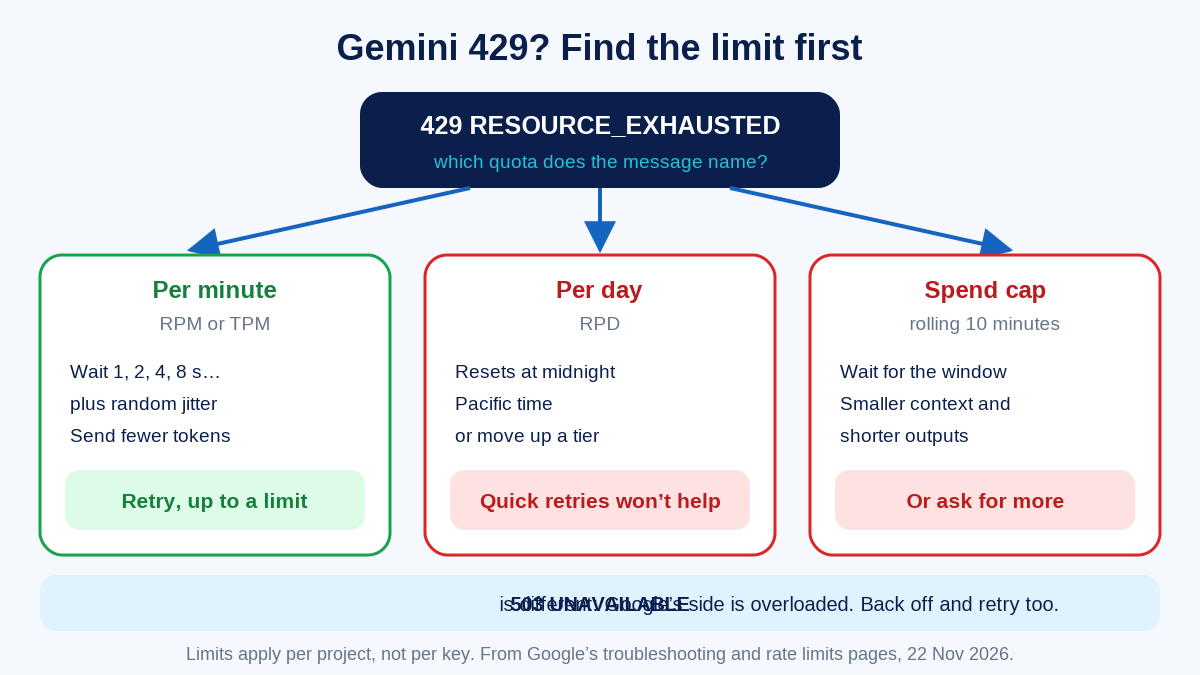
A 429 RESOURCE_EXHAUSTED error from the Gemini API means your Google Cloud project went over one of its limits: requests per minute (RPM), input tokens per minute (TPM), requests per day (RPD), or a spend cap. Going over any one of them triggers the error, even if the others are fine. For per-minute limits, wait and retry with exponential backoff and jitter, which is what Google's own troubleshooting guide recommends. For the daily limit, wait until it resets at midnight Pacific time. If you keep hitting it, move to a higher usage tier or send fewer, smaller requests. Creating a new API key in the same project won't help, because limits apply per project, not per key.
Everything below was checked against Google's troubleshooting guide, rate limits page and API error reference on 22 November 2026 and again on 24 November 2026. (The old ai.google.dev/gemini-api/docs links now redirect to these pages.) Limits and tiers change, so check your current numbers in AI Studio's rate limit page.
Step 1: Work out which limit you hit
Google's rate limits page says limits are usually measured in three ways, and some models have more:
| Limit | What it counts | When it resets |
|---|---|---|
| RPM | Requests per minute | Every minute |
| TPM | Input tokens per minute | Every minute |
| RPD | Requests per day | Midnight Pacific time |
| Spend cap | Money spent in a rolling 10-minute window | As the window moves on |
| Others | Images per minute for image models, tokens per day for some models, daily limits on built-in tools like Google Search grounding | Depends on the limit |
Two things catch beginners. First, you can hit TPM while sending very few requests, if each request has a long prompt or a big document. Second, the limits belong to the whole project. If a teammate's script, a test suite and your app all use keys from the same project, they share one budget.
Read the error message itself. Google's errors usually name the quota metric that ran out, for example a per-minute or per-day request quota, or a free-tier quota. That tells you which row of the table you're in.
Step 2: Retry per-minute errors with backoff
The troubleshooting guide says that when you get an error telling you to retry, such as 429 RESOURCE_EXHAUSTED or 503 UNAVAILABLE, you should use exponential backoff. Its advice for custom retry code:
- wait longer after each failure, for example 1, 2, 4 and 8 seconds
- add random jitter, so many clients don't retry at the same moment
- retry only temporary errors (429, 408 and 5xx), never 400, 402 or 403
- set a maximum number of retries
If you use Google's Python SDK, the guide says it already retries 429 and 5xx errors for you, up to four times. The guide doesn't say the same for the JavaScript SDK (@google/genai), so check its options before you add your own loop, or you may retry twice over.
Here is a retry helper for plain fetch. It also reads a retryDelay from the error details when one is there. Google's docs don't promise that field, but developers on the Google AI forum report seeing it in 429 bodies, so the code treats it as a bonus, not a requirement.
// Errors that waiting will not fix.
const NO_RETRY = new Set([400, 401, 402, 403, 404]);

// Some 429 bodies carry a RetryInfo detail such as { retryDelay: "21s" }.
function serverDelayMs(body) {
  const info = (body?.error?.details ?? []).find((d) => d.retryDelay);
  const seconds = info ? parseFloat(info.retryDelay) : NaN;
  return seconds > 0 ? seconds * 1000 : 0;
}

export async function withRetry(doRequest, { maxAttempts = 5, baseMs = 1000, maxMs = 60000 } = {}) {
  for (let attempt = 1; ; attempt++) {
    const res = await doRequest();
    if (res.ok) return res;

    const body = await res.clone().json().catch(() => ({}));
    const retryable = !NO_RETRY.has(res.status) && (res.status === 429 || res.status === 408 || res.status >= 500);

    if (!retryable || attempt >= maxAttempts) {
      throw new Error(`Gemini request failed: ${res.status} ${body?.error?.status ?? ""} ${body?.error?.message ?? ""}`.trim());
    }

    const backoff = Math.min(maxMs, baseMs * 2 ** (attempt - 1));
    const jitter = Math.random() * backoff; // full jitter
    const waitMs = Math.max(serverDelayMs(body), jitter);
    console.log(`Attempt ${attempt} got ${res.status}. Waiting ${Math.round(waitMs)} ms.`);
    await new Promise((r) => setTimeout(r, waitMs));
  }
}
Use it around a normal generateContent call. Put your key in an environment variable, never in code, and replace the model name with the one you use:
const MODEL = "your-model-id"; // for example, a Gemini model listed in AI Studio

const res = await withRetry(() =>
  fetch(`https://generativelanguage.googleapis.com/v1beta/models/${MODEL}:generateContent`, {
    method: "POST",
    headers: {
      "x-goog-api-key": process.env.GEMINI_API_KEY,
      "Content-Type": "application/json",
    },
    body: JSON.stringify({ contents: [{ parts: [{ text: "Explain a 429 error in one line." }] }] }),
  })
);
const data = await res.json();
console.log(data.candidates[0].content.parts.map((p) => p.text).join(""));
We tested withRetry on 22 November 2026 with Node.js against a small local server that returned two 429 responses with a retryDelay and then a success. It waited, retried and returned the answer on the third call. A 400 stopped at once without retrying. We didn't call the live Gemini API for this test.
The same helper also works for streamGenerateContent and the Interactions API, because they return the same HTTP status codes. If you're building a longer-running tool, our guide to the AI agent loop shows where retries fit in.
Step 3: Fix a daily limit or a spend cap
Retrying a few seconds later won't fix these.
- Daily limit (RPD). Wait for the reset at midnight Pacific time, or move to a higher tier. Note that midnight Pacific is the middle of the day in Pakistan and much of Asia, so plan batch jobs around it.
- Spend cap. Google's rate limits page says spend-based limits are checked over a rolling 10-minute window and return a 429 when you hit them. Its fixes: wait, send cheaper requests (smaller context, shorter output), or ask for an increase.
Step 4: Move up a tier if you keep hitting the limit
The rate limits page describes four tiers. You leave the Free tier by linking a billing account in AI Studio, and the higher tiers unlock automatically after you've paid a set amount and some days have passed since your first payment. The page says the move from Free to Tier 1 usually takes effect at once. It also warns that limits aren't guaranteed, and that preview and experimental models have tighter limits than stable ones.
If your project is stuck on free-tier quotas even after you set up billing, check that the API key really belongs to the billed project. Google checks eligibility per Cloud project, so a key from another project stays on that project's tier.
Step 5: Send fewer tokens
Many 429s are really TPM problems. Smaller requests fix them and cut your bill:
- Don't resend a whole document or chat history when you only need part of it. Our guide to counting tokens before an API call shows how to measure what you're sending.
- Cache long, repeated instructions where the API allows it. The idea is the same as in our post on prompt caching.
- Spread batch jobs out instead of firing everything at once.
429 or 503: what's the difference?
Both are worth retrying, but they mean different things. A 429 means your project used up a limit. Google's error reference describes a 503 as the service being temporarily overloaded or down, which isn't caused by your usage. For a 503, back off and retry; if it lasts, try again later or switch to another model. The same pattern shows up with other providers, as in our guides to the OpenAI 429 error and the Claude API 429 error.
Frequently asked questions
Will a new API key fix a 429?
Not if the key is in the same project. Google's rate limits page says limits apply per project, not per API key, so every key in a project shares the same limits.
When does the Gemini daily limit reset?
Requests per day reset at midnight Pacific time, according to Google's rate limits page.
Why do I get a 429 when I only send a few requests?
You've probably hit tokens per minute rather than requests per minute, for example by sending long prompts or files. Or another script using the same project is spending the same budget.
Is the free tier enough for a real app?
Free-tier limits are lower and can change, and preview models are tighter still. They're fine for learning and testing. For an app with real users, link billing so the project moves to a paid tier, and check the current limits in AI Studio.
- #gemini api
- #error 429
- #resource exhausted
- #rate limits
- #retries
- #javascript
Want a full course on this?
Build Apps with AI
Use AI coding assistants to build, fix and ship real websites and apps.
Join the free waitlistWant to learn AI video properly?
The AI Content Creator Program takes you from your first prompt to a portfolio you can show: 27 short, focused lessons in easy Urdu, with a weekly live session and tasks our team reviews.
Enroll now