How to fix the OpenAI API error 429 Too Many Requests
A 429 from the OpenAI API means either you are going too fast or you have run out of credit. Here is how to tell which one, and the retry code that fixes the first.
Saqqa Academy team
10-Nov-2026 · 5 min read
In this article
A 429 Too Many Requests error from the OpenAI API means one of two very different things. Either you sent requests or tokens faster than your limit allows, which fixes itself if you wait and retry, or your account has hit a billing, spend or usage limit, which no amount of waiting will fix. Read the error.code in the response body to tell them apart. For speed limits, wait for the time in the Retry-After header (or use exponential backoff with jitter) and retry a few times. For billing limits, add credit or raise the limit in your dashboard.
Everything below was checked against OpenAI's official rate limits guide and error codes guide on 10 November 2026.
Step 1: Read the error body, not just the status code
The same status code, 429, is used for several causes. OpenAI's error codes guide lists, among others:
| What the error says | What it means | Does retrying help? |
|---|---|---|
| Rate limit reached for requests | Too many requests or tokens per minute | Yes, after waiting |
slow_down | Your traffic rose too quickly, even inside your limits | Yes, after waiting and ramping up slowly |
credit_balance_exhausted | No prepaid credit left | No, add credit |
organization_spend_limit_exceeded / project_spend_limit_exceeded | You hit a monthly spend limit you set | No, raise the limit or wait for the month to reset |
organization_usage_limit_exceeded | You hit the usage limit OpenAI assigned | No, request a higher limit |
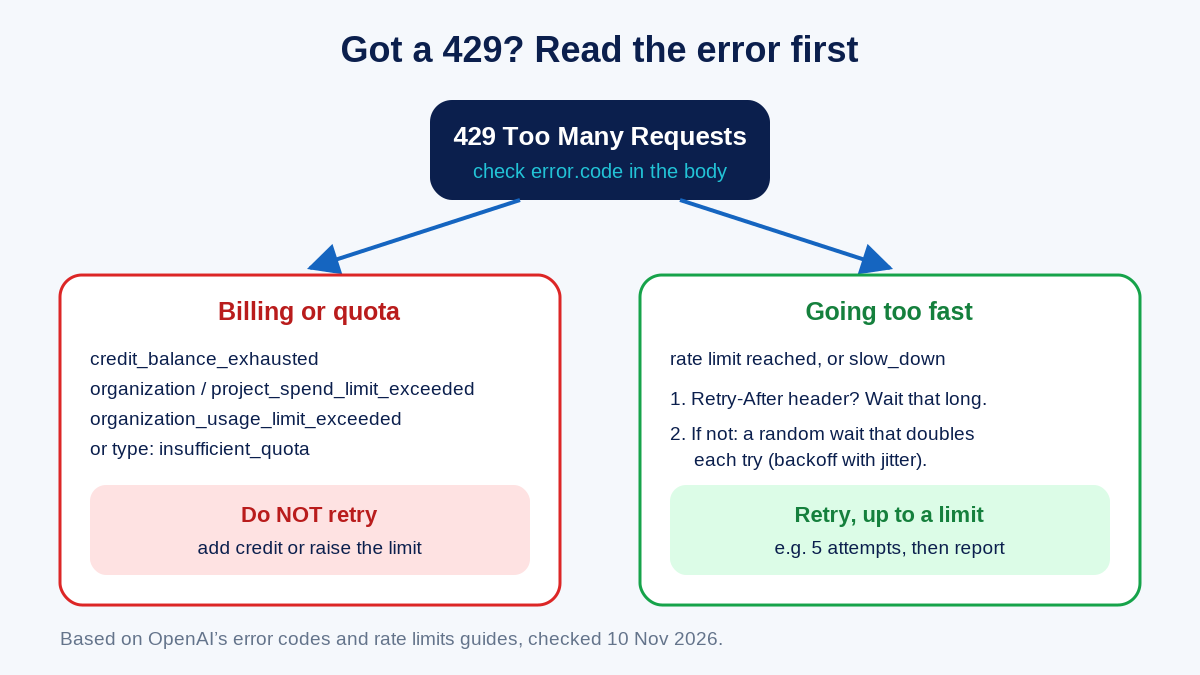
The guide also notes that for billing errors the broader error.type can still be insufficient_quota. So a quick check is: if the code is one of the billing ones, or the type is insufficient_quota, stop retrying and go to the billing page.
Step 2: Understand what is being limited
Rate limits are counted in several ways at once: requests per minute (RPM), requests per day (RPD), tokens per minute (TPM), tokens per day (TPD) and, for image models, images per minute. Whichever you hit first triggers the 429.
This catches many beginners. You might send only 10 requests a minute, but if each one has a very long prompt, you can still run out of tokens per minute. Limits apply to your whole organization, so a teammate's script running at the same time counts against the same limit.
The response headers tell you where you stand:
x-ratelimit-remaining-requestsandx-ratelimit-remaining-tokens: how much is leftx-ratelimit-reset-requestsandx-ratelimit-reset-tokens: how long until each resetsRetry-After: the minimum number of seconds to wait before retrying, when present
Step 3: Retry the right way
OpenAI's official SDKs already retry eligible 429 and 503 errors for you, and the guide says they respect Retry-After. If you use the SDK, you may not need your own loop at all. If you write your own retry code, the guide says to turn off SDK retries or count them, otherwise every failure gets retried twice over.
If you call the API with plain fetch, here is a small retry helper. It:
- Stops at once on billing errors.
- Waits for
Retry-Afterwhen the server sends it. - Otherwise waits a random time up to an exponentially growing limit ("full jitter"), so many clients do not all retry at the same moment.
- Gives up after a fixed number of attempts.
// Errors that waiting will not fix: add credits or raise limits instead.
const BILLING_CODES = new Set([
  "credit_balance_exhausted",
  "organization_spend_limit_exceeded",
  "project_spend_limit_exceeded",
  "organization_usage_limit_exceeded",
]);

async function withRetry(doRequest, { maxAttempts = 5, baseMs = 1000, maxMs = 30000 } = {}) {
  for (let attempt = 1; ; attempt++) {
    const res = await doRequest();
    if (res.ok) return res;

    const body = await res.clone().json().catch(() => ({}));
    const err = body.error ?? {};
    const billing = BILLING_CODES.has(err.code) || err.type === "insufficient_quota";
    const retryable = (res.status === 429 || res.status === 503) && !billing;

    if (!retryable || attempt >= maxAttempts) {
      throw new Error(`Request failed: ${res.status} ${err.code ?? err.type ?? ""}`.trim());
    }

    const retryAfter = Number(res.headers.get("retry-after"));
    const backoff = Math.min(maxMs, baseMs * 2 ** (attempt - 1));
    const waitMs = retryAfter > 0 ? retryAfter * 1000 : Math.random() * backoff; // full jitter

    console.log(`Attempt ${attempt} got ${res.status}. Waiting ${Math.round(waitMs)} ms...`);
    await new Promise((r) => setTimeout(r, waitMs));
  }
}
Use it by wrapping your request in a function, so it can be sent again:
const res = await withRetry(() =>
  fetch("https://api.openai.com/v1/responses", {
    method: "POST",
    headers: {
      "Content-Type": "application/json",
      Authorization: `Bearer ${process.env.OPENAI_API_KEY}`,
    },
    body: JSON.stringify({ model: "YOUR_MODEL", input: "Say hello" }),
  })
);
console.log(await res.json());
We tested withRetry in Node.js 22 against a fake server that returned two 429 errors and then a success. It waited 1 second for the first (which had Retry-After: 1), a short random time for the second, and returned the success on the third call. A fake credit_balance_exhausted error failed straight away after one call, as it should. We did not run the real fetch example against OpenAI, because it needs a paid key. Replace YOUR_MODEL with a model from your dashboard.
Step 4: Send less, so you hit the limit less often
Retries treat the symptom. These changes reduce how often you hit the limit in the first place, and they are all suggested in OpenAI's guide:
- Set the maximum output tokens close to what you need. OpenAI's guide recommends keeping it near your expected response size rather than leaving a very large ceiling.
- Combine small prompts. If you hit the requests-per-minute limit but have tokens to spare, send several items in one request.
- Use the Batch API for work that is not urgent, such as tagging a thousand product descriptions overnight. It has its own, separate queue limits.
- Ramp up slowly. A sudden jump in traffic can trigger
slow_downeven below your limit. For very large workloads, the guide's rule of thumb is to increase by no more than 50% every 15 minutes once you are above 1 million input tokens per minute. - Do not loop on failures. Failed requests still count towards your per-minute limit, so a tight retry loop makes the problem worse.
Step 5: If you still hit it, check your tier
OpenAI places accounts in usage tiers based on how much credit you have bought, and higher tiers usually get higher limits. Your current limits are shown on the Limits page in your OpenAI dashboard settings. Tiers change, so check the current table in the rate limits guide rather than trusting numbers in old blog posts.
Frequently asked questions
Why do I get a 429 on my very first request?
Almost always this is a billing error, not speed. A new account with no credit, or a project with a spend limit of zero, returns 429 on the first call. Look at the error.code in the response. If it says credit_balance_exhausted or a spend limit code, add credit or raise the limit.
How many times should I retry?
There is no official number. Three to five attempts with a cap on the total wait is a sensible start for interactive apps. For background jobs you can wait longer. Always cap both the number of attempts and the total time, as OpenAI's guide advises.
Is a 503 error the same thing?
No. A 503 with server_is_overloaded means OpenAI's servers are busy, not that you broke a limit. It is also safe to retry after a delay, and the helper above handles it the same way.
Will a VPN or a new API key avoid the limit?
No. Limits apply to your organization and project, not to your IP address or a single key. Creating more keys in the same organization does not raise them.
- #openai api
- #error 429
- #rate limits
- #retries
- #javascript
Want a full course on this?
Build Apps with AI
Use AI coding assistants to build, fix and ship real websites and apps.
Join the free waitlistWant to learn AI video properly?
The AI Content Creator Program takes you from your first prompt to a portfolio you can show: 27 short, focused lessons in easy Urdu, with a weekly live session and tasks our team reviews.
Enroll now