Why is my Claude API response cut off? How to handle stop_reason max_tokens
If Claude's answer stops mid-sentence, check stop_reason. Here is what max_tokens and the other stop reasons mean, and code that continues or retries safely.
Saqqa Academy team
11-Nov-2026 · 5 min read
In this article
If a Claude API answer stops in the middle of a sentence, look at the stop_reason field in the response. When it says "max_tokens", the model did not finish: it hit the max_tokens limit you set in the request, and the API cut the answer off there. It is not an error and you get no warning, so your code has to check for it. The fix is to raise max_tokens, or to ask Claude to continue and join the parts. If a tool call was cut off, retry with a higher limit instead, because half a tool call can't be used.
Facts in this post come from Anthropic's stop reasons guide, checked on 11 November 2026.
What stop_reason tells you
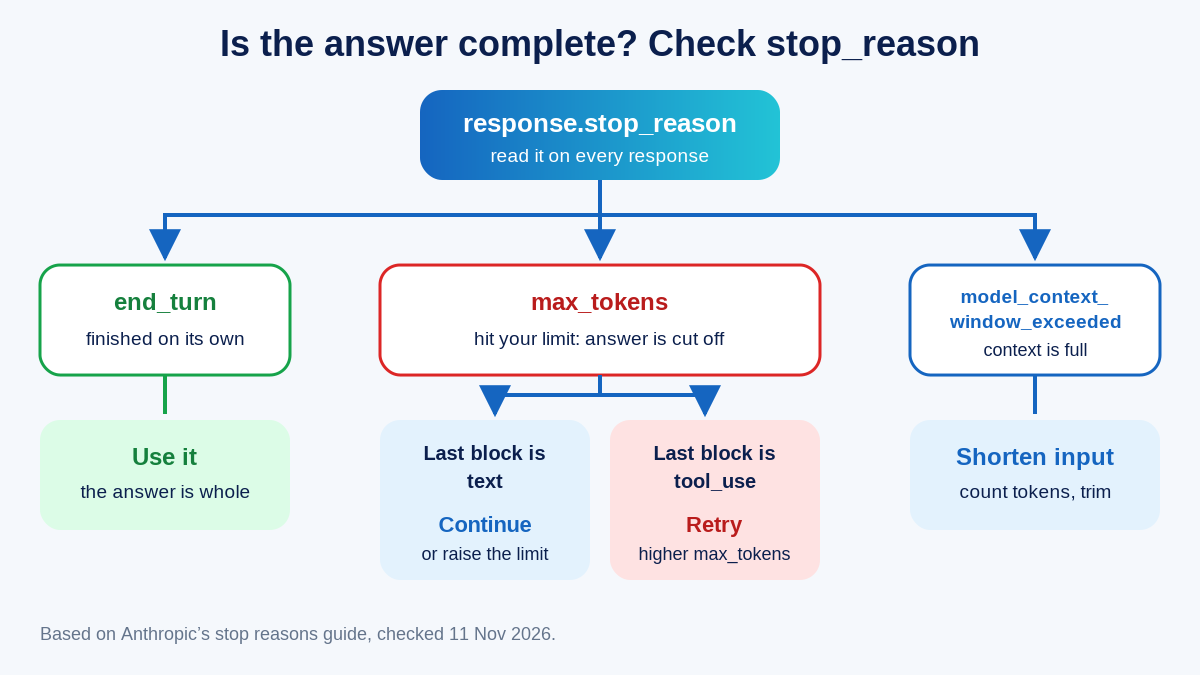
Every successful Messages API response has a stop_reason. It explains why Claude stopped writing, which is different from an HTTP error (a 429 or 529 means the request itself failed). Here are the values in Anthropic's guide and what to do with each:
| stop_reason | What happened | What to do |
|---|---|---|
end_turn | Claude finished on its own | Use the answer |
max_tokens | The answer reached your max_tokens limit | Raise the limit, or continue |
model_context_window_exceeded | The answer filled the model's whole context window | Treat it as cut off |
stop_sequence | Claude wrote one of your stop_sequences | Read stop_sequence to see which |
tool_use | Claude wants to call one of your tools | Run it and send the result back |
pause_turn | A server tool loop (such as web search) hit its limit | Send the response back to let it continue |
refusal | Claude declined to answer | Read stop_details, or retry on a fallback model |
Two of these mean "the text you got is incomplete": max_tokens and model_context_window_exceeded. The rest of this post is about those two.
Step 1: Check stop_reason on every response
The most common bug is code that reads response.content[0].text and never looks at stop_reason. Then a cut-off answer looks like a finished one. This small Node.js function sorts every response into an action:
// Decide what to do with a Claude response, based on stop_reason.
export function nextAction(response) {
  const last = response.content.at(-1);
  switch (response.stop_reason) {
    case "end_turn":
    case "stop_sequence":
      return "use";
    case "max_tokens":
      // Half a tool call can't be run: ask again with more room.
      return last?.type === "tool_use" ? "retry-higher" : "continue";
    case "model_context_window_exceeded":
      return "shorten-input";
    case "tool_use":
      return "run-tool";
    case "pause_turn":
      return "send-back";
    case "refusal":
      return "refused";
    default:
      return "unknown";
  }
}
We tested this in Node.js 24 with fake response objects for each stop reason (no live API call). It returned "continue" for cut-off text and "retry-higher" when the last block was a tool_use.
Step 2: Pick the right max_tokens
max_tokens is the most the model may write in one answer. It is a hard ceiling: a low value cuts answers off, it doesn't make them shorter or better planned. Some tips:
- Don't set it very low to save money. You pay for the tokens Claude writes, not the limit. A cut-off answer you have to throw away and redo costs more.
- Each model has its own maximum output. Look it up on Anthropic's models overview before you raise the value.
- Use streaming for large values. The guide notes that the Python SDK requires streaming when
max_tokensis above roughly 21,000, because a long answer without streaming can hit an HTTP timeout. See the streaming guide. - If you want a short answer, say so in the prompt ("answer in 3 sentences"), and keep
max_tokensas a safety net.
Step 3: Continue a cut-off answer
When the cut-off part is plain text, you can send the partial answer back and ask Claude to continue. Anthropic's guide shows this pattern: put the partial answer in an assistant message, then add a user message asking it to continue from where it stopped. Repeat a few times at most.
import Anthropic from "@anthropic-ai/sdk";

const client = new Anthropic();

// Ask a question and keep asking Claude to continue while it hits max_tokens.
export async function getCompleteAnswer(prompt, { maxRounds = 3, api = client } = {}) {
  let full = "";
  let messages = [{ role: "user", content: prompt }];

  for (let round = 0; round < maxRounds; round++) {
    const response = await api.messages.create({
      model: "claude-opus-5-5",
      max_tokens: 4096,
      messages,
    });

    for (const block of response.content) {
      if (block.type === "text") full += block.text;
    }

    if (response.stop_reason !== "max_tokens") {
      return { text: full, complete: true, stopReason: response.stop_reason };
    }

    messages = [
      { role: "user", content: prompt },
      { role: "assistant", content: full },
      { role: "user", content: "Please continue from exactly where you left off." },
    ];
  }

  return { text: full, complete: false, stopReason: "max_tokens" };
}
We tested this function with a fake client that returned max_tokens twice and then end_turn: it joined all three parts, sent the partial text back each round, and reported complete: true. It was not run against the live API for this post.
Two things to watch:
- Return
complete: falsewhen you give up, and show the reader a note such as "answer was cut short". Anthropic's guide suggests adding a notice like this so nobody mistakes a partial answer for a whole one. - The join may not be perfect. The continued text can repeat a few words or restart a sentence. For structured output such as JSON, don't stitch parts together: raise
max_tokensand ask again. Our guide to getting valid JSON from an LLM covers that case.
Older code sometimes "prefilled" the last assistant turn so Claude would carry on mid-word. Anthropic's prompting best practices say prefill on the last assistant turn is not supported from the Claude 4.6 models onward (it returns a 400 error), which is why the pattern above ends with a user message instead.
Step 4: A cut-off tool call needs a retry, not a continue
If Claude was writing a tool_use block when it hit the limit, the tool input is incomplete. Anthropic's guide says to send the same request again with a higher max_tokens to get the full tool call. Don't try to run the half-finished input, and don't ask Claude to "continue" it.
This happens most often with tools that take large inputs, such as "write this file". If you see it often, give those requests more room by default.
Step 5: When the context window is full
model_context_window_exceeded means the input plus the answer used up the model's whole context window, so Claude stopped before reaching your max_tokens. Anthropic describes it as a way to ask for the most tokens possible without measuring the input first. The answer you got is valid, just shorter than you asked for.
If you didn't expect it, the input is too big. Count it first (see how to count tokens before an API call), then send less: summarise old chat turns, send only the part of a document that matters, or drop tools the request doesn't need.
Frequently asked questions
Is stop_reason max_tokens an error?
No. The request succeeded (HTTP 200), and the API is telling you the answer reached your limit. Your code must check stop_reason, because nothing else marks the answer as incomplete.
Am I charged for max_tokens even if Claude writes less?
No. You are billed for the output tokens Claude actually writes, shown in usage.output_tokens. The limit only caps how many it may write.
How do I see stop_reason when streaming?
When you stream, stop_reason arrives in the message_delta event near the end of the stream, as Anthropic's streaming guide describes. SDK helpers such as finalMessage() in TypeScript give you the complete message, including stop_reason.
What's the difference between max_tokens and model_context_window_exceeded?
max_tokens means the answer hit the limit you set. model_context_window_exceeded means the answer hit the model's own context window before reaching your limit, usually because the input was very long.
- #claude api
- #stop_reason
- #max_tokens
- #truncated response
- #error fix
Want a full course on this?
Build Apps with AI
Use AI coding assistants to build, fix and ship real websites and apps.
Join the free waitlistWant to learn AI video properly?
The AI Content Creator Program takes you from your first prompt to a portfolio you can show: 27 short, focused lessons in easy Urdu, with a weekly live session and tasks our team reviews.
Enroll now