How to use the Claude Message Batches API to pay half price
The Message Batches API runs Claude requests in the background at 50% of the normal price. When to use it, its limits, and code to send a batch and read the results.
Saqqa Academy team
15-Nov-2026 · 6 min read
In this article
If you send Claude lots of requests and don't need the answers right away, the Message Batches API lets you pay half the normal price. You put up to 100,000 requests into one batch and send it, and Claude works through them in the background. You collect the results later, usually in under an hour, and you're billed at 50% of the standard API price for input and output tokens. The trade is speed: you can't stream, and a batch can take up to 24 hours. This guide explains when batching is worth it, the rules to know, and the code for each step.
The facts here come from Anthropic's batch processing guide, checked on 15 November 2026. Limits and prices change, so check that page before you plan a big job.
When batching is the right choice
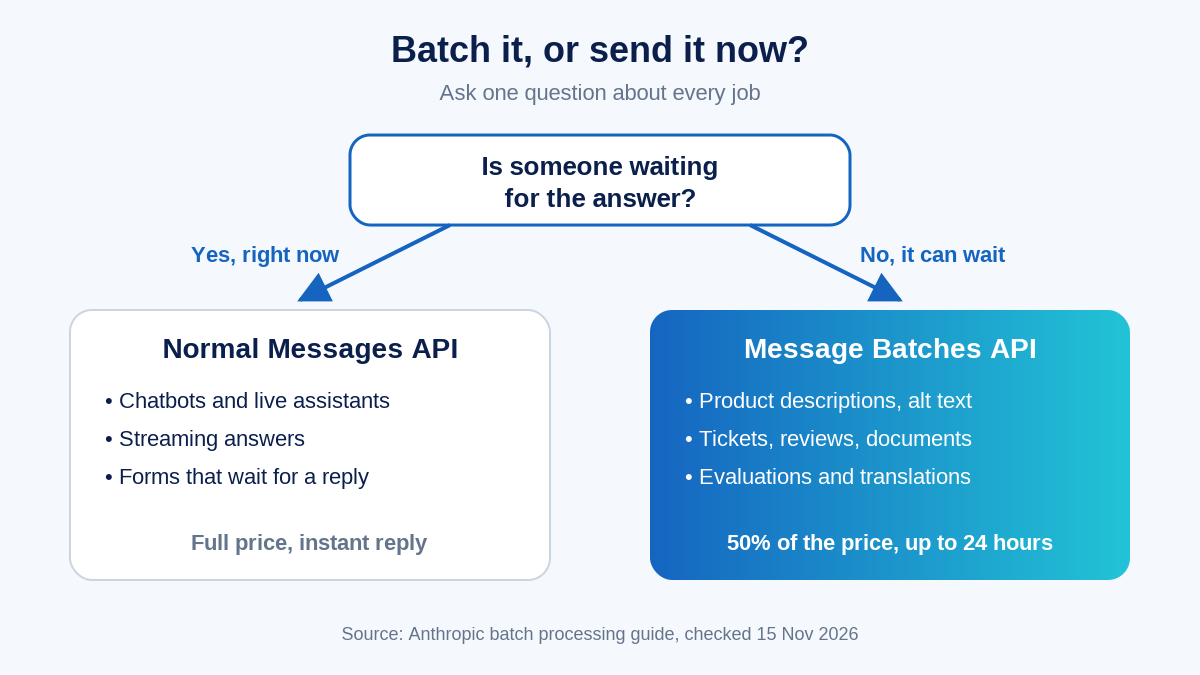
Batching suits work that doesn't have a person waiting on the answer:
- writing product descriptions or alt text for a whole catalogue
- tagging, sorting or summarising thousands of support tickets, reviews or documents
- running an evaluation, where you send the same test prompts to a model and score the answers
- translating a set of pages, or pulling structured data out of a pile of files
It's the wrong choice for anything a user is watching in real time, such as a chatbot, a live coding assistant or a form that waits for a reply. Those need the normal Messages API.
The rules you need to know
From Anthropic's guide:
| Rule | What it means |
|---|---|
| Price | All usage is billed at 50% of standard API prices |
| Size | Up to 100,000 requests or 256 MB per batch, whichever comes first |
| Time | Most batches finish within 1 hour; any request not processed within 24 hours expires |
| Results | Available for 29 days after the batch is created |
| Order | Results can come back in any order, so you match them by custom_id |
| Not allowed | stream: true, fast mode (speed), server-side fallbacks and max_tokens: 0 |
Almost everything else works inside a batch: system prompts, images, tool use, multi-turn conversations and extended thinking. You can also mix different kinds of request in one batch, because each request is processed on its own.
To give a sense of the saving, Anthropic's pricing table lists Claude Sonnet 5.5 in a batch at $1 per million input tokens and $5 per million output tokens, half of the standard rate. You aren't billed for requests that end as errored, canceled or expired.
Step 1: Build your requests
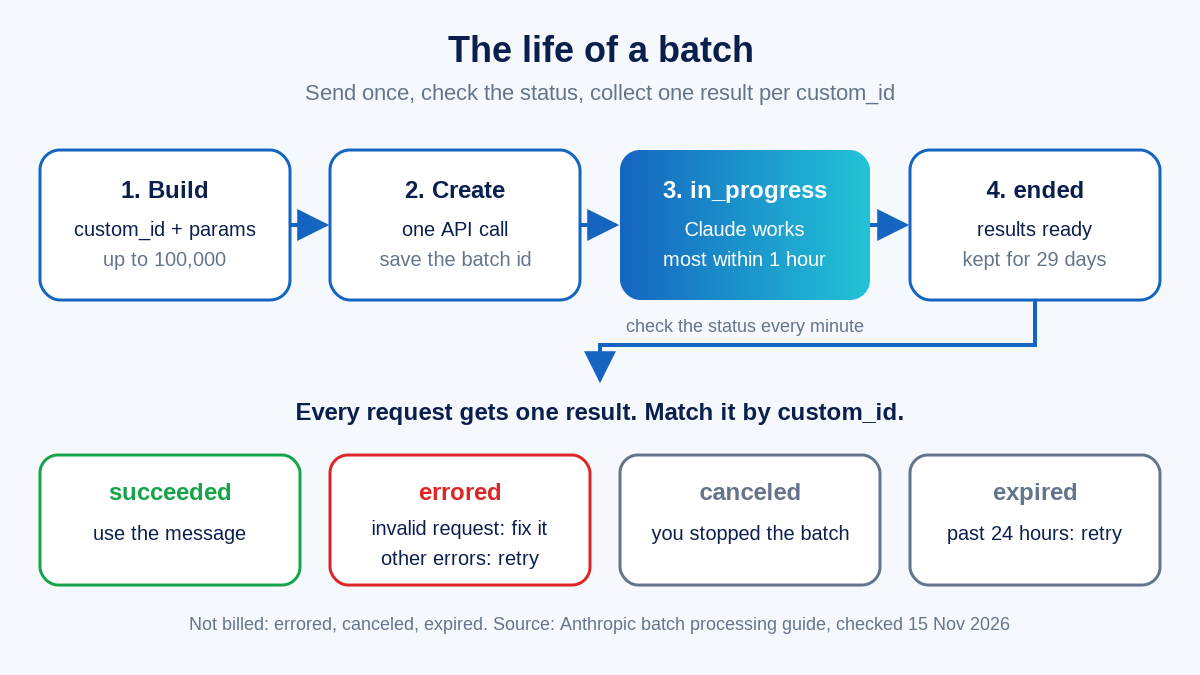
Each request has two parts: a custom_id that you choose, and params, which are the same fields you would send to the normal Messages API. The custom_id must be 1 to 64 characters long and use only letters, numbers, hyphens and underscores. Make it something you can match later, such as a product code.
This script builds the requests and checks the IDs before anything is sent. It needs no API key, and we tested it with Node 22:
// build-batch.mjs: build Message Batches requests from a list of products.
const products = [
  { sku: "SKU-101", name: "Roasted almonds, 500 g" },
  { sku: "SKU-102", name: "Kashmiri walnuts, 1 kg" },
  { sku: "SKU-103", name: "Mixed dry fruit gift box" },
];

const ID_RULE = /^[a-zA-Z0-9_-]{1,64}$/; // custom_id rule from the docs

const requests = products.map((p) => {
  const custom_id = `desc-${p.sku}`;
  if (!ID_RULE.test(custom_id)) throw new Error(`Bad custom_id: ${custom_id}`);
  return {
    custom_id,
    params: {
      model: "claude-haiku-5-5",
      max_tokens: 300,
      system: "You write short, honest product descriptions for an online shop.",
      messages: [{ role: "user", content: `Write a 60-word description for: ${p.name}` }],
    },
  };
});

const ids = new Set(requests.map((r) => r.custom_id));
if (ids.size !== requests.length) throw new Error("custom_id values must be unique");

console.log(`${requests.length} requests ready`);
Running it prints 3 requests ready. In a real job, the product list would come from your database or a CSV file.
Step 2: Send the batch and wait
With the official TypeScript SDK (npm install @anthropic-ai/sdk) and your key in the ANTHROPIC_API_KEY environment variable, you send the whole list in one call and then check the status until it says ended. This part follows the official guide, but we didn't run it for this post because it makes paid API calls:
import Anthropic from "@anthropic-ai/sdk";

const client = new Anthropic();

const batch = await client.messages.batches.create({ requests });
console.log("Batch id:", batch.id); // save this id

// Check every minute until processing has ended.
let status = batch;
while (status.processing_status !== "ended") {
  await new Promise((resolve) => setTimeout(resolve, 60_000));
  status = await client.messages.batches.retrieve(batch.id);
  console.log(status.processing_status, status.request_counts);
}
processing_status starts as in_progress and becomes ended once every request has finished. request_counts shows how many requests have succeeded, errored, been canceled or expired so far. You can also watch batches on the Batches page of the Claude Console. If you change your mind, the cancel endpoint (client.messages.batches.cancel(id)) stops the batch. Requests that already finished stay in the results.
Save the batch ID somewhere safe, such as a file or a database row. If your script stops, you can pick up from the ID instead of sending the batch again and paying twice.
Step 3: Read the results and retry what failed
Every request gets exactly one result, with one of four types:
- succeeded: the message is included
- errored: something went wrong. If the error type is
invalid_request_error, fix the request first. Other errors, such as server errors, can be sent again as they are - canceled: you canceled the batch before this request ran
- expired: the 24-hour limit was reached before this request ran
The SDK streams the results to you one at a time (for await (const r of await client.messages.batches.results(batch.id))). Whichever way you read them, sort them by custom_id, because the order isn't guaranteed. This script does the sorting on a saved results file, one JSON object per line, and puts anything worth retrying into a list. We tested it with Node 22 on a small sample file shaped like the results in the docs:
// read-results.mjs: sort results into "done" and "retry", matched by custom_id.
import { readFileSync } from "node:fs";

const lines = readFileSync("results.jsonl", "utf8").split("\n").filter(Boolean);
const done = {};
const retry = [];

for (const line of lines) {
  const { custom_id, result } = JSON.parse(line);
  if (result.type === "succeeded") {
    done[custom_id] = result.message.content.find((b) => b.type === "text")?.text ?? "";
  } else if (result.type === "errored" && result.error.error.type === "invalid_request_error") {
    console.log(`Fix this request before sending again: ${custom_id}`);
  } else {
    retry.push(custom_id); // server errors, canceled and expired: safe to send again
  }
}

console.log(`Done: ${Object.keys(done).length}, retry: ${retry.join(", ") || "none"}`);
With two successes and one expired request in the sample, it prints Done: 2, retry: desc-SKU-103. Put the retry list into a new, smaller batch.
Save even more with prompt caching
If every request in a batch starts with the same long text, such as a style guide, a list of rules or a reference document, you can combine batching with prompt caching. Anthropic's guide points out that a batch can take longer than the default 5-minute cache lifetime, so it suggests the 1-hour cache duration for shared context in batches. Put the shared part first and identical in every request, so the cache can match it.
Two more ways to keep a batch cheap: set max_tokens to what you really need, and count tokens first on a few sample requests so you know roughly what the full batch will cost before you send it.
Frequently asked questions
Is the Batch API really 50% cheaper?
Yes. Anthropic's batch processing guide says all usage in a batch is charged at 50% of standard API prices, and its pricing table lists the batch rate for each model. You aren't charged for requests that error, are canceled or expire.
How long does a Claude batch take?
Anthropic says most batches finish within an hour. It can be slower when demand is high. Any request not processed within 24 hours expires, and you can still collect results for the requests that did finish.
Can I use the Batch API for a chatbot?
No. A batch doesn't stream and can take minutes or hours, so a person chatting would be left waiting. Use the normal Messages API for anything live and batches for background jobs.
Do results come back in the same order I sent them?
Not necessarily. Results can arrive in any order, which is why every request needs a unique custom_id. Always match results to requests by that ID.
- #claude api
- #batch api
- #message batches
- #api costs
- #anthropic
Want a full course on this?
AI Automation & Agents
Build automations and AI agents that do real work: WhatsApp replies, lead follow-ups, reports.
Join the free waitlistWant to learn AI video properly?
The AI Content Creator Program takes you from your first prompt to a portfolio you can show: 27 short, focused lessons in easy Urdu, with a weekly live session and tasks our team reviews.
Enroll now