How to price AI video work as a beginner, without guessing
Work out your price from your hours, your tool costs, the revisions you include and a small buffer, then turn it into simple packages clients can say yes to.
Saqqa Academy team
15-Nov-2026 · 5 min read
In this article
To price AI video work as a beginner, don't copy a number from someone else. Add up the hours one job really takes (brief, making, editing and revisions), multiply by the hourly rate you choose for yourself, add the tool credits the job uses, and add a small buffer for retries. That gives you a floor: the lowest price at which the job is worth doing. Then package it with a clear scope, such as "one 15-second vertical ad, two rounds of changes, delivered in three days", so the client knows exactly what they're buying.
This guide gives you a method, not a rate card. Prices for AI video work vary a lot by city, niche, client size and the quality of your portfolio, and we won't pretend there is one correct number. All the rupee figures below are made-up examples to show the maths.
Why beginners get pricing wrong
Most new freelancers make one of three mistakes:
- They price per video, not per hour of work. A 15-second ad can take an afternoon or three days, depending on how many shots, retries and changes it needs.
- They forget tool costs. AI video and image tools charge in credits or subscriptions. A job that needs many retries can use far more credits than you expected.
- They offer unlimited changes. "Revisions until you're happy" sounds friendly, but it means you can't know how long the job will take.
Fixing all three is mostly a matter of writing things down before you quote.
Step 1: Time one real job
Before you can price anything, you need an honest number of hours. Make one practice piece from start to finish, for example one of the spec pieces from our guide on building an AI video portfolio, and note the time for each stage:
- Brief: reading it, asking questions, planning the shots
- Making: images, clips, voice, music
- Editing: cutting, captions, sound levels, export
- Revisions: the changes after the client's first look
Most beginners are surprised by how much time goes into retries and editing. That's normal, and it's exactly why you time it instead of guessing.
Step 2: Choose your hourly rate
Your hourly rate is a decision, not a fact you look up. Think about what your time is worth to you, what the same hours could earn you elsewhere, and how strong your portfolio is right now. A beginner with three good case studies can reasonably charge more than a beginner with none.
If you want to know what businesses in your area pay, ask. Look at real job posts, ask other freelancers, and ask clients what they've paid before. Our post on what Pakistani companies ask for in AI video jobs shows what employers expect to see, which also tells you what is worth more.
Step 3: Add tools, revisions and a buffer
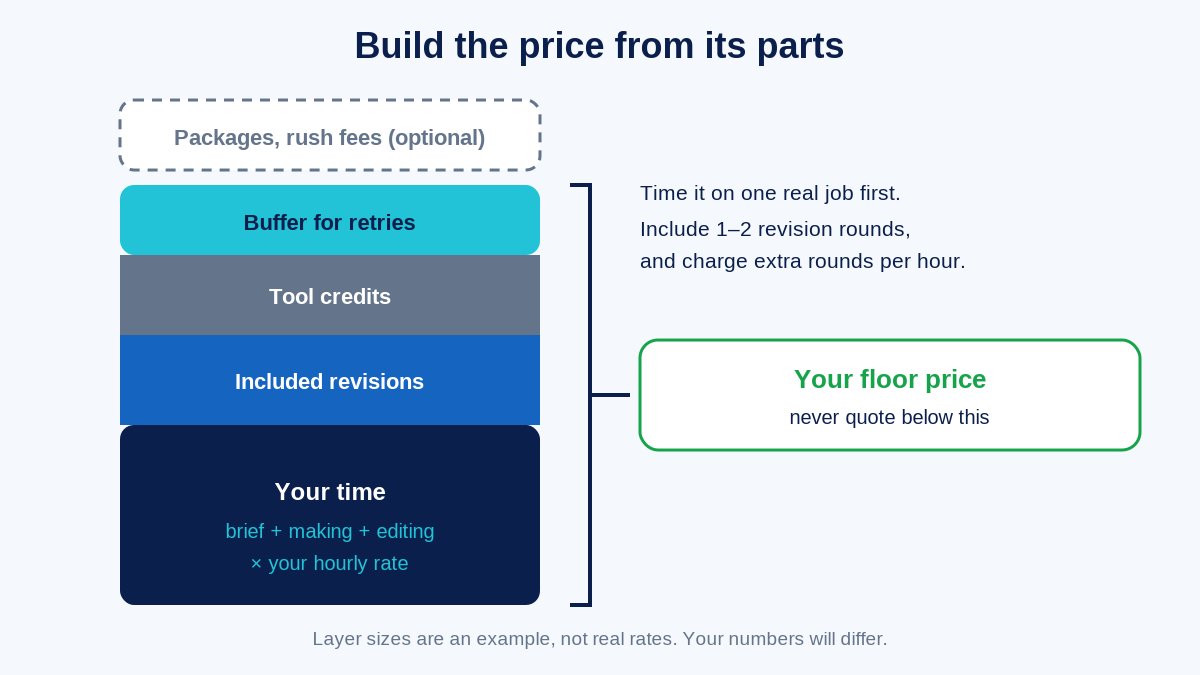
Now build the price from its parts:
- Your time: total hours × your hourly rate
- Tool costs: the credits this job uses, or a fair share of your monthly subscription
- Included revisions: the hours for the rounds you include, usually one or two
- A buffer: a small percentage on top for failed generations and surprises
Here's the same calculation as a tiny script. Change the numbers to your own and run it with Node.js (node price.js). We tested it with Node.js 24.
// Build a price from your own numbers. Change these to match your work.
const hourlyRate = 1500;   // what one hour of your time is worth to you
const hours = {
  brief: 1,        // reading the brief, questions, planning
  making: 5,       // images, clips, voice
  editing: 2,      // cutting, captions, music
  revisions: 1.5,  // the rounds included in the price
};
const toolCost = 1200;     // credits or subscription share used for this job
const buffer = 0.15;       // 15% for retries and surprises

const totalHours = Object.values(hours).reduce((sum, h) => sum + h, 0);
const base = totalHours * hourlyRate + toolCost;
const price = Math.ceil((base * (1 + buffer)) / 500) * 500; // round up to 500

console.log(`Hours: ${totalHours}`);
console.log(`Base cost: Rs ${base.toLocaleString("en-US")}`);
console.log(`Quoted price: Rs ${price.toLocaleString("en-US")}`);
With these example numbers it prints:
Hours: 9.5
Base cost: Rs 15,450
Quoted price: Rs 18,000
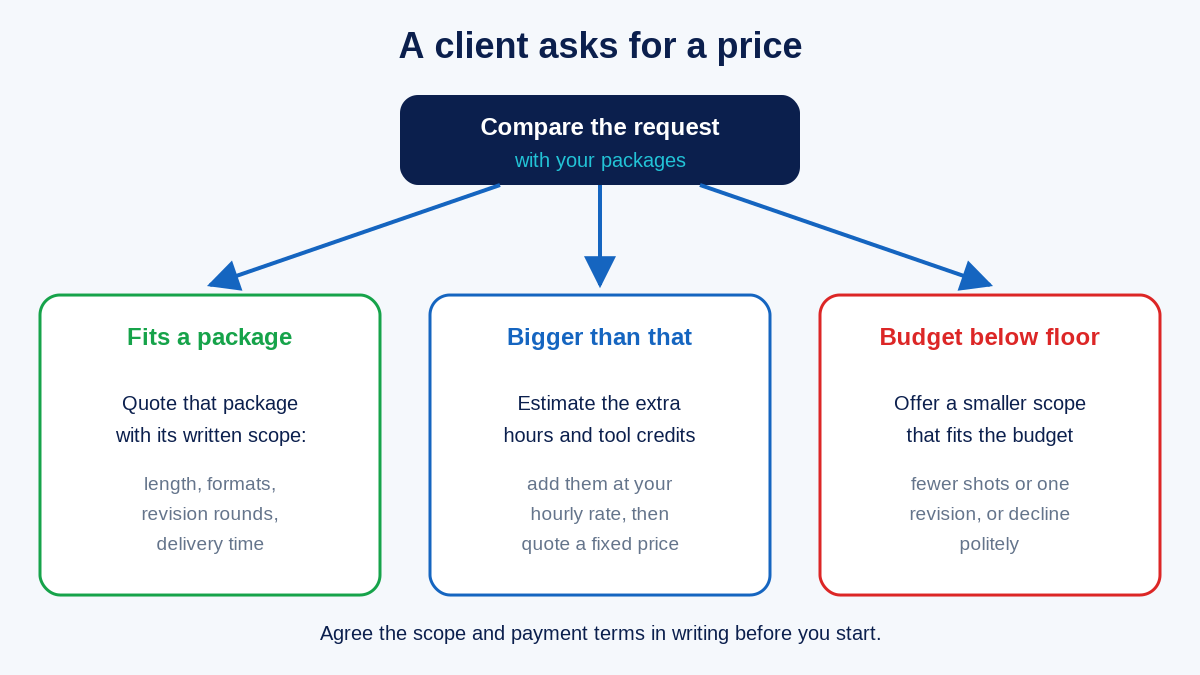
Treat that result as your floor. If a client offers less, either reduce the scope (fewer shots, one revision) or say no politely. Going below your floor means paying to work.
Step 4: Turn the price into packages
Clients find it easier to choose between two or three clear options than to judge one number. Build packages from the same calculation, changing the scope:
| Package | What's included | How you price it |
|---|---|---|
| Starter | one short vertical ad, one round of changes | your floor for that scope |
| Standard | one ad in two formats, two rounds of changes | floor for the bigger scope |
| Monthly | a set number of ads each month | floor per ad, a small discount for the commitment |
Write the scope in plain words: length, formats, number of revision rounds, delivery time, and what isn't included (for example voice-over in a second language, or extra rounds, which you charge per hour). A clear scope protects both of you.
Step 5: Raise your price on purpose
Your first price isn't permanent. Check it after every few jobs:
- Did the job take longer than you planned? Your hours estimate was too low, so fix it.
- Do clients say yes immediately, every time? You may be priced below what they expected.
- Did you add a strong new piece to your portfolio? Your work is now worth more.
Raise prices for new clients first, and give existing clients notice before a change. If you're still looking for that first paying client, our guide on finding your first client for AI video work covers where to look and what to send.
Pricing, scoping and getting work are part of the last module of our AI Content Creator Program, alongside making the videos themselves.
Frequently asked questions
Should I work for free to get my first client?
Spec pieces you make for your own portfolio are a good idea. Free work for a real business is risky, because it sets the expectation that your work costs nothing. A small, clearly scoped paid first job is usually better than a large free one.
Should I charge per video or per hour?
Quote per video or per package, because clients want a fixed price. But calculate it from your hours, so the fixed price still covers your time. Charge per hour only for work outside the agreed scope.
Should I ask for payment before I start?
Many freelancers ask for part of the price up front and the rest on delivery, especially with new clients. Agree on it in writing before you begin, along with the scope and the number of revision rounds.
How do I explain why AI video isn't "just one click"?
Show your process. A short case study with your brief, a few starting frames and the final edit shows the retries, choices and editing behind the result, which is what the client is paying for.
- #pricing
- #freelancing
- #ai video
- #clients
- #packages
Want to learn AI video properly?
The AI Content Creator Program takes you from your first prompt to a portfolio you can show: 27 short, focused lessons in easy Urdu, with a weekly live session and tasks our team reviews.
Enroll now