How to read a streaming Claude API response in JavaScript (no SDK)
Stream Claude's answer word by word with plain fetch: how the server-sent events arrive, which ones carry text, and a tested parser that handles split chunks and errors.
Saqqa Academy team
20-Nov-2026 · 5 min read
In this article
To read a streaming Claude API response without the SDK, send your Messages API request with "stream": true, read the response body chunk by chunk, split the text into events at each blank line (\n\n), parse the JSON after data:, and append delta.text from every content_block_delta event whose delta.type is text_delta. Keep any half-finished event in a buffer until the next chunk arrives, read the stop_reason from the message_delta event, and treat an error event as a failure even though the HTTP status was 200. The tested code below does all of this in about 40 lines of Node.js.
If you can use the official SDK, it handles streaming for you and is usually the better choice. This post is for when you call the API with fetch directly (a small script, an edge function, or a runtime without the SDK), or when you simply want to understand what the SDK is doing.
Why stream at all?
Without streaming, your app waits until the whole answer is ready and then shows it at once. For a long answer, that can feel like nothing is happening. With streaming, the first words appear quickly and the rest arrives as it's generated, the way chat apps type out their replies.
Streaming doesn't make the full answer cheaper or faster to finish; it only lets you show it sooner. It is also useful for long outputs, which can otherwise run into request timeouts.
How the stream is shaped
Claude streams using server-sent events (SSE). Each event is a small block of text: an event: line naming the type, a data: line holding JSON, and a blank line to end it. According to Anthropic's streaming documentation (checked 20 November 2026), a response arrives in this order:
message_start: an empty message object.- For each content block:
content_block_start, then one or morecontent_block_deltaevents, thencontent_block_stop. message_delta: top-level changes, including thestop_reasonand output token usage.message_stop: the end.
ping events can appear anywhere, and an error event (for example overloaded_error) can arrive in the middle of a stream. The docs also say new event types may be added, so your code should ignore types it doesn't know rather than crash.
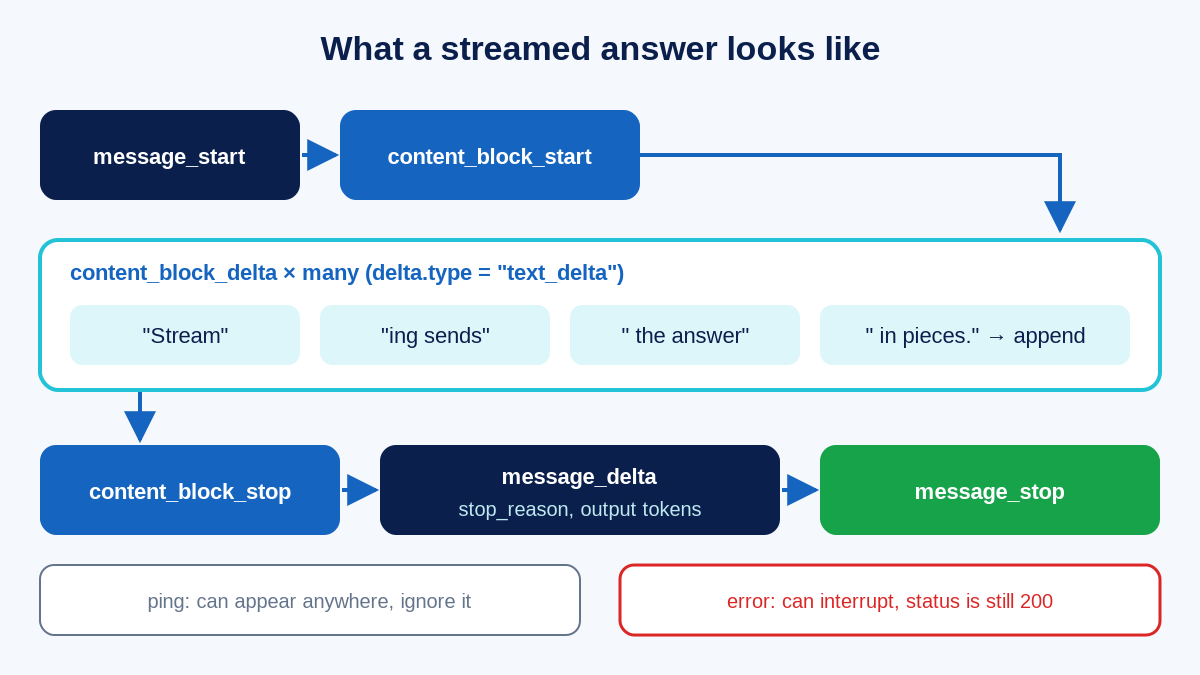
A single text event looks like this on the wire:
event: content_block_delta
data: {"type":"content_block_delta","index":0,"delta":{"type":"text_delta","text":"Hello"}}
The one bug almost everyone hits: split events
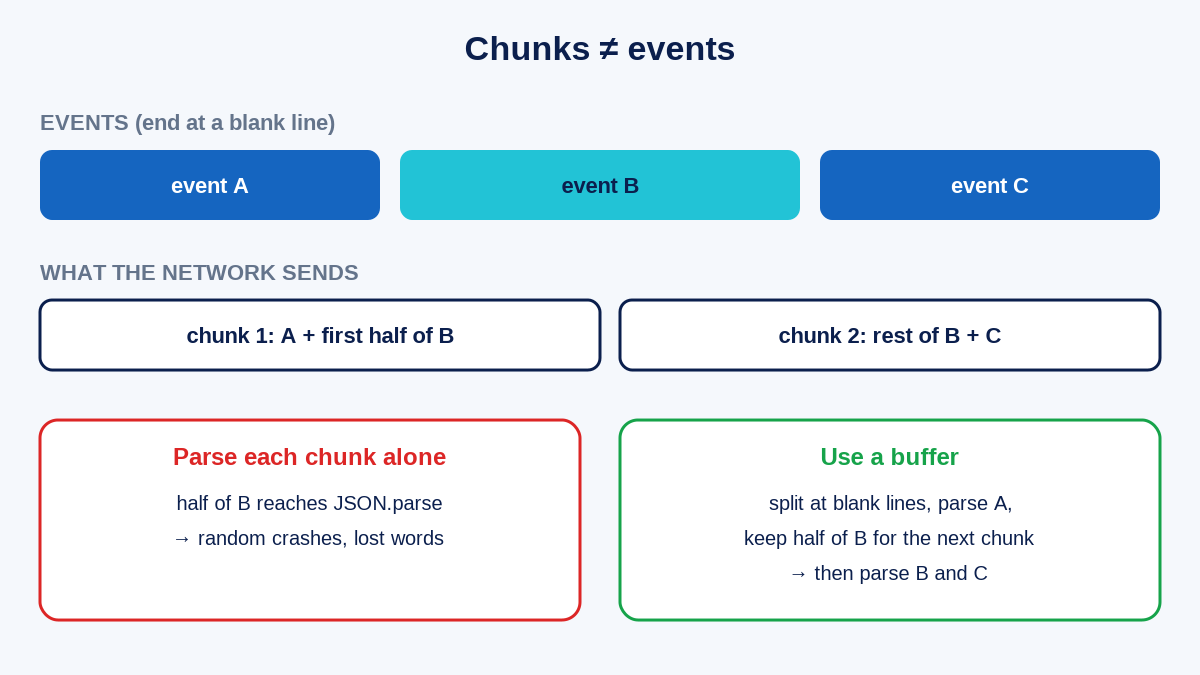
The network doesn't deliver data one event at a time. One chunk may hold three events and half of a fourth; the next chunk holds the rest of that fourth event. If you parse each chunk on its own, JSON.parse fails on the broken half, usually only now and then, which makes it hard to track down.
The fix is a buffer: add each chunk to a string, split the string at \n\n, process every complete event, and keep the last piece (which may be incomplete) for next time.
The code
This works in Node.js 18 or newer, where fetch is built in and the response body can be read with for await. Set ANTHROPIC_API_KEY in your environment first.
// stream.mjs - read a Claude streaming response with fetch, no SDK.
const API_URL = process.env.API_URL ?? "https://api.anthropic.com/v1/messages";

async function streamClaude(prompt, onText) {
  const res = await fetch(API_URL, {
    method: "POST",
    headers: {
      "x-api-key": process.env.ANTHROPIC_API_KEY,
      "anthropic-version": "2023-06-01",
      "content-type": "application/json",
    },
    body: JSON.stringify({
      model: process.env.MODEL ?? "claude-sonnet-5-5",
      max_tokens: 1024,
      stream: true,
      messages: [{ role: "user", content: prompt }],
    }),
  });
  // Errors before the stream starts come back as a normal JSON response.
  if (!res.ok) throw new Error(`HTTP ${res.status}: ${await res.text()}`);

  const decoder = new TextDecoder();
  let buffer = "";
  let fullText = "";
  let stopReason = null;

  for await (const chunk of res.body) {
    // A network chunk can end in the middle of an event, so keep the leftover.
    buffer += decoder.decode(chunk, { stream: true });
    const events = buffer.split("\n\n");
    buffer = events.pop();

    for (const raw of events) {
      const dataLine = raw.split("\n").find((line) => line.startsWith("data:"));
      if (!dataLine) continue;
      const event = JSON.parse(dataLine.slice(5).trim());

      if (event.type === "content_block_delta" && event.delta.type === "text_delta") {
        fullText += event.delta.text;
        onText(event.delta.text);
      } else if (event.type === "message_delta") {
        stopReason = event.delta.stop_reason;
      } else if (event.type === "error") {
        throw new Error(`Stream error: ${event.error.type}: ${event.error.message}`);
      }
      // ping, message_start, content_block_start/stop, message_stop and any
      // new event types are ignored on purpose.
    }
  }
  return { text: fullText, stopReason };
}

const result = await streamClaude("Explain streaming in one sentence.", (t) => process.stdout.write(t));
console.log(`\n\nstop_reason: ${result.stopReason}, ${result.text.length} characters`);
Run it with node stream.mjs. The text prints as it arrives, followed by the stop reason.
How we tested it: with Node.js 24.13 against a small local server that sends the documented event sequence, deliberately cut into 7-byte pieces so that almost every event is split across chunks. The parser printed the full text and stop_reason: end_turn. In a second run, the server sent an overloaded_error event mid-stream, and the function threw a clear error after printing the text received so far. We did not run it against the live API for this post, and the model name is only an example; use one from the models overview.
Step by step: what each part does
stream: truein the body switches the response to SSE.TextDecoderwith{ stream: true }turns bytes into text safely, even when a multi-byte character (like an emoji or Urdu letter) is split between two chunks.buffer.split("\n\n")andevents.pop()give you the complete events and keep the unfinished one.- The
data:line holds the JSON. Theevent:line repeats the type, so you can rely onevent.typeinside the JSON. text_deltapieces are fragments, not whole words or sentences, so always append them; never assume each one is a word.message_deltatells you why the answer ended. If it saysmax_tokens, the answer was cut off; see how to fix a Claude response cut off by max_tokens, and our guide to Claude's stop_reason values for the others.
Handling errors
There are two kinds of failure:
- Before the stream starts: a normal HTTP error status (400, 401, 429, 529 and so on) with a JSON body. The
res.okcheck catches these. Our guides on the 429 rate limit error and the 529 overloaded error explain when to retry. - During the stream: the HTTP status is already 200, so the error arrives as an
errorevent. Decide what your app should do with the partial text: show it with a "connection lost" note, or retry the whole request.
What about tool use and thinking?
The same loop works, but other delta types appear. Tool calls stream their input as input_json_delta pieces of a JSON string, which you join and parse only after content_block_stop. Extended thinking streams as thinking_delta. The code above ignores those safely; add branches for them when you need them, as described in the streaming docs.
Frequently asked questions
Do I need a library to parse server-sent events?
No. For the Claude API, splitting at blank lines and reading the data: line is enough, as shown above. A library or the official SDK can still save time if you need reconnection or many event types.
Why does JSON.parse sometimes fail on my stream?
Almost always because an event was split across two network chunks and you tried to parse half of it. Keep a buffer and only parse complete events that end with a blank line.
Can I use this code in the browser?
The parsing works in modern browsers too, but don't put your API key in front-end code, because anyone could copy it. Call the API from your server and stream the text on to the browser from there.
How do I know the stream finished normally?
You receive message_delta with a stop_reason such as end_turn, followed by message_stop. If the connection closes without them, treat the answer as incomplete.
- #claude api
- #streaming
- #server-sent events
- #javascript
- #node.js
- #fetch
Want a full course on this?
Build Apps with AI
Use AI coding assistants to build, fix and ship real websites and apps.
Join the free waitlistWant to learn AI video properly?
The AI Content Creator Program takes you from your first prompt to a portfolio you can show: 27 short, focused lessons in easy Urdu, with a weekly live session and tasks our team reviews.
Enroll now