How to fix the Claude API error 401 authentication_error (invalid x-api-key)
A 401 from the Claude API means the key never arrived or was rejected. Read the message, check the header and the environment variable, and fix it in five minutes.
Saqqa Academy team
13-Nov-2026 · 6 min read
In this article
A 401 authentication_error from the Claude API means the request reached Anthropic but the API key was missing, wrong, revoked or expired. It is not a rate limit and not a server problem, so retrying will not help: the response even carries an x-should-retry: false header. The fix depends on the exact message. x-api-key header is required means the key never left your machine, usually because an environment variable was empty. invalid x-api-key means a key was sent but Anthropic does not accept it. A message starting CORS requests are not allowed means you called the API from a browser, which is not permitted.
The error descriptions below come from Anthropic's Claude API errors page, read on 13 November 2026. We reproduced the two common messages with curl on the same day.
What the error looks like
Every Claude API error is JSON with a type and a message, plus a request_id you can quote to support. Here is a real 401, produced by sending a made-up key:
{
  "type": "error",
  "error": { "type": "authentication_error", "message": "invalid x-api-key" },
  "request_id": "req_011CgzT6FNfjWeQZQe7wgkU4"
}
And here is the one you get when the header is missing completely:
{
  "type": "error",
  "error": { "type": "authentication_error", "message": "x-api-key header is required" },
  "request_id": "req_011CgzT6H38LMpNGcft5ZzJN"
}
In the official SDKs the same error surfaces as a typed exception, for example anthropic.AuthenticationError in Python or Anthropic.AuthenticationError in TypeScript, with the same message inside.
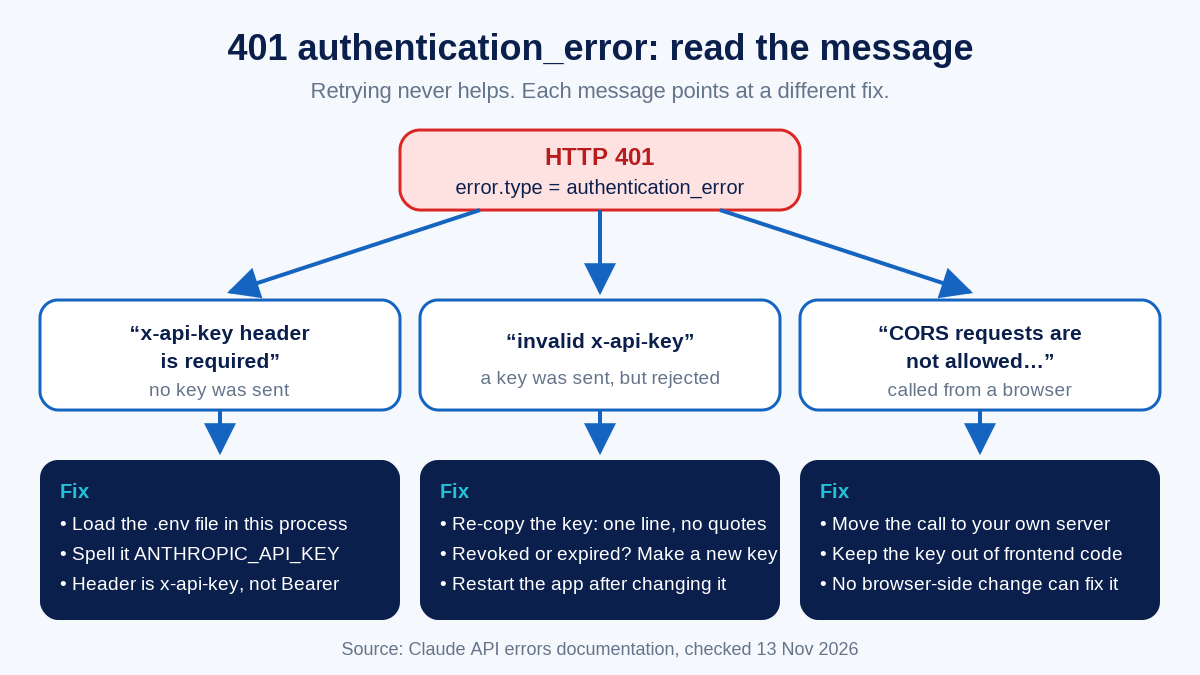
Fix 1: "x-api-key header is required"
The key was never sent. Nine times out of ten the environment variable is empty in the process that made the call.
Check the variable is really set in the same terminal or process:
echo "${ANTHROPIC_API_KEY:0:7}"If this prints nothing, the variable is not set there. Common causes:
- You put the key in a
.envfile but did not load it. Node 20 and newer can load it withnode --env-file=.env app.mjs; many frameworks load.envautomatically, but only from the project root. - You exported the key in one terminal tab and ran the code in another, or in a scheduled job that has no shell profile.
- The variable name is misspelled (
ANTHROPIC_APIKEY,ANTHROPIC_KEY). The official SDKs read exactlyANTHROPIC_API_KEY. - You deployed to a host such as Vercel or Railway and set the variable in the dashboard, but did not redeploy afterwards.
Fail early with a clear message so this never costs you an hour again. Put this at the top of your script:
// Fail early with a clear message instead of a confusing 401 later.
const key = process.env.ANTHROPIC_API_KEY;
if (!key) {
  console.error("ANTHROPIC_API_KEY is not set. Did you load your .env file?");
  process.exit(1);
}
console.log(`Key loaded: starts with ${key.slice(0, 7)}..., ${key.length} characters`);
We ran this with Node.js 24. Without the variable it printed the warning and exited with code 1; with a test value it printed Key loaded: starts with sk-ant-.... Printing only the first few characters is safe; never log the whole key.
If you call the API by hand, check the header name too. It is x-api-key, not Authorization: Bearer, which some other APIs use:
curl https://api.anthropic.com/v1/messages \
  -H "x-api-key: $ANTHROPIC_API_KEY" \
  -H "anthropic-version: 2026-10-21" \
  -H "content-type: application/json" \
  -d '{"model":"claude-sonnet-5","max_tokens":50,"messages":[{"role":"user","content":"Say hello"}]}'
Fix 2: "invalid x-api-key"
A key arrived, but Anthropic rejected it. According to the errors page, this means the key is malformed, revoked or expired. Work through these:
- Copy error. Keys are long. A missing last character, an extra space, or a line break pasted into the
.envfile all produce this message. Open the file and check the key is on one line, with no quotes that ended up inside the value. - Revoked key. Someone on your team may have deleted it in the Claude Console. Keys that were committed to a public repository are often revoked quickly. Create a new key and update every place that uses it.
- Expired key. Keys can have an expiry date. Check the key's row in the Console; if it has expired, create a new one.
- Wrong workspace or account. If you have several organisations, make sure the key belongs to the one you think you are billing. A key from a deleted workspace is invalid.
- Old key cached in the process. After replacing the key, restart your server or job. A long-running process keeps the value it read at start-up.
If you use Claude through AWS instead of the Claude API directly, the docs note that a 401 can also mean a problem with your AWS credentials or signature, which is a separate fix on the AWS side.
Fix 3: "CORS requests are not allowed for this Organization"
This 401 is not about your key at all. Browsers add an Origin header to requests, and the Claude API refuses direct calls from browsers. The docs are clear that no change to the browser request fixes it. The only correct fix is to move the call to your own backend: a small server route or serverless function that holds the key and forwards the request. That is also the only safe design, because any key shipped in frontend code can be read by anyone who opens the developer tools.
Similar errors that are not 401
Three neighbours of 401 confuse people. From the same errors page:
| Code | Type | What it means |
|---|---|---|
| 400 | invalid_request_error | Something in the request body is wrong, or you hit a spend limit you set on the organisation or workspace |
| 402 | billing_error | A problem with billing or payment details. Fix it in the Console |
| 403 | permission_error | The key is valid but is not allowed to use that resource. Check workspace and organisation settings |
So a valid key with no credit does not give a 401. If your key works in one script and fails in another, the difference is almost always how the environment variable is loaded, not the key itself.
Keep the key safe while you fix it
Two habits prevent most 401s and most leaked keys:
- Keep the key only in environment variables or a secrets manager, never in source code, and add
.envto.gitignorebefore the first commit. - Give each app and each teammate their own key, so that revoking one does not break everything else.
Frequently asked questions
Does retrying fix a 401 error?
No. A 401 is deterministic: the same request will fail the same way until the key or the header changes. The response includes x-should-retry: false, and the official SDKs do not retry it.
Where do I find my Claude API key?
In the Claude Console at platform.claude.com, under API keys. If you cannot see the key value any more, you cannot recover it; create a new one and update your environment variables.
Why does my key work in curl but not in my app?
The app process does not see the same environment. Check how your app loads .env, whether the variable name is exactly ANTHROPIC_API_KEY, and whether you restarted the app after setting it.
Can I call the Claude API from a web page with my key?
No. The API refuses browser requests, and a key in frontend code is visible to every visitor. Call it from your own server and let the page talk to that server.
- #claude api
- #error 401
- #authentication_error
- #x-api-key
- #api keys
Want a full course on this?
Build Apps with AI
Use AI coding assistants to build, fix and ship real websites and apps.
Join the free waitlistWant to learn AI video properly?
The AI Content Creator Program takes you from your first prompt to a portfolio you can show: 27 short, focused lessons in easy Urdu, with a weekly live session and tasks our team reviews.
Enroll now