What is few-shot prompting? How to add examples to a prompt
Few-shot prompting means showing an AI model a few worked examples before your real task. Learn how many to use, how to format them, and the mistakes to avoid.
Saqqa Academy team
11-Nov-2026 · 5 min read
In this article
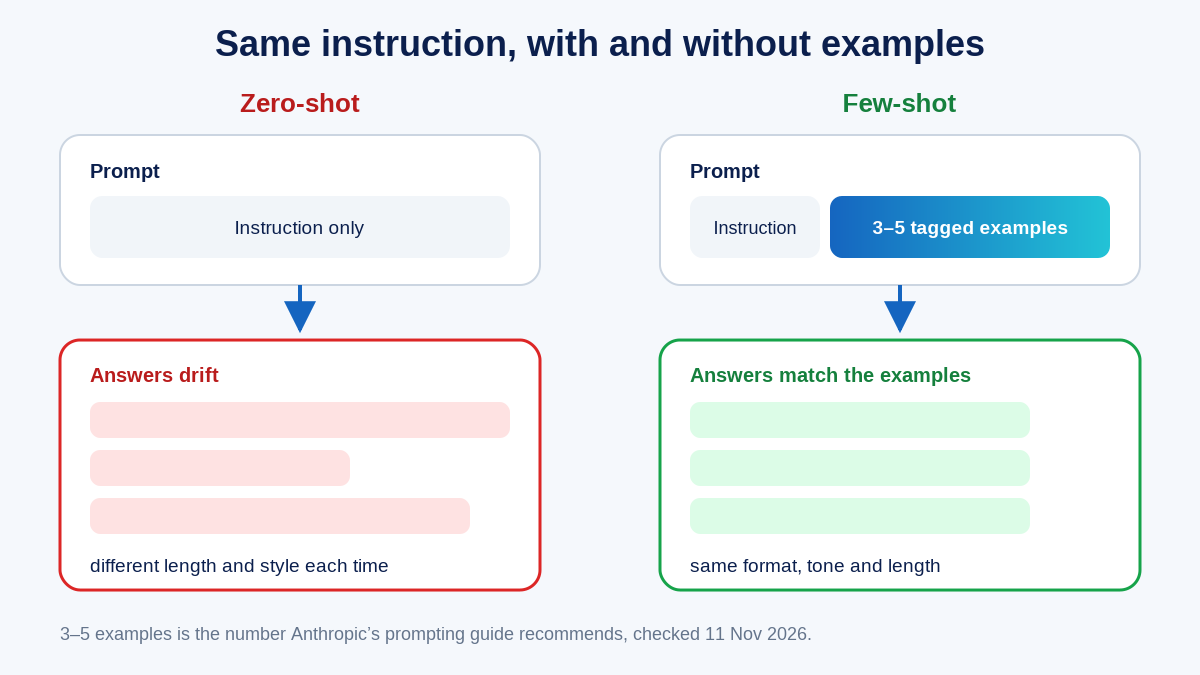
Few-shot prompting means putting a few worked examples (an input and the answer you want) into your prompt before the real task, so the model copies the pattern. It is one of the most reliable ways to control an AI model's format, tone and structure. Anthropic's prompting guide recommends 3 to 5 examples that are relevant to your real task, varied enough to cover edge cases, and wrapped in tags such as <example> so the model can tell them apart from your instructions. "Zero-shot" means no examples; "one-shot" means one.
The advice from Anthropic in this post comes from its prompting best practices guide, checked on 11 November 2026. The technique works with other chat models too.
Why examples work better than more instructions
Describing a format in words is harder than it looks. "Write a short, friendly product caption with one emoji and a call to action" still leaves a lot open: how short? Where does the emoji go? Is "Shop now" a call to action, or "DM us to order"?
One good example answers all of those at once. The model sees the length, the style and the layout, and matches them. That is why examples are especially useful when:
- the output has to fit a fixed format (a table row, a label, JSON, a caption style),
- you want a consistent tone across hundreds of outputs,
- the task has edge cases that are hard to explain in words.
Step 1: Write the instruction first
Examples don't replace the instruction; they back it up. Start with a clear sentence that says what to do, then show examples of it done well. Say what the output is for, too: Anthropic's guide notes that explaining why an instruction matters gives Claude more information about your goal and helps it give more targeted answers.
You write Instagram captions for a small Karachi bakery.
Captions are for local customers ordering on WhatsApp, so keep them short and warm.
Step 2: Add 3 to 5 examples in tags
Wrap each example in <example> tags, and the whole set in <examples>. Inside each one, keep the same small structure: the input, then the output.
<examples>
<example>
<product>Chocolate fudge cake, 2 pounds</product>
<caption>Rich, gooey and made fresh this morning 🍫 Order on WhatsApp for same-day delivery.</caption>
</example>
<example>
<product>Sugar-free date cookies, box of 12</product>
<caption>Sweet from dates, not sugar. A box of 12 for your chai break ☕ Message us to order.</caption>
</example>
<example>
<product>Custom birthday cake (sold out this week)</product>
<caption>This week's birthday cakes are fully booked 🎂 Message us now to reserve next week's slot.</caption>
</example>
</examples>

Now write a caption for:
<product>Pistachio kulfi cupcakes, pack of 6</product>
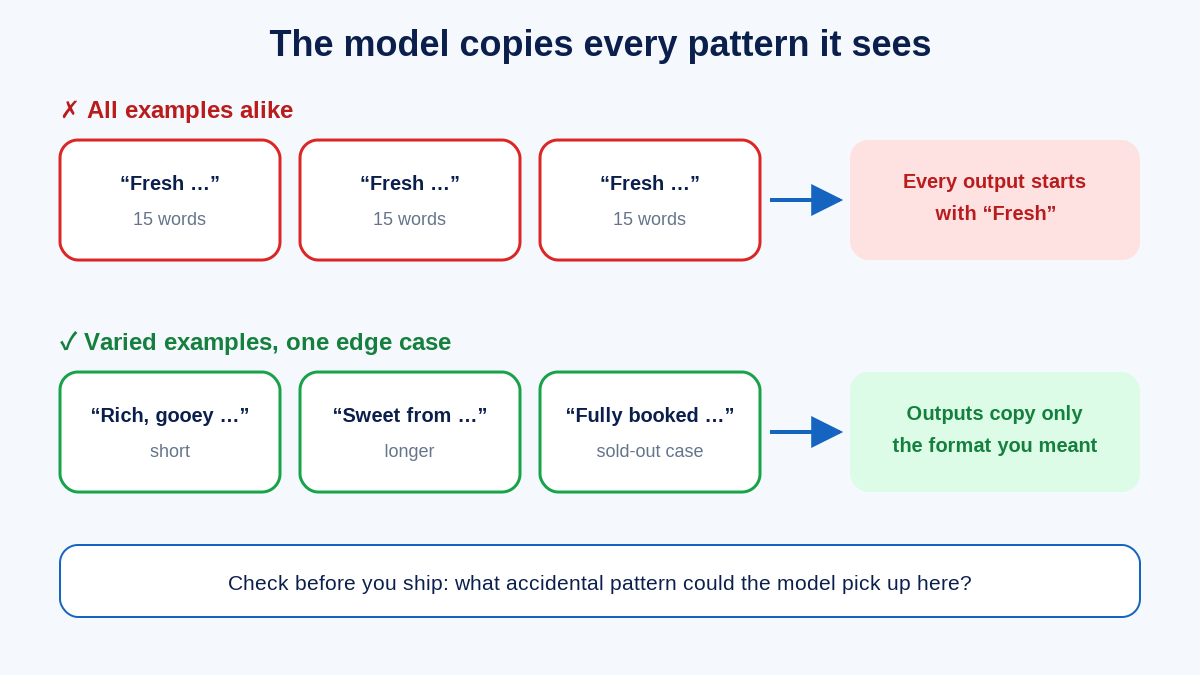
Notice the third example. It covers an edge case (the item is sold out), so the model learns what to do there instead of guessing. That is what Anthropic means by diverse examples.
Step 3: Make the examples relevant and varied
Anthropic's guide lists three qualities for good examples:
- Relevant: they should look like your real inputs. Examples about cars won't help a bakery.
- Diverse: they should cover different cases and vary enough that the model doesn't copy something you didn't intend.
- Structured: wrapped in tags, so they don't blend into your instructions.
The "diverse" point matters more than it sounds. Models copy everything they see in the examples, including patterns you didn't mean. If all three captions start with "Fresh", most new captions will too. If every example is exactly 15 words, outputs will cluster around 15 words. Before you ship a prompt, read your examples and ask: what accidental pattern might the model pick up here?
Step 4: Build the prompt in code
If you generate prompts in an app, keep your examples as data and build the tagged block from it. This makes it easy to add, remove or test examples later. Here is a small Node.js helper:
// Build a few-shot prompt from an instruction, example pairs and the new input.
export function buildFewShotPrompt({ instruction, examples, input, inTag, outTag }) {
  const shots = examples
    .map((ex) => `<example>\n<${inTag}>${ex.input}</${inTag}>\n<${outTag}>${ex.output}</${outTag}>\n</example>`)
    .join("\n");

  return [
    instruction.trim(),
    "",
    `<examples>\n${shots}\n</examples>`,
    "",
    "Now write one for:",
    `<${inTag}>${input}</${inTag}>`,
  ].join("\n");
}

const prompt = buildFewShotPrompt({
  instruction: "You write short, warm Instagram captions for a small bakery.",
  examples: [
    { input: "Chocolate fudge cake", output: "Rich, gooey and made fresh this morning 🍫 Order on WhatsApp." },
    { input: "Sugar-free date cookies", output: "Sweet from dates, not sugar ☕ Message us to order." },
  ],
  input: "Pistachio kulfi cupcakes",
  inTag: "product",
  outTag: "caption",
});

console.log(prompt);
We ran this in Node.js 24: it printed the instruction, an <examples> block with one <example> per pair, and the new product at the end. Send the result as the user message to whichever model you use.
Step 5: Test, then improve the examples
Run the prompt on 10 to 20 real inputs and read the outputs side by side. When something is wrong, the fix is usually in the examples:
- Outputs too similar to each other? Your examples are too similar. Vary them.
- One case keeps going wrong? Add an example for exactly that case.
- Model copies an example word for word? Make the examples more different from the real input, or add a line such as "Write a new caption; don't reuse the examples."
Anthropic's guide also suggests a shortcut: ask Claude itself to check your examples for relevance and variety, or to write more examples based on the ones you have. Review what it writes before you use it.
Few-shot prompting with reasoning models
Many current models think before they answer. Anthropic's guide says examples still help here: worked examples shape how Claude approaches similar problems in its thinking. For maths or logic tasks, show each example as the problem, the method you want used, and the expected answer, not just the final answer.
Frequently asked questions
How many examples should a few-shot prompt have?
Anthropic recommends 3 to 5 for best results. Fewer can work for simple formats. More examples make the prompt longer, so you pay for more input tokens on every call; if you reuse the same examples often, prompt caching can lower that cost.
What is the difference between zero-shot, one-shot and few-shot prompting?
Zero-shot gives only the instruction. One-shot adds a single example. Few-shot (also called multishot) adds several examples, which usually gives more consistent results than one.
Do I need XML tags for examples?
They are not required, but Anthropic recommends wrapping examples in <example> tags (and the set in <examples>) so Claude can separate them clearly from your instructions and the real input.
Can examples make the output worse?
Yes, if they are all alike. The model may copy their length, opening words or topic. Vary your examples and include at least one edge case.
- #few-shot prompting
- #multishot prompting
- #prompt engineering
- #examples
- #claude
Want a full course on this?
AI for Everyone
Use ChatGPT, Claude and Gemini properly for study, work and daily tasks.
Join the free waitlistWant to learn AI video properly?
The AI Content Creator Program takes you from your first prompt to a portfolio you can show: 27 short, focused lessons in easy Urdu, with a weekly live session and tasks our team reviews.
Enroll now