How to describe lighting in AI product image prompts
Flat, fake-looking AI product photos usually come from missing lighting words. Learn the five lighting details to write in every prompt, with ready examples.
Saqqa Academy team
20-Nov-2026 · 6 min read
In this article
To get AI product images that look like a real studio photo, describe the light the way a photographer would set it up: where the light comes from, how soft or hard it is, its colour, what the shadows do, and what the product is sitting on. A prompt like "a perfume bottle, professional photo" leaves all of that to chance, so the model often gives you flat, even light with no depth. Adding one short lighting sentence, for example "large soft light from the left, gentle shadow falling right, warm white, on a matte stone surface", usually changes the picture more than adding ten more adjectives.
This guide works with any image model that takes a text prompt, such as the ones in Google Flow, Freepik or ChatGPT. Models differ, so treat the wording below as a starting point and test it on your own tool.
Why lighting makes or breaks a product photo
In real product photography, the photographer spends most of the time on light, not on the camera. Light shows the shape of the product (a curved bottle looks round because one side is brighter), the texture (the grain of leather, the shine of glass), and the mood (bright and clean, or dark and premium).
When a prompt says nothing about light, the model has to guess. The guess is often a soft, even glow from everywhere. Even light hides shape and texture, which is one of the reasons AI images look fake. We covered the other reasons, like plastic skin and perfect symmetry, in why AI images look fake.
The five lighting details to write in every prompt
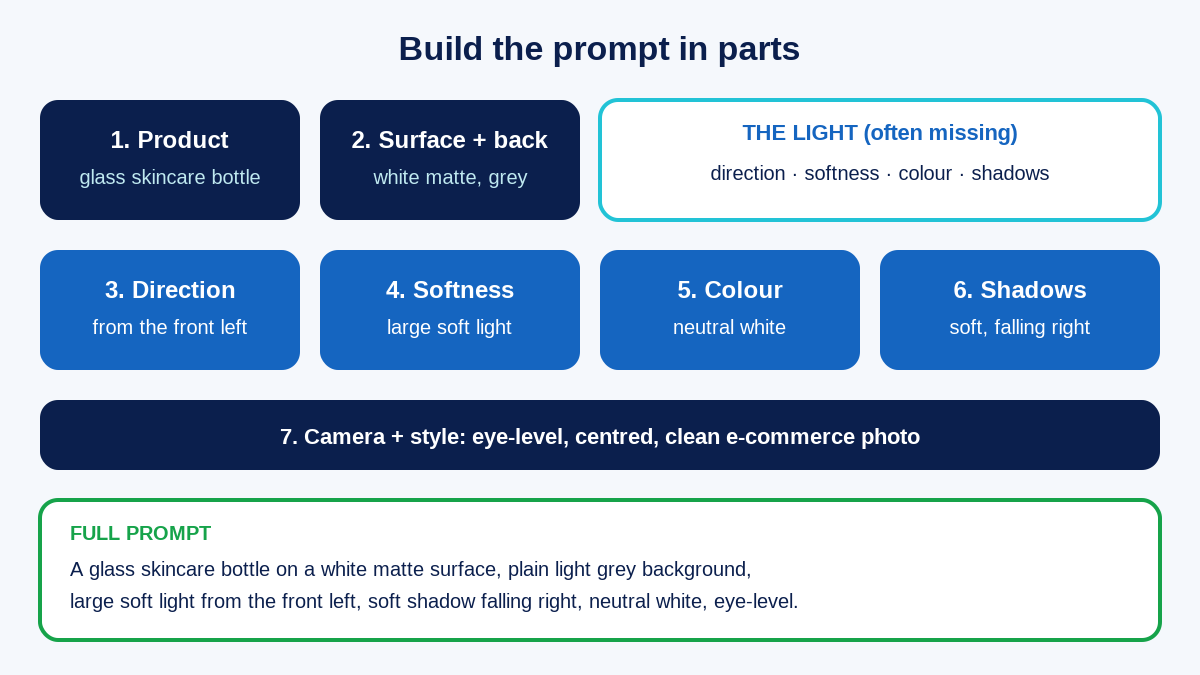
You don't need studio jargon. Answer these five questions in plain words:
- Where is the light coming from? Left, right, above, behind the product, or from a window.
- Is it soft or hard? Soft light (a big light source, a cloudy window) gives smooth, gentle shadows. Hard light (direct sun, a small bulb) gives sharp, dark shadows.
- What colour is it? Warm (golden, evening), neutral (clean white) or cool (bluish, early morning).
- What do the shadows do? "A soft shadow falls to the right", "a long shadow", "almost no shadow".
- What is the product standing on, and what is behind it? A matte surface, marble, wood, water, a plain coloured backdrop. The surface catches the light and the shadow, so it matters as much as the light itself.
Three lighting setups that work for most products
You can light almost any product with one of these three setups. Pick the one that matches the feeling the brand wants.
1. Soft front-side light: clean and trustworthy
The most common look for online shops and simple ads. The product looks bright, honest and easy to see.
A glass skincare bottle on a white matte surface, plain light grey background,
large soft light from the front left, gentle shadow falling behind to the right,
neutral white light, clean e-commerce product photo, eye-level, centred.
2. Hard side light: texture and drama
Light from one side, with darker shadows on the other side. It shows texture well, which suits food, leather, wood and dry fruits.
A wooden bowl of almonds and pistachios on a dark slate surface, black background,
hard warm light from the right side, deep shadows on the left, visible texture
on every nut, moody premium food photo, low angle, close-up.
3. Back light or rim light: premium and glowing
Light from behind the product draws a thin bright outline around its edge. It suits glass, liquids, perfume and anything that should feel luxurious.
A dark perfume bottle on a black glossy surface with a soft reflection,
black background, strong light from behind creating a thin bright rim along
the bottle edges, small soft fill light from the front, cool white light,
luxury product photo, eye-level.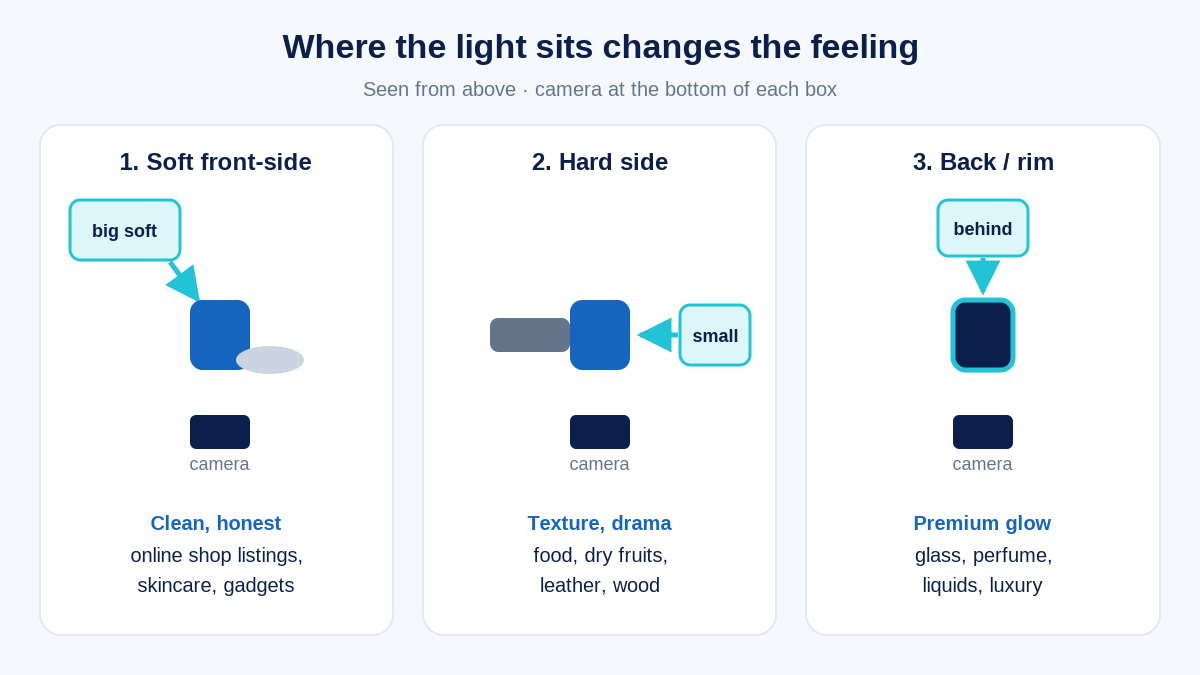
Step by step: fix a flat product image
Here is how we improve a weak first result:
- Start with the product and surface only. "A hexagon gift box of dry fruits on a cream linen cloth, beige background." Generate once to check the product looks right.
- Add one light. "Large soft window light from the left." Generate again and compare. Change only one thing at a time, so you know what made the difference.
- Name the shadow. "Soft shadow falling to the right of the box." If the shadow points the wrong way, the light and shadow words disagree; make them match.
- Set the colour. "Warm morning light" for a gift or food feeling, "neutral white" for an online shop listing.
- Add a small detail of real light. "Light catches the gold ribbon", "slight reflection on the surface". Small touches like this make it feel photographed rather than generated.
If the product itself keeps changing between images, fix that first with a reference image, as we explain in how to turn one product photo into an AI ad. Lighting words can't fix a product that looks different in every shot.
Common mistakes
- Mixing lights that fight. "Golden sunset light, cool blue studio light, bright even light" gives the model three different answers. Choose one main light, and optionally one weaker fill light.
- Only using mood words. "Cinematic", "stunning" and "8K" don't say where the light is. Keep one style word if you like, but describe the actual light.
- Forgetting the surface. A shadow needs something to fall on. "Floating product, white background" often looks pasted in.
- Wrong light for the product. Hard light on a shiny phone screen can cause harsh white spots. Soft light or a rim light usually suits shiny and glass products better.
- Text in the image. If you ask for the brand name or price inside the image, check it letter by letter. Our guide to fixing misspelled text in AI product images shows the safer way: add text later in the editor.
Use the same light across a whole ad
If you are making several images for one ad or carousel, copy the exact same lighting sentence into every prompt. When the light jumps from warm left to cool right between shots, viewers feel something is off, even if they can't say what. Keep your lighting sentence in your shot list, next to each shot, as we do in how to plan an AI product ad with a shot list.
When you later animate the still images, describe the same light in the video prompt too, or say "lighting stays the same", so the clip doesn't change the mood halfway.
Writing prompts like this for product shots, then turning the images into short video ads, is one of the hands-on projects in the AI Content Creator Program.
Frequently asked questions
Do I need to know photography to write lighting prompts?
No. Answer the five plain questions: where the light comes from, soft or hard, what colour, what the shadows do, and what the product stands on. That covers most of what a photographer would think about.
Why does my AI product image still look flat after adding "studio lighting"?
"Studio lighting" doesn't say where the light is. Studios can be lit in many ways. Name a direction and softness instead, for example "large soft light from the left, shadow falling right".
Which lighting is best for food and dry fruits?
Side light usually works well because it shows texture. Soft side light feels fresh and natural; hard warm side light on a dark surface feels rich and premium. Test both and pick the one that suits the brand.
Should every image in a carousel use the same light?
Yes, as a rule. Copy the same lighting sentence into every prompt so the set looks like one photo shoot. Change the light only when you want a clearly different scene.
- #ai images
- #product photography
- #lighting
- #image prompts
- #product ads
Want a full course on this?
AI for Everyone
Use ChatGPT, Claude and Gemini properly for study, work and daily tasks.
Join the free waitlistWant to learn AI video properly?
The AI Content Creator Program takes you from your first prompt to a portfolio you can show: 27 short, focused lessons in easy Urdu, with a weekly live session and tasks our team reviews.
Enroll now