What is MCP (Model Context Protocol)? A simple explanation with examples
MCP is an open standard that lets AI apps like Claude, ChatGPT and VS Code connect to tools and data in one common way. What it is, how it works and when to use it.
Saqqa Academy team
10-Nov-2026 · 6 min read
In this article
MCP (Model Context Protocol) is an open-source standard for connecting AI applications to outside systems: files, databases, search, calendars, design tools and more. Instead of every AI app building its own connector for every service, a service builds one MCP server, and any app that speaks MCP (Claude, ChatGPT, VS Code, Cursor and many others) can use it. The official docs compare it to a USB-C port: one shared plug instead of a different cable for each device. Under the hood, the app and the server exchange JSON-RPC 2.0 messages to find out what the server offers and to call its tools.
Facts in this guide come from the official MCP introduction and architecture overview, checked on 10 November 2026. The protocol version used in the docs that day was 2026-07-28.
The problem MCP solves
Say you want your AI assistant to read your project files, check your database and look up errors in your bug tracker. Without a standard, each AI app has to write its own code for each of those services, and each service has to support each app separately. With MCP, the bug tracker builds one MCP server, and every MCP app can use it.
It helps to know what MCP is not. The docs are clear that MCP only defines how context is exchanged. It does not decide which AI model you use or how the app uses the information it gets.
The three parts: host, client and server
MCP has three roles:
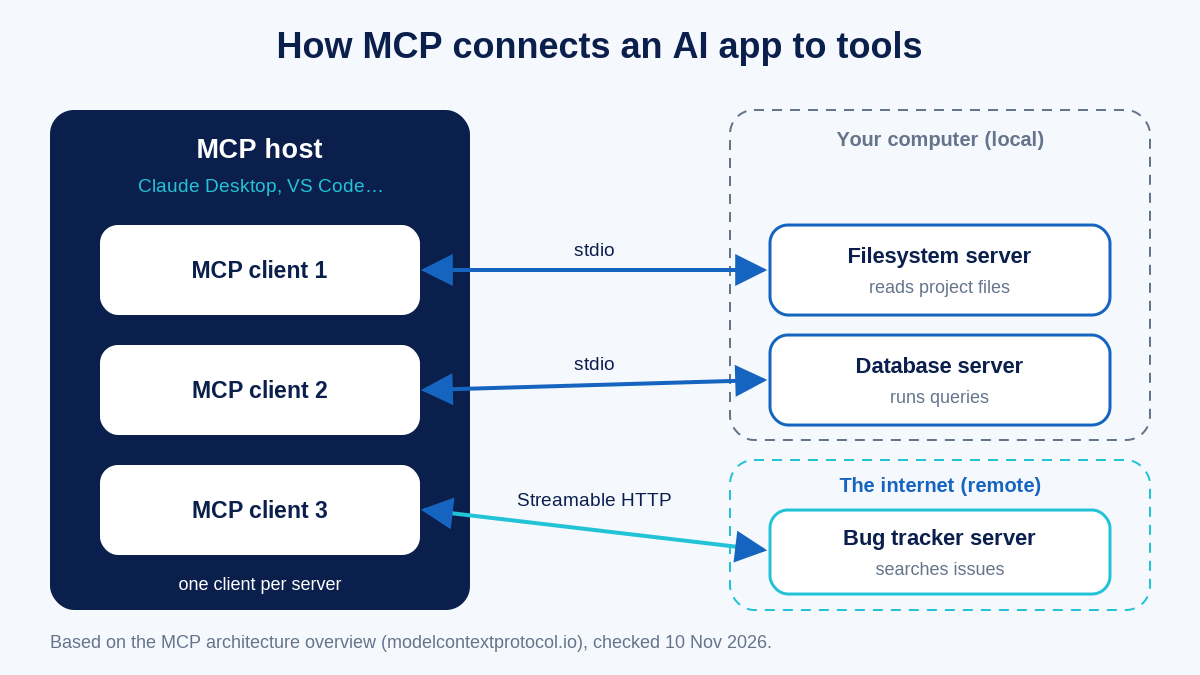
- Host: the AI application you use, such as Claude Desktop, Claude Code or Visual Studio Code.
- Client: a small connector inside the host. The host creates one client for each server it connects to, and each client keeps its own connection.
- Server: a program that offers context and actions, such as a filesystem server or a Sentry server.
A server can run in two places:
- Local, on your own computer. The host starts it and they talk through standard input and output (the stdio transport). A local server usually serves one client.
- Remote, on the internet. They talk over Streamable HTTP, which uses HTTP POST and can stream with Server-Sent Events. A remote server usually serves many clients, and the docs recommend OAuth to get access tokens.
What a server can offer: tools, resources and prompts
An MCP server can expose three kinds of things, which the spec calls primitives:
| Primitive | What it is | Example |
|---|---|---|
| Tools | Actions the AI can call | search_issues, run_query, create_file |
| Resources | Data the app can read as context | a file's contents, a database schema |
| Prompts | Ready-made templates for a task | "summarise this bug report" with examples |
Each one has a list method so the app can discover what exists (for example tools/list), and tools also have tools/call to run them. Because the list is asked for at run time, a server can add or remove tools without the app being rebuilt.
There is also something a client can offer the server: elicitation, which lets a server ask the user for more information or a confirmation, using elicitation/create. Two older client features, sampling (a server asking the app's model for a completion) and logging, are deprecated as of protocol version 2026-07-28. If you read an older tutorial that relies on sampling, keep that in mind.
How a tool call works, step by step
Here is the flow when you ask an MCP-enabled assistant, "How many open bugs mention login?"
- Discover. The client may send
server/discoverto learn the server's name, supported protocol versions and capabilities. This is optional, because in the current version every request carries the protocol version and client capabilities in a_metafield. - List tools. The client sends
tools/list. The server replies with each tool'sname,title,descriptionand aninputSchema(a JSON Schema for its inputs). - The model chooses. The host gives those tool descriptions to the AI model. The model decides to use
search_issueswith{"query": "login", "status": "open"}. - Call. The client sends
tools/callwith that name and those arguments. - Result. The server runs the search and returns a
contentarray, usually text. The host passes it back to the model, which writes the final answer.
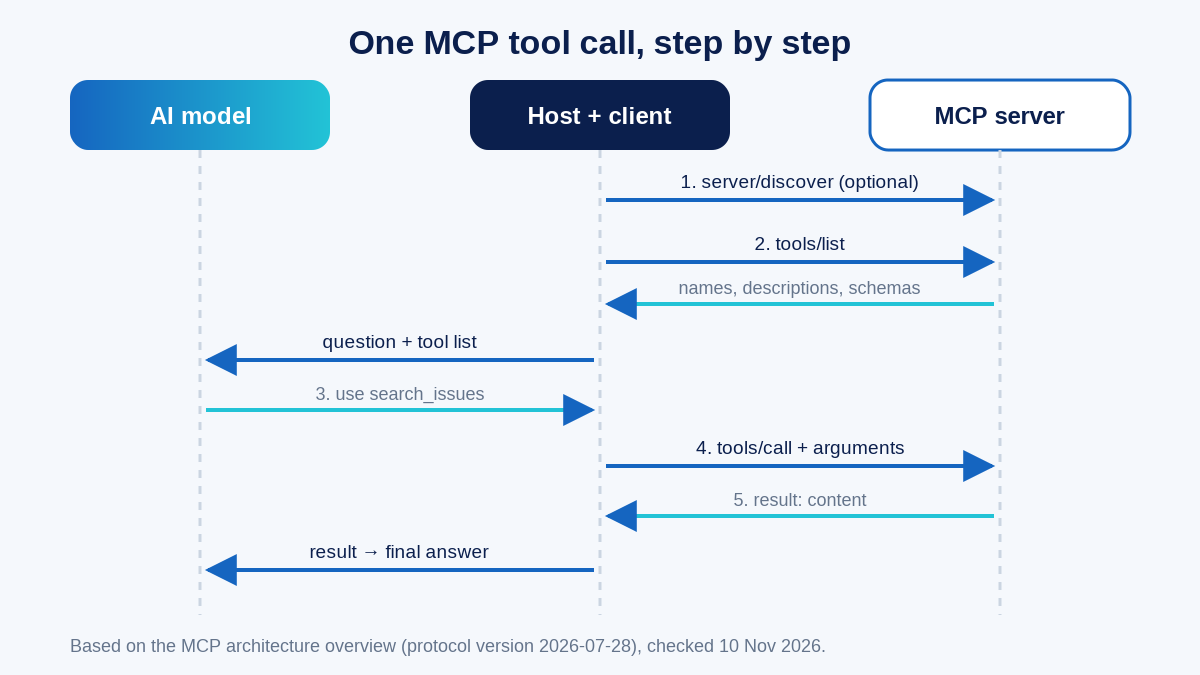
Steps 3 to 5 are the same idea as the AI agent loop: the model asks for a tool, your side runs it, and the result goes back. MCP standardises the part where the tools come from.
What the messages look like
These are simplified versions of the messages for the example above. The tool and its data are our own example, following the format in the official architecture page. A tool call request:
{
  "jsonrpc": "2.0",
  "id": 3,
  "method": "tools/call",
  "params": {
    "name": "search_issues",
    "arguments": { "query": "login", "status": "open" },
    "_meta": {
      "io.modelcontextprotocol/protocolVersion": "2026-07-28",
      "io.modelcontextprotocol/clientCapabilities": { "elicitation": {} }
    }
  }
}
And the server's reply:
{
  "jsonrpc": "2.0",
  "id": 3,
  "result": {
    "resultType": "complete",
    "content": [
      { "type": "text", "text": "3 open issues mention login: #41, #57, #62" }
    ]
  }
}
The id matches the request to its reply, as in any JSON-RPC 2.0 exchange. You rarely write these by hand: the official MCP SDKs handle them, and the MCP Inspector lets you see and test a server's messages while you build it.
MCP or plain tool use: which do you need?
Most AI APIs already let you define tools (often called function calling) in your request. So when is MCP worth it?
- Use plain tool use when you are building one app, and the tools live in your own code. It is simpler and has fewer moving parts.
- Use MCP when you want the same tools to work in several AI apps, when you want to use servers other people already built (the official reference servers are a good start), or when you are offering your product's data to AI assistants.
Stay safe with MCP servers
An MCP server can read your data and take actions for the AI, so treat installing one like installing software:
- Only connect servers from sources you trust, and check what tools they expose.
- Give each server the least access it needs, for example one project folder instead of your whole disk.
- Keep human confirmation on for actions that change or delete things.
The official security best practices page covers the risks in detail, and is worth reading before you build a server for other people.
Frequently asked questions
Is MCP only for Claude?
No. It is an open protocol. The official docs list support in Claude, ChatGPT, Visual Studio Code, Cursor and many other apps, and anyone can build a client or a server.
Do I need to code to use MCP?
Not always. In many apps you can add an existing MCP server through settings and start using its tools. You need to code if you want to build your own server or client, usually with one of the official SDKs.
What is the difference between an MCP server and an API?
An API is the service's own interface, different for every service. An MCP server wraps that service in one standard shape (tools, resources and prompts, found through list methods), so any MCP app can use it without custom code.
Is MCP the same as an AI agent?
No. An agent is a model that works in a loop, choosing actions until a task is done. MCP is one way to give that agent its tools and data.
- #mcp
- #model context protocol
- #ai agents
- #tools
- #json-rpc
Want a full course on this?
AI Automation & Agents
Build automations and AI agents that do real work: WhatsApp replies, lead follow-ups, reports.
Join the free waitlistWant to learn AI video properly?
The AI Content Creator Program takes you from your first prompt to a portfolio you can show: 27 short, focused lessons in easy Urdu, with a weekly live session and tasks our team reviews.
Enroll now